
PlayerCoordsAPI
Lightweight Fabric mod exposing locally MC player coords through HTTP API
Screenshots
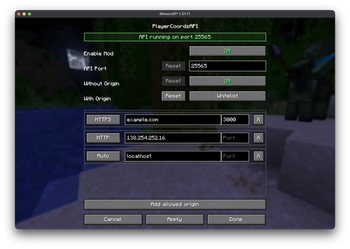
About this Mod
PlayerCoordsAPI
A lightweight Fabric mod that exposes your Minecraft player coordinates via a local HTTP API.


📋 Overview
PlayerCoordsAPI provides real-time access to your Minecraft player coordinates through a simple HTTP endpoint. This enables external applications to track your position without needing to read Minecraft's memory or capture the screen.
✨ Features
- Lightweight HTTP server running only on localhost providing your coordinates
- Client-side only - no server-side components needed
- Works in singleplayer and multiplayer
- Mod menu integration allowing you to enable/disable the API, change its port, and configure requests with or without an
Originheader
🚀 Installation
- Install Fabric Loader for a supported Minecraft version
- Download the latest
playercoordsapi-x.x.x+mcx.x.x.jarfrom the releases page - Place the jar in your
.minecraft/modsfolder - Launch Minecraft with the Fabric profile
⚙️ Configuration
The API is read-only and only accepts loopback connections such as 127.0.0.1 and ::1.
From Mod Menu, you can configure:
- Whether the API is enabled
- Which port it listens on (default:
25565) - How requests without a CORS
Originheader are handled - How requests with a CORS
Originheader are handled
Requests with an Origin can be handled in three different modes:
Allow allLocal originsWhitelist
In Whitelist mode, you can configure each allowed origin with a scheme, host/IP, and optional port.
🔌 API Usage
| Endpoint | Method | Description |
|---|---|---|
/api/coords |
GET, OPTIONS |
Returns the player's current coordinates and world infos |
Response Fields
| Field | Type | Description |
|---|---|---|
x |
number |
East-West |
y |
number |
Height |
z |
number |
North-South |
yaw |
number |
Horizontal rotation (degrees) |
pitch |
number |
Vertical rotation (degrees) |
world |
string |
Minecraft world registry ID |
biome |
string |
Minecraft biome registry ID |
uuid |
string |
Player UUID |
username |
string |
Player username |
Error Responses
| Status | Message |
|---|---|
403 |
Access denied / Origin not allowed |
404 |
Player not in world |
405 |
Method not allowed |
Response Format Example
{
  "x": 123.45,
  "y": 64.00,
  "z": -789.12,
  "yaw": 180.00,
  "pitch": 12.50,
  "world": "minecraft:overworld",
  "biome": "minecraft:plains",
  "uuid": "550e8400-e29b-41d4-a716-446655440000",
  "username": "PlayerName"
}
🛠️ Examples
Replace 25565 with your configured port if you changed it in the Mod Menu.
cURL
curl http://localhost:25565/api/coords
Python
import requests

response = requests.get("http://localhost:25565/api/coords")
data = response.json()
print(f"Player {data['username']} (UUID: {data['uuid']}) at X: {data['x']}, Y: {data['y']}, Z: {data['z']}")
JavaScript
fetch("http://localhost:25565/api/coords")
    .then(response => response.json())
    .then(data => console.log(`Player ${data.username} (UUID: ${data.uuid}) at X: ${data.x}, Y: ${data.y}, Z: ${data.z}`));
Available Versions
How to Install PlayerCoordsAPI on Your Server
Order Server
Order a Minecraft Java server with at least 3 GB RAM (4 GB recommended).
Set fabric Loader
In the panel under "Egg", select the fabric loader and matching Minecraft version (26.1.2).
Install Mod
Open the mod browser in the dashboard and search for "PlayerCoordsAPI". Click "Install" – done! Alternatively, upload the .jar via SFTP to the /mods folder.
Compatibility
Mod Loaders
Minecraft Versions
26.1.2, 1.21.11, 1.21.8 (+2 more)
Server-side
✗ UnsupportedRecommended RAM
4 GB(min. 3 GB)Frequently Asked Questions
PlayerCoordsAPI server crashes on startup – what to do?
Most common cause: wrong fabric version or insufficient RAM. Check the server log (latest.log) for "OutOfMemoryError" or "Mixin" errors. With Mado Hosting: ensure at least 3 GB RAM is allocated and the loader matches the mod version (26.1.2). You can switch loaders with one click in the panel.
Is PlayerCoordsAPI compatible with fabric and quilt?
PlayerCoordsAPI officially supports fabric, quilt for Minecraft 26.1.2, 1.21.11, 1.21.8. The Mado dashboard automatically detects incompatible loader combinations.
Server lagging with PlayerCoordsAPI – how to optimize performance?
Recommended RAM: 4 GB (per 8 players). Use /spark profiler to check if PlayerCoordsAPI consumes the most tick time. Common fixes: reduce server view-distance to 8-10, install "performant" or "starlight" as supplementary mods on Forge. With Mado Hosting, your server runs on NVMe SSDs with dedicated CPU cores for minimal latency.
Similar Mods





Rent Modded Server
Install PlayerCoordsAPI with just one click on your server.