
PlayerEX: Directors Cut
PlayerEX is a Minecraft mod built using the Fabric ecosystem that adds RPG-themed attributes to the game and the player.
Screenshots
About this Mod

Forge when?





(though more assembly is required, see further below)






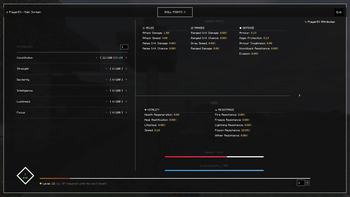
The 4.0.0+ PlayerEX Screen
🧬 What Is PlayerEX: Director’s Cut?
PlayerEX: Director’s Cut is a fundamentally rewritten and expanded version of CleverNucleus’ PlayerEx.
It adds:
- An RPG-style leveling system for players
- A full suite of custom attributes (offense, defense, utility, magic, etc.)
- Skill points & refund points with a dedicated screen
- And now: weapon & armor leveling, letting your gear gain experience and power over time
All of this is powered by Data Attributes: Director’s Cut, making PlayerEX highly configurable and extremely modpack-friendly.
🔢 By default, PlayerEX DC uses a level cap of 100.
This cap can be fully adjusted via Data Attributes and the config.
🎮 Core Features
📈 Player Leveling & Attributes
- Earn experience and levels beyond vanilla’s enchantment system.
- Spend skill points in a clean, modern GUI (default hotkey: -).
- Customize:
- How many points you gain per level
- Which attributes are available
- How strong each attribute is per point
Attributes are defined & modified via Data Attributes DC, meaning:
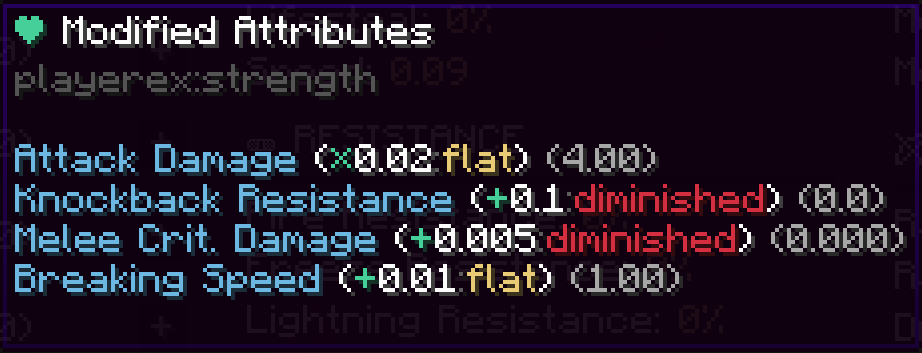
- You can target any attribute, from base damage to custom modded stats.
- You can create complex formulas instead of static bonuses.
- Everything is data-driven, not hardcoded.
🛡️⚔️ Armor & Weapon Leveling
PlayerEX now also supports gear progression:
- Weapons can gain XP from combat (kills, damage dealt, etc., depending on config).
- Armor can gain XP from damage taken, blocking, or other events.
- Each item can level up and gain:
- Attribute bonuses
- Scaling effects (e.g. more damage, more defense, etc.)
- Pack-defined perks via Data Attributes
This system is:
- Optional – you can disable it entirely or per-item.
- Configurable – control XP rates, max levels, and how impactful leveling is.
- Modpack-oriented – designed so you can build “ARPG-style” progression (Diablo/PoE/MMO vibes) on top of vanilla or other combat overhauls.
🧩 The PlayerEX Screen
The PlayerEX screen provides:
- A non-intrusive, modern UI built with
owo-lib. - Sections for:
- Current level, XP bar, and next level info
- Attributes and their descriptions
- Skill points / refund points
- Fully extendable by other mods (e.g. WizardEX, RelicEX, EXHud) using PlayerEX’s APIs.
You can open it with a keybind (default: -), and pack makers can change that in configs.
📦 Companion Mods (The “EX” Family)
These are complementary but optional:
EXHud: Director’s Cut
An opinionated, highly configurable HUD for PlayerEX and other systemsRelicEX: Director’s Cut
An ARPG-style loot system for PlayerEX- Randomized relics dropped from mobs and chests
- Rarities, weighted attributes, tomes, refund orbs, Dragon Stone level resets
WizardEX: Director’s Cut
A bridge between PlayerEX and Wizards / Spell Power Attributes- Lets you tie magic scaling directly into PlayerEX attributes and gear progression
📚 Documentation
Full documentation, including:
- Attribute reference
- Config options
- Integration guides
- Modpack tips and best practices
…can be found here:
👉 https://bareminimumstudios.github.io/Bare-Minimum-Docs/
🛠️ For Modpack Authors
PlayerEX: DC is built as a toolbox for RPG packs. You can:
- Define your own attribute set or extend the default ones.
- Control:
- XP curve and level cap (default is 100)
- Skill point and refund point gains
- How expensive respecs are
Enable and tune weapon & armor leveling:
- Set max gear level
- Control XP gain sources and rates
- Attach attribute scaling or custom effects per gear level
Paired with Data Attributes DC, you get JSON-driven control over almost every number in the system.
👨💻 For Developers
You’re the fun ones.
PlayerEX DC exposes:
- A registry-based way to define and modify attributes, including custom ones.
- The ability to override any registered attribute safely.
- APIs to apply attributes to any
LivingEntity, not just players. - Hooks for screens and overlays using
owo-lib. - Integration points for:
- Custom skills and trees
- External XP sources
- Your own gear/level systems that plug into PlayerEX data
More technical details and examples are provided in the docs and on the GitHub repository.
🪨 Forge Users
Yes, we see you.
There is no planned official Forge port of PlayerEX: Director’s Cut.
Forge builds will not be developed or supported.
If you really want to try it on a Forge environment, you may be able to run it via Sinytra Connector:
⚠️ This is entirely at your own risk.
There is no guarantee it will work correctly, and support cannot be provided for Connector-based setups.
🙌 Contributors
The People Who Made This A Reality
- The studio – Bare Minimum Studios
- The wispforest team 💖 – for
owo-liband general ecosystem magic - One guy’s modpack – you know who you are
- Literally YOU – testers, packmakers, bug reporters, chaos gremlins
- And most importantly, CleverNucleus – creator of the original PlayerEx
Translators (legacy, <= 3.*)
- gyular – Korean
- Hertz – Spanish
- MrTYZzik – Russian
- Orygeunik – Russian improvements
- NianGuu – Simplified Chinese
- sky_bai – Simplified Chinese (older releases)
💸 Thanks to Our Sponsor
!
Use code bareminimum for 25% off your first month!
Available Versions
How to Install PlayerEX: Directors Cut on Your Server
Order Server
Order a Minecraft Java server with at least 3 GB RAM (4 GB recommended).
Set fabric Loader
In the panel under "Egg", select the fabric loader and matching Minecraft version (1.20.1).
Install Mod
Open the mod browser in the dashboard and search for "PlayerEX: Directors Cut". Click "Install" – done! Alternatively, upload the .jar via SFTP to the /mods folder.
Compatibility
Mod Loaders
Minecraft Versions
1.20.1
Server-side
✓ RequiredRecommended RAM
4 GB(min. 3 GB)Frequently Asked Questions
PlayerEX: Directors Cut server crashes on startup – what to do?
Most common cause: wrong fabric version or insufficient RAM. Check the server log (latest.log) for "OutOfMemoryError" or "Mixin" errors. With Mado Hosting: ensure at least 3 GB RAM is allocated and the loader matches the mod version (1.20.1). You can switch loaders with one click in the panel.
Is PlayerEX: Directors Cut compatible with fabric and quilt?
PlayerEX: Directors Cut officially supports fabric, quilt for Minecraft 1.20.1. The Mado dashboard automatically detects incompatible loader combinations.
Server lagging with PlayerEX: Directors Cut – how to optimize performance?
Recommended RAM: 4 GB (per 8 players). Use /spark profiler to check if PlayerEX: Directors Cut consumes the most tick time. Common fixes: reduce server view-distance to 8-10, install "performant" or "starlight" as supplementary mods on Forge. With Mado Hosting, your server runs on NVMe SSDs with dedicated CPU cores for minimal latency.
Similar Mods




Rent Modded Server
Install PlayerEX: Directors Cut with just one click on your server.