
PlayerLocatorPlus 26.1 Port
Unofficial port of PlayerLocatorPlus to 26.1.2
Screenshots
About this Mod
Player Locator Plus
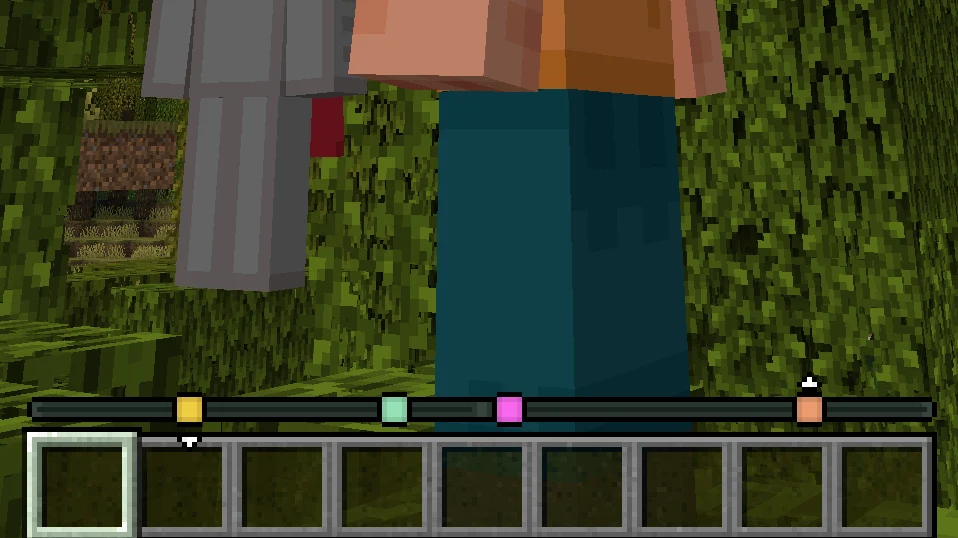
Track other players' locations on your experience bar like a compass!


NOTE: This is an unofficial port to 26.1.2 by Notenlish. Original project is PlayerLocatorPlus by @sit.
Marker colors
By default, each player's color is determined randomly by their UUID. There are other options in the config (see below).
Distance fade
When a player is very far away, their marker starts to fade:

Disappearing
There are three ways to hide from the player locator:
- Crouching
- Wearing a carved pumpkin
- Having the invisibility effect

Configuration
The config is available at config/player-locator-plus.toml.
You can also access the configuration screen with Mod Menu.
Server parameters:
enabled: Is the mod enabled server-side at all. Note that the bar will still be visible ifvisibleis true. Default:truesendServerConfig: Whether the server will try to force its config on the client. This will only have effect if the clients haveacceptServerConfigset to true. Default:truesendDistance: Whether to send distance information along with the direction information.
There's basically no point in settings this tofalse, as players can still easily
triangulate the exact location of others even without knowing the distance.
However, it is harder with this option on, especially if you consider that other players
move.
Default:truemaxDistance: The maximum distance at which other players are visible on the compass.
Default:0(unlimited)directionPrecision: The amount of segments the direction vector is split into. Decreasing this value significantly will make tracking way more inaccurate but be helpful in preventing triangulation. Default:300ticksBetweenUpdates: How many ticks apart are the compass updates.
The less, the smoother the movements of faraway players are.
Close players (inside the entity render distance) do not depend on this parameter as much.
Default:5(four times per second)sneakingHides: Whether sneaking hides players from the locator. Default:truepumpkinHides: Whether wearing a pumpkin (or any othergaze_disguise_equipment) hides
players from the locator.
Default:truemobHeadsHide: Whether wearing a mob/player head hides players from the locator. The exact list can be edited with a datapack by changingdata/player-locator-plus/tags/item/hiding_equipment.json(see default here). Default:trueinvisibilityHides: Whether being invisible hides players from the locator. Default:truecolorMode: How to determine the color of the markers. Vanilla waypoints always override this setting. Available modes:UUID(default): Assign a random color based on the UUID of the player.TEAM_COLOR: Use the color of the player's team (or white)CUSTOM: Allow every player to assign a color with the/plp colorcommandCONSTANT: Everyone has the same color from theconstantColoroption
constantColor: Color used whencolorModeisCONSTANT. Default:0xFFFFFF(white)allowVanillaLocatorBar: Allow sending waypoint to vanilla players without the mod. Default:true
Client parameters:
visible: Show the player locator. Default:truevisibleEmpty: Show the player locator even there are no players online and no markers in sight. Default:falseacceptServerConfig: Whether to override the client-side config with the server-side one. The server config will also be able set client parameters. Default:truefadeMarkers: Fade markers of faraway players. Default:truefadeStart: At what distance the markers start to fade. Default:100fadeEnd: At what distance the markers stop fading and settle atfadeEndOpacity. Default:1000fadeEndOpacity: The final opacity when/afterfadeEndis reached. Default:0.3showHeight: Show little arrows above/below a marker if the height difference is significant.
Default:truealwaysShowHeads: Always show player heads, regardless of whether Tab is pressed. Default:falseshowHeadsOnTab: Show player heads when Tab is pressed. Default:trueshowNamesOnTab: Show player names when Tab is pressed. Default:trueshowVanillaWaypoints: Show custom waypoints created by adding thewaypoint_transmit_rangeattribute. Default:true
Acknowledgements
Originally introduced in Minecraft: Bedrock Edition Preview here, covered by Phoenix SC.
Known issues
- Major versions (1.x.x and 2.x.x) are NOT compatible! At least the major version must match between the server and the client.
License
Player Locator Plus is licensed under the GNU General Public License Version 3 or later.
Available Versions
How to Install PlayerLocatorPlus 26.1 Port on Your Server
Order Server
Order a Minecraft Java server with at least 3 GB RAM (4 GB recommended).
Set fabric Loader
In the panel under "Egg", select the fabric loader and matching Minecraft version (26.1.2).
Install Mod
Open the mod browser in the dashboard and search for "PlayerLocatorPlus 26.1 Port". Click "Install" – done! Alternatively, upload the .jar via SFTP to the /mods folder.
Compatibility
Mod Loaders
Minecraft Versions
26.1.2
Server-side
✓ RequiredRecommended RAM
4 GB(min. 3 GB)Frequently Asked Questions
PlayerLocatorPlus 26.1 Port server crashes on startup – what to do?
Most common cause: wrong fabric version or insufficient RAM. Check the server log (latest.log) for "OutOfMemoryError" or "Mixin" errors. With Mado Hosting: ensure at least 3 GB RAM is allocated and the loader matches the mod version (26.1.2). You can switch loaders with one click in the panel.
Is PlayerLocatorPlus 26.1 Port compatible with fabric?
PlayerLocatorPlus 26.1 Port officially supports fabric for Minecraft 26.1.2. The Mado dashboard automatically detects incompatible loader combinations.
Server lagging with PlayerLocatorPlus 26.1 Port – how to optimize performance?
Recommended RAM: 4 GB (per 8 players). Use /spark profiler to check if PlayerLocatorPlus 26.1 Port consumes the most tick time. Common fixes: reduce server view-distance to 8-10, install "performant" or "starlight" as supplementary mods on Forge. With Mado Hosting, your server runs on NVMe SSDs with dedicated CPU cores for minimal latency.
Similar Mods






Rent Modded Server
Install PlayerLocatorPlus 26.1 Port with just one click on your server.