
PlayerName Styler
a NeoForge mod that lets your nickname in chat, tab list, and nameplates. Also supports Luckperms mod.
Screenshots
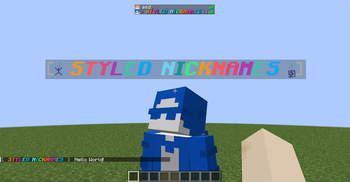
About this Mod
PlayerName Styler
Add configurable nicknames and styled player names across chat, tab list, and above-head nameplates.
Features
- Per-player nicknames (
/nickname) - Configurable formatting for chat, tab list, and nameplates (TOML)
- Placeholder system (built-ins + API for other mods to register their own placeholders)
- Styling support
- Minecraft
&color/format codes (&a,&6,&l,&r, etc.) - Hex colors (
&#RRGGBBand<#RRGGBB>) - Tags like
<bold>,<red>,<reset> <gradient:#RRGGBB:#RRGGBB>text</gradient>and<rainbow>text</rainbow>
- Minecraft
- LuckPerms prefix/suffix integration (optional via
%prefix%/%suffix%; empty when LuckPerms is not installed) - Simple JSON nickname storage in your config folder (
config/nicknames.json) - Real username lookup with
/realname - Nameplate renderer is configurable (
text_displaydefault, witharmor_standfallback) - Scoreboard
below_namesupport — shows thebelow_namedisplay slot (e.g. health) as a second line under custom nameplates, which Minecraft otherwise hides once the name tag is replaced
Commands
/nickname— show your current nickname/nickname <nickname>— set your nickname/nickname clear— clear your nickname/nickname set <player> <nickname>— admin set (OP level 2)/nickname clear <player>— admin clear (OP level 2)/nickname reload— reload nicknames file (OP level 2)/nickname cleartags— remove stuck/orphaned nameplate entities and refresh online players (OP level 2)/realname— list all nicknames/realname <search>— search nickname/real name
Configuration
Config file: config/playernamestyler-common.toml
chatFormat,tabListFormat,nameplateFormataccept placeholders like:%displayname%,%username%,%prefix%,%suffix%,%chatmessage%%world%/%dimension%,%biome%,%ping%,%x%/%y%/%z%,%health%, etc.
nameplateRenderercan betext_displayorarmor_standshowBelowNametoggles the scoreboardbelow_nameline under custom nameplates (defaulttrue)
Compatibility
- Loader: NeoForge
- Minecraft: 1.21.1–1.21.11 (separate build per listed version)

Available Versions
How to Install PlayerName Styler on Your Server
Order Server
Order a Minecraft Java server with at least 3 GB RAM (4 GB recommended).
Set neoforge Loader
In the panel under "Egg", select the neoforge loader and matching Minecraft version (1.21.11).
Install Mod
Open the mod browser in the dashboard and search for "PlayerName Styler". Click "Install" – done! Alternatively, upload the .jar via SFTP to the /mods folder.
Compatibility
Mod Loaders
Minecraft Versions
1.21.11, 1.21.10, 1.21.9 (+8 more)
Server-side
✓ RequiredRecommended RAM
4 GB(min. 3 GB)Frequently Asked Questions
PlayerName Styler server crashes on startup – what to do?
Most common cause: wrong neoforge version or insufficient RAM. Check the server log (latest.log) for "OutOfMemoryError" or "Mixin" errors. With Mado Hosting: ensure at least 3 GB RAM is allocated and the loader matches the mod version (1.21.11). You can switch loaders with one click in the panel.
Is PlayerName Styler compatible with neoforge?
PlayerName Styler officially supports neoforge for Minecraft 1.21.11, 1.21.10, 1.21.9. The Mado dashboard automatically detects incompatible loader combinations.
Server lagging with PlayerName Styler – how to optimize performance?
Recommended RAM: 4 GB (per 8 players). Use /spark profiler to check if PlayerName Styler consumes the most tick time. Common fixes: reduce server view-distance to 8-10, install "performant" or "starlight" as supplementary mods on Forge. With Mado Hosting, your server runs on NVMe SSDs with dedicated CPU cores for minimal latency.
Similar Mods






Rent Modded Server
Install PlayerName Styler with just one click on your server.