
PlayerSettingChanger
PlayerSettingChanger lets you customize how online players look, sound, and appear on your client with per-player nicknames, skin URL overrides, voice mutes, and a premium themed GUI.
Screenshots
About this Mod
PlayerSettingChanger
About
PlayerSettingChanger is a client-side Minecraft mod that gives you a clean, modern menu for managing how other online players appear and sound only on your client.
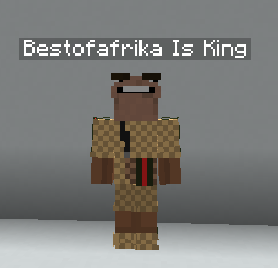
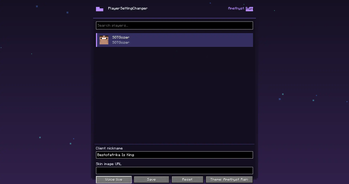
Open the mod from Mod Menu and you’ll see every online player listed in a premium styled GUI with their player head and username. From there, you can set a custom client-side nickname, add a skin image URL override, mute them through Simple Voice Chat support, or reset their settings back to normal.
Features
- Modern player settings GUI
- Shows all online players
- Player head and username cards
- Client-side nickname changer
- Client-side skin URL override
- Per-player Simple Voice Chat mute
- Reset button to restore a player back to original
- Settings are saved per player UUID
- 50 custom themes
- Animated theme effects
- Flapping cat-ear style header
- Custom mod logo
- Works through Mod Menu
Important
This mod is client-side only.
Custom names, skins, and mute settings are only visible or active for you. Other players will not see your changes.
Skin overrides require a direct PNG image URL, usually a Minecraft skin image in 64x64 format.
Simple Voice Chat Support
If Simple Voice Chat is installed, PlayerSettingChanger can mute selected players locally by silencing their incoming voice audio on your client.
Dependencies
Required:
- Fabric Loader
- Fabric API
- Minecraft 1.21.11
Recommended:
- Mod Menu
- Simple Voice Chat, for voice mute support
Author
Made by BestOfAfrika
Available Versions
How to Install PlayerSettingChanger on Your Server
Order Server
Order a Minecraft Java server with at least 3 GB RAM (4 GB recommended).
Set fabric Loader
In the panel under "Egg", select the fabric loader and matching Minecraft version (1.21.11).
Install Mod
Open the mod browser in the dashboard and search for "PlayerSettingChanger". Click "Install" – done! Alternatively, upload the .jar via SFTP to the /mods folder.
Compatibility
Mod Loaders
Minecraft Versions
1.21.11
Server-side
✗ UnsupportedRecommended RAM
4 GB(min. 3 GB)Frequently Asked Questions
PlayerSettingChanger server crashes on startup – what to do?
Most common cause: wrong fabric version or insufficient RAM. Check the server log (latest.log) for "OutOfMemoryError" or "Mixin" errors. With Mado Hosting: ensure at least 3 GB RAM is allocated and the loader matches the mod version (1.21.11). You can switch loaders with one click in the panel.
Is PlayerSettingChanger compatible with fabric?
PlayerSettingChanger officially supports fabric for Minecraft 1.21.11. The Mado dashboard automatically detects incompatible loader combinations.
Server lagging with PlayerSettingChanger – how to optimize performance?
Recommended RAM: 4 GB (per 8 players). Use /spark profiler to check if PlayerSettingChanger consumes the most tick time. Common fixes: reduce server view-distance to 8-10, install "performant" or "starlight" as supplementary mods on Forge. With Mado Hosting, your server runs on NVMe SSDs with dedicated CPU cores for minimal latency.
Rent Modded Server
Install PlayerSettingChanger with just one click on your server.