
Pocket Villagers
Capture Villagers in Cubes with Compact Villager Automation
Screenshots

About this Mod
Please consider supporting me on ko-fi if you like the mod and can afford it, I appreciate even 1 dollar. 
I grant permission to anyone seeking to add my mod to a modpack
NeoForge Version Requires: Architectury Api! and Forgified Fabric Api! Also suggests Mod Menu: Neoforge Edition!
Fabric Version: No Requirements, But Suggests Mod Menu!
Pocket Villagers changes how you interact with villagers in Minecraft by allowing you to capture them into convenient portable cubes. Whether you're managing trades, automating farms, or optimizing your village setup, this mod provides powerful tools to streamline every aspect of villager management.
🎯 Core Features
Villager Capture System
Right-click any villager to capture them into a Pocket Cube - a portable item that stores your villager safely. Transport villagers anywhere with ease, no more minecart madness or boat navigation nightmares!
Smart Trading Interface
The main Pocket Cube comes packed with trading enhancements:
Exhaustion Prevention - Trade without worrying about villagers locking their trades
Manual Refresh Button - Refresh trades on demand
Auto Refresher - Set search terms (like "mending", "sharpness", etc.) and automatically refresh trades until your desired enchantment appears-
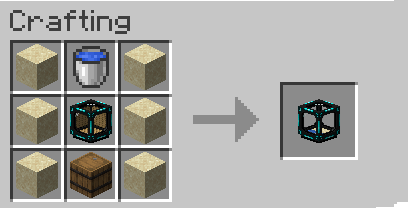
📦 Storage Pocket Cube
Need to manage multiple villagers at once? The Storage Pocket Cube can hold up to 10 villagers simultaneously!
Mass Storage - Capture and transport up to 10 villagers in a single item
Terminal Integration - Acts as the primary storage interface for Pocket Terminal transfers
Bulk Management - Perfect for organizing your villager collection
Flexible Distribution - Easily distribute villagers to different automation cubes via the Pocket Terminal
Baby Auto-Transfer - If placed next to a breeder pocket cube, babies that grow to 100% automatically transfer
🖥️ Pocket Terminal
The Pocket Terminal is your central command center for managing all your villager cubes!
Centralized Management
Place a Pocket Terminal anywhere in your base, and it will automatically detect all cubes within a 64-block radius. View and manage your entire villager network from one convenient location.
Seamless Villager Transfer
Transfer villagers between cubes through an intuitive GUI - no need to release villagers back into the world! Simply select a villager and move them to any connected cube with a few clicks.
Key Benefits:
64-Block Detection Radius - Covers large areas of your base
Beautiful GUI - Clean, easy-to-use interface for managing your villagers
Direct Transfers - Move villagers cube-to-cube instantly
Never Release Villagers - Keep everything contained and organized
Perfect for Large Setups - Manage dozens of cubes from a single terminal
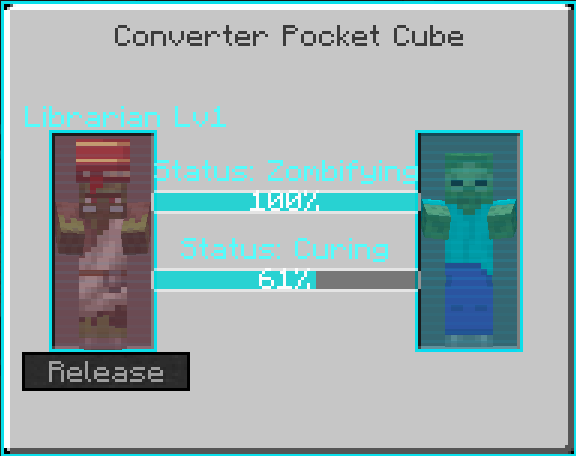
🧪 Converter Cube
Transform your villagers with the Converter Cube:
Zombification - Convert villagers to zombie villagers
Curing - Cure zombie villagers back to normal
Perfect for obtaining discounted trades through the cure discount mechanic
⚙️ Automation Cubes
🛒 Auto Trader Cube
Automatically executes trades with captured villagers. Perfect for bulk trading operations and resource generation.
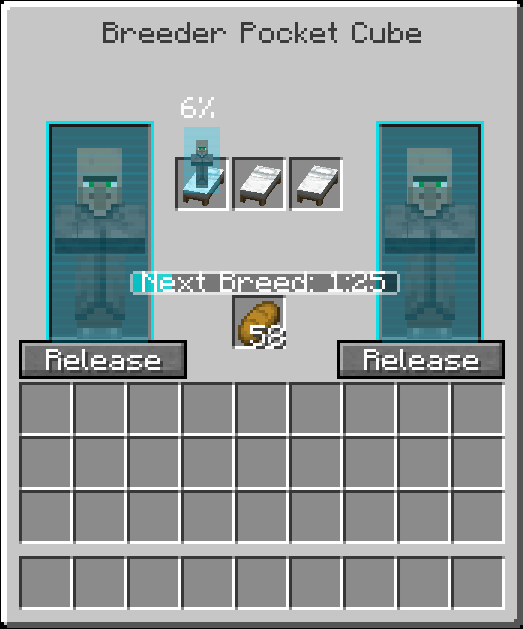
💚 Breeder Cube
Handles villager breeding automatically. Maintain optimal population levels without manual intervention.
⚒️ Iron Farm Cube
Automated iron production using captured villagers. Set it and forget it!
⛏️ Mining Cube
Let your villagers do the mining work for you. Automated resource gathering at your fingertips.
🌾 Farming Cube
Automate crop farming with villager-powered agriculture. Keep your food supplies stocked effortlessly.
🎣 Fishing Cube
Automated fishing operations. Collect fish, treasures, and more while you focus on other tasks.
💡 Why Pocket Villagers?
Convenience - No more villager transportation headaches
Automation - Set up self-sustaining systems for all your needs
Efficiency - Get the trades you want without endless rerolling
Flexibility - Mix and match cubes to create your perfect setup
Also no good option on fabric Easy Villagers is not available on fabric so I made this mod instead!
Secret Feature: Right-click villagers holding a workstation to instantly job them, no more placing the station down and waiting for them to claim it.
Compatibility Mods:
Available Versions
How to Install Pocket Villagers on Your Server
Order Server
Order a Minecraft Java server with at least 3 GB RAM (4 GB recommended).
Set fabric Loader
In the panel under "Egg", select the fabric loader and matching Minecraft version (1.21.10).
Install Mod
Open the mod browser in the dashboard and search for "Pocket Villagers". Click "Install" – done! Alternatively, upload the .jar via SFTP to the /mods folder.
Compatibility
Mod Loaders
Minecraft Versions
1.21.10, 1.21.8, 1.21.1 (+1 more)
Server-side
✓ RequiredRecommended RAM
4 GB(min. 3 GB)Frequently Asked Questions
Pocket Villagers server crashes on startup – what to do?
Most common cause: wrong fabric version or insufficient RAM. Check the server log (latest.log) for "OutOfMemoryError" or "Mixin" errors. With Mado Hosting: ensure at least 3 GB RAM is allocated and the loader matches the mod version (1.21.10). You can switch loaders with one click in the panel.
Is Pocket Villagers compatible with fabric and neoforge?
Pocket Villagers officially supports fabric, neoforge for Minecraft 1.21.10, 1.21.8, 1.21.1. The Mado dashboard automatically detects incompatible loader combinations.
Server lagging with Pocket Villagers – how to optimize performance?
Recommended RAM: 4 GB (per 8 players). Use /spark profiler to check if Pocket Villagers consumes the most tick time. Common fixes: reduce server view-distance to 8-10, install "performant" or "starlight" as supplementary mods on Forge. With Mado Hosting, your server runs on NVMe SSDs with dedicated CPU cores for minimal latency.
Similar Mods






Rent Modded Server
Install Pocket Villagers with just one click on your server.