![[Cobblemon] PocketMorph](https://cdn.modrinth.com/data/j3wTk6KL/7a3e438c9378d38092a27947ae33ffbbd246ab18_96.webp)
[Cobblemon] PocketMorph
A polished Cobblemon transformation mod that lets players become Pokémon, not just disguise as them.
Screenshots
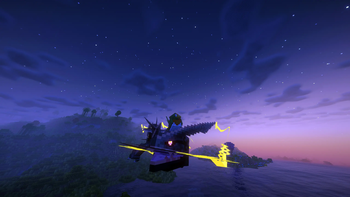
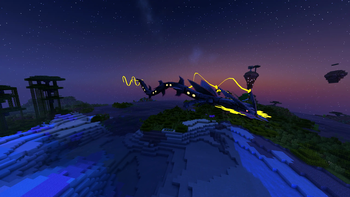
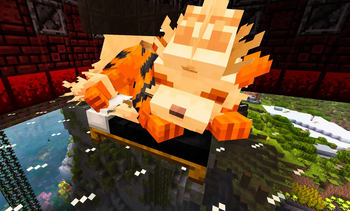
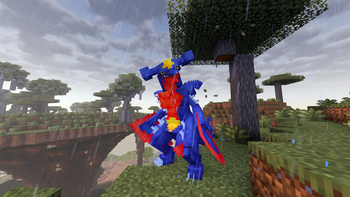
About this Mod
[Cobblemon] PocketMorph

BIG UPDATE 2.0.0!! Check change log for details!
PocketMorph is a Cobblemon transformation mod that lets players become Pokémon — visually, mechanically, and socially — instead of only wearing a simple disguise. Love Pokemon Mystery Dungeon-style gameplay? This mod is for you!
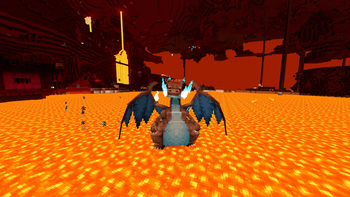
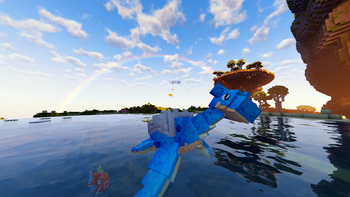
Transform into Pokémon, preview forms in a polished GUI, save favorites, roll random transformations, ride eligible transformed players, use Pokémon-inspired abilities, and even bring your own transformed Pokémon form into battle through PocketMorph’s self-battler system.

Highlights
- Transform into Cobblemon Pokémon with the PocketMorph GUI or
/disguisecommand. - Browse Pokémon and forms with a visual selector.
- Use a live preview with rotate, pan, zoom, shiny/gender toggles, type icons, ability badges, and stat summaries.
- Save favorite transformations and quickly load them later.
- Roll random transformations with optional form, shiny, gender, and scale randomization.
- Use forms, shiny variants, scale, nicknames, gender, level labels, and other validated Cobblemon-style properties.
- First-person transformed body rendering so you can look down and see your Pokémon form.
- Polished third-person visuals for local and remote players in multiplayer.
- Pokémon-inspired abilities such as flight, water breathing, swim boosts, fire resistance, lava movement, land-speed boosts, mining Haste, and Attack-based unarmed damage.
- Ride transformed players when the transformed Pokémon is already rideable through Cobblemon or loaded ride data.
- Use your transformed Pokémon as a self-battler in Cobblemon battles.
- Includes a Battler panel with portrait, status, held item/cosmetic actions, battle camera toggle, rescue/remove tools, and Use Item support.
- Pokédex-based transformation restrictions, whitelist/blacklist controls, scale limits, and readable configs for servers and modpacks.
Have a suggestion for a feature or change? Feel free to leave a comment in our discord: https://discord.gg/em5nSQsZUU.
Enjoyed the mod? You can support the project here:
Ko-fi: https://ko-fi.com/pixelpitstop1

Requirements
- Minecraft: 1.21.1
- Loader: Fabric
- Java: 21+
- Requires: Fabric API and Cobblemon
- Cobblemon: 1.7.3 or higher recommended
- Cobblemon 1.7.0+ may work, but versions below 1.7.3 have not been fully tested.
- Multiplayer: install on both server and client instances for proper multiplayer functionality.
Getting Started
Open the transformation GUI with the assigned hotkey (editable in keybinds), or:
/disguise gui
Or use command-based transformations:
/disguise lucario
/disguise charizard shiny
/disguise arcanine form=hisuian
/disguise pikachu scale=0.6
/disguise nickname Guardian
/disguise clear
The GUI is the easiest way to browse Pokémon, forms, properties, Favorites, Random, and Live Preview options. Commands remain available for quick use, server scripts, and advanced players.
The PocketMorph GUI
The main GUI is built around a visual-first workflow:
- Search for a base Pokémon.
- Pick a form or variant.
- Preview it live.
- Adjust properties such as shiny, gender, scale, nickname, or displayed level.
- Transform, favorite it, or roll something random.
The Live Preview supports mouse controls:
- Left-drag: rotate
- Right-drag: pan
- Mouse wheel: zoom
- Middle-click: reset preview


Self-Battlers
PocketMorph 2.0.0 adds the self-battler system. When enabled, your transformed Pokémon can be synced into your party and used in Cobblemon battles.
By default, the key to open the battler panel is the right-arrow on your keyboard, but can be edited in keybinds.
The Battler panel provides quick access to common actions, including:
- add/sync/remove battler;
- rescue tools;
- held item and cosmetic item actions;
- battle camera toggle;
- Use Item support for right-click-style items such as compatible TM disks.
PocketMorph includes safety guards to prevent self-battlers from being lost through storage, release, trade, or unsafe battle states.


Pokémon-Inspired Abilities
Depending on the current Pokémon form and server config, transformations can receive gameplay touches such as:
- flight for flying forms;
- water breathing and swim help for aquatic forms;
- fire resistance and lava movement help for Fire-type/fire-resistant forms;
- land speed boosts for fast grounded Pokémon;
- mining Haste for Ground-type Pokémon;
- unarmed damage bonuses based on base Attack.
These features are configurable so servers can choose how powerful transformations should be.

Built for Multiplayer and Modpacks
PocketMorph is designed for Cobblemon multiplayer environments. Other players can see your Pokémon form, scale, labels, riding state, held items, and battle-related visual state.
It also includes compatibility-focused handling for:
- addon/resource-pack forms;
- Mega and special forms;
- unusual model shapes;
- sparse animation sets;
- camera/raycast/throw-origin edge cases;
- server progression rules.

Server and Pack Controls
Server owners and modpack makers can configure:
- Pokédex requirements: any / seen / caught;
- creative-mode bypass;
- species whitelist and blacklist;
- shiny restrictions;
- scale limits;
- transformed hitbox behavior;
- ability strength and movement tuning;
- self-battler availability;
- riding rules;
- client/server visual defaults.
Generated configs include plain-English descriptions, defaults, ranges, and warnings for settings that can affect performance or gameplay.

Useful Commands
/disguise gui
/disguise <species> [properties]
/disguise clear
/disguise status
/disguise preview
/disguise nickname <name>
/disguise nickname clear
/disguise config show
/disguise config path
/disguise config reload
/disguise battler status

Compatibility Notes
- Camera mods may conflict with PocketMorph’s camera adjustments. Client config options are available if needed.
- Very large scale values can reduce FPS or make gameplay harder to control. Server scale limits are configurable.
- Mounted accessories/backpacks are intentionally hidden for compatibility with accessory mods that use custom renderers.
- PocketMorph is intended for Cobblemon-based modpacks and should be installed on both the server and client for multiplayer.
Disclaimer
PocketMorph is designed for Cobblemon-based Minecraft experiences and is not affiliated with Mojang, Microsoft, Nintendo, Game Freak, Creatures Inc., or The Pokémon Company.
Available Versions
How to Install [Cobblemon] PocketMorph on Your Server
Order Server
Order a Minecraft Java server with at least 3 GB RAM (4 GB recommended).
Set fabric Loader
In the panel under "Egg", select the fabric loader and matching Minecraft version (1.21.1).
Install Mod
Open the mod browser in the dashboard and search for "[Cobblemon] PocketMorph". Click "Install" – done! Alternatively, upload the .jar via SFTP to the /mods folder.
Compatibility
Mod Loaders
Minecraft Versions
1.21.1
Server-side
✓ RequiredRecommended RAM
4 GB(min. 3 GB)Frequently Asked Questions
[Cobblemon] PocketMorph server crashes on startup – what to do?
Most common cause: wrong fabric version or insufficient RAM. Check the server log (latest.log) for "OutOfMemoryError" or "Mixin" errors. With Mado Hosting: ensure at least 3 GB RAM is allocated and the loader matches the mod version (1.21.1). You can switch loaders with one click in the panel.
Is [Cobblemon] PocketMorph compatible with fabric?
[Cobblemon] PocketMorph officially supports fabric for Minecraft 1.21.1. The Mado dashboard automatically detects incompatible loader combinations.
Server lagging with [Cobblemon] PocketMorph – how to optimize performance?
Recommended RAM: 4 GB (per 8 players). Use /spark profiler to check if [Cobblemon] PocketMorph consumes the most tick time. Common fixes: reduce server view-distance to 8-10, install "performant" or "starlight" as supplementary mods on Forge. With Mado Hosting, your server runs on NVMe SSDs with dedicated CPU cores for minimal latency.
Similar Mods




Rent Modded Server
Install [Cobblemon] PocketMorph with just one click on your server.