
Pokeblocks unofficial
Unofficial NeoForge build of Pokeblocks for Minecraft 1.21.1
Screenshots
About this Mod
Pokeblocks NeoForge Unofficial
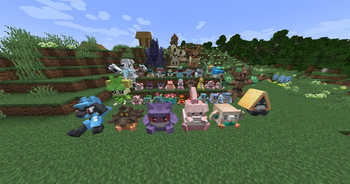
Bring more collectible decorations to your world ! This is an unofficial NeoForge build of Pokeblocks for Minecraft 1.21.1.
This mod adds a large collection of placeable Pokedolls, oversized gigantic variants, themed decorations, figurines, and collectible items for players who want to decorate bases, shops, spawn areas, gyms, or Cobblemon-style servers.
Features
- A large lineup of placeable Pokedolls.
- Regular, shiny, animated, and gigantic doll variants.
- Decorative blocks such as the Luvdisc Cushion, Magikarp Fishbowl, Applin Basket, Eiscue Head, and Pokemon Trophy.
- Figurines and small collectible items for display or server rewards.
- Poke Block decorations for Bulbasaur, Charmander, and Squirtle variants.
- Pokedolls can appear in supported vanilla chest loot tables.
- English and French language support.
- Compatible with current CobbledGacha v.3 for Minecraft
1.21.1on NeoForge
Good for
- Cobblemon-themed worlds and servers.
- Decorative reward crates, builds, and event areas.
- Player shops, museums, collection rooms, and themed bases.
- Anywhere you want pokemon style plushies i guess.
Compatibility
- Minecraft
1.21.1 - NeoForge
21.1.200+ - GeckoLib
4.8.4or newer
Credits and License
This is an unofficial NeoForge redistribution/port of Pokeblocks. Original mod credit goes to MrShawn. Apart from the NeoForge port, the only changes are french translations and fixes described in the changelogs.
The bundled license is Creative Commons Attribution-NonCommercial-ShareAlike 4.0 International. See the included LICENSE file for the full terms.
Available Versions
How to Install Pokeblocks unofficial on Your Server
Order Server
Order a Minecraft Java server with at least 3 GB RAM (4 GB recommended).
Set neoforge Loader
In the panel under "Egg", select the neoforge loader and matching Minecraft version (1.21.1).
Install Mod
Open the mod browser in the dashboard and search for "Pokeblocks unofficial". Click "Install" – done! Alternatively, upload the .jar via SFTP to the /mods folder.
Compatibility
Mod Loaders
Minecraft Versions
1.21.1
Server-side
✓ RequiredRecommended RAM
4 GB(min. 3 GB)Frequently Asked Questions
Pokeblocks unofficial server crashes on startup – what to do?
Most common cause: wrong neoforge version or insufficient RAM. Check the server log (latest.log) for "OutOfMemoryError" or "Mixin" errors. With Mado Hosting: ensure at least 3 GB RAM is allocated and the loader matches the mod version (1.21.1). You can switch loaders with one click in the panel.
Is Pokeblocks unofficial compatible with neoforge?
Pokeblocks unofficial officially supports neoforge for Minecraft 1.21.1. The Mado dashboard automatically detects incompatible loader combinations.
Server lagging with Pokeblocks unofficial – how to optimize performance?
Recommended RAM: 4 GB (per 8 players). Use /spark profiler to check if Pokeblocks unofficial consumes the most tick time. Common fixes: reduce server view-distance to 8-10, install "performant" or "starlight" as supplementary mods on Forge. With Mado Hosting, your server runs on NVMe SSDs with dedicated CPU cores for minimal latency.
Similar Mods




Rent Modded Server
Install Pokeblocks unofficial with just one click on your server.
Details
- License
- Creative Commons Attribution Non Commercial 4.0 International
- Server-side
- Required