
PokeUtilities
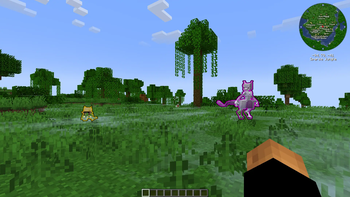
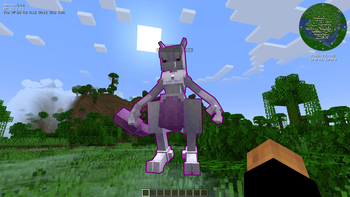
Highlights wild shinies and legendaries in Cobblemon, with a live catch-rate overlay tied to the ball in your hand.
Screenshots
About this Mod
PokeUtilities
Client-side quality-of-life mod for Cobblemon on Fabric. ESP-style highlights for shinies and legendaries, plus a live overlay that shows species, level, HP, IVs, and catch-rate prediction based on the ball in your hand.
Client-side only. No server install required. Sends only the same packets the vanilla Cobblemon client would.
Features (free)
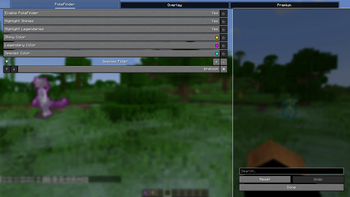
PokeFinder
- Highlight wild shiny Pokémon
- Highlight wild legendary Pokémon
- Species filter — highlight specific species by name (multi-select with autocomplete from the Cobblemon dex)
- Configurable colors
Overlay
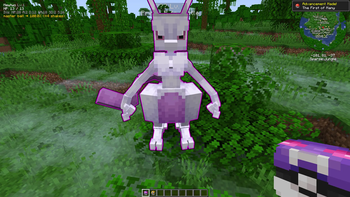
- Species, level, HP for the Pokémon you're looking at or fighting
- Numeric IVs
- Live catch-rate prediction — updates as you switch balls in hand
Config
- Press
Uin-game, or open via ModMenu
Premium
Premium build adds:
- World-space tracers — camera-to-target lines for highlighted Pokémon
- Pokédex helper — orange line for species you've never encountered, dim gray for seen-but-not-caught
- Smart filters — IV thresholds (count of perfect IVs, total IV sum), level threshold, hidden-ability, specific abilities / natures / genders lists
- Extended dossier — gender, ability (with hidden marker), nature (with mint flag), held item, caught ball, tera type, friendship
- Type-effectiveness HUD — your moves' multipliers vs. the opposing Pokémon during battle
- Battle move advisor — picks the strongest move each turn using a Showdown-trained PPO neural net plus an AlphaZero-style game-tree search with a Nash solver. Three modes: PPO-only (fast), search-only (deeper), and PPO+search (search guided by the network's value estimates)
- Auto-fish — vanilla rods + Cobblemon PokéRods, recasts and reels in bites
- Auto-leave fishing battles — flees wild fishing encounters with a species whitelist for the ones you want to keep
- Auto-battle — picks first usable move (or first alive party switch) each turn
- Force-forfeit keybind — flee on demand from any wild battle
Premium ships via Ko-fi: https://ko-fi.com/furix
Funds development of both builds. Free build keeps getting bug fixes and MC version bumps.
Requirements
| Mod | Version |
|---|---|
| Minecraft | 1.21.1 |
| Fabric Loader | >= 0.16.0 |
| Fabric API | latest for 1.21.1 |
| Fabric Language Kotlin | >= 1.13.0 |
| Cobblemon | >= 1.7.3, < 1.8.0 |
| YetAnotherConfigLib | >= 3.6.1 |
| ModMenu | >= 11.0.3 |
Install
- Install Fabric Loader for Minecraft 1.21.1
- Drop required mods (above) into
mods/ - Drop
pokeutilities-1.0.0.jarinto the samemods/ - Launch
Premium ships as a separate, standalone jar distributed via Ko-fi. It replaces the free jar (delete the free one first); the two cannot run together.
FAQ
Why two builds? Free covers the core QoL — highlights, overlay, catch-rate prediction. Premium is a separate, standalone jar (not an add-on) that includes everything free has plus the heavier stuff (tracers, smart filters, auto-actions, battle-move advisor). Ko-fi funds new development on the premium branch and bug-fix / version-bump work on the free one.
Will free features get gated later? No. Free build will not have features removed or paywalled retroactively. Anything currently in the free build stays in the free build.
Can I run free and premium together? No — they share the same Fabric mod id. Premium replaces free at install time: delete the free jar, drop in the premium jar.
Anti-cheat / fair play? Mod only reads client-visible state and renders overlays.
Network / telemetry? None. The mod opens no sockets; the only outbound action is launching your default browser when you click the Ko-fi link.
Links
- Premium / support development: https://ko-fi.com/furix
- Discord (community, bug reports, premium downloads): https://discord.gg/MNkgkfB3UK
License
MIT.
Available Versions
How to Install PokeUtilities on Your Server
Order Server
Order a Minecraft Java server with at least 3 GB RAM (4 GB recommended).
Set fabric Loader
In the panel under "Egg", select the fabric loader and matching Minecraft version (1.21.1).
Install Mod
Open the mod browser in the dashboard and search for "PokeUtilities". Click "Install" – done! Alternatively, upload the .jar via SFTP to the /mods folder.
Compatibility
Mod Loaders
Minecraft Versions
1.21.1
Server-side
✗ UnsupportedRecommended RAM
4 GB(min. 3 GB)Frequently Asked Questions
PokeUtilities server crashes on startup – what to do?
Most common cause: wrong fabric version or insufficient RAM. Check the server log (latest.log) for "OutOfMemoryError" or "Mixin" errors. With Mado Hosting: ensure at least 3 GB RAM is allocated and the loader matches the mod version (1.21.1). You can switch loaders with one click in the panel.
Is PokeUtilities compatible with fabric?
PokeUtilities officially supports fabric for Minecraft 1.21.1. The Mado dashboard automatically detects incompatible loader combinations.
Server lagging with PokeUtilities – how to optimize performance?
Recommended RAM: 4 GB (per 8 players). Use /spark profiler to check if PokeUtilities consumes the most tick time. Common fixes: reduce server view-distance to 8-10, install "performant" or "starlight" as supplementary mods on Forge. With Mado Hosting, your server runs on NVMe SSDs with dedicated CPU cores for minimal latency.
Similar Mods




Rent Modded Server
Install PokeUtilities with just one click on your server.