
PolarBooks
Allows you to dynamically add commands that open customizable book GUIs
Screenshots
About this Mod
PolarBooks
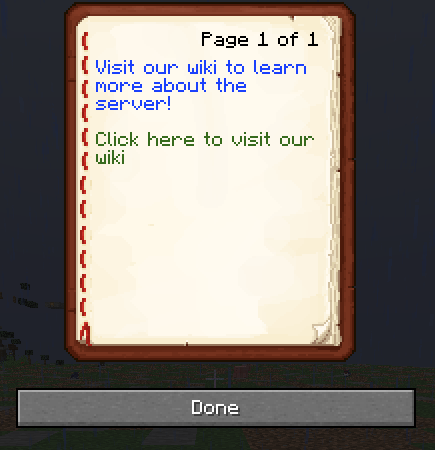
This mod is aimed at allowing servers to create books that allow you to inform players through a simple book GUI.
The mod has three main components that you can include for every piece of text you add:
- text itself
- A link, if you wish for the text to lead to a website
- A color for the text.
- A command to run upon clicking the text.
Sidenote: A link takes precedence over a command, make sure to only include a command or a link.
If you do not wish to include a color, a command or a link, you can omit them in the config file.
This mod also allows you to dynamically add commands to access the different books, which can also be configured in the JSON files.
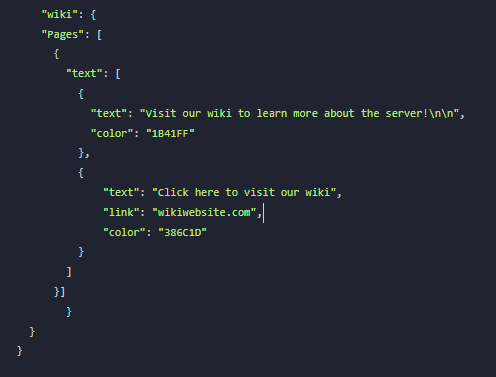
The default config looks as follows:
{
      "Pages": [
        {
          "text": [
            {
              "text": "Visit our store:\n",
              "color": "1B41FF"
            },
            {
              "text": "Click me",
              "link": "https://www.minecraft.net/en-us",
              "color": "CDFF00"
            }
          ]
        }
      ]
}
The configs work as follows:
By adding a new dictionary inside "pages" (A dictionary is anything wrapped in {}), you will add a new page with the text components you add in the text list.
When you run the command to get the book, it will automatically load all the pages and text contents inside it.
🛠️ Adding new commands
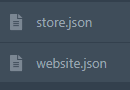
If you wish to add a new command using this mod, you need to create a new file with the same format as the default config. Upon restarting your server, they will be loaded in.
In the following example, a website and store command will load:
❓ Need Help?


Available Versions
How to Install PolarBooks on Your Server
Order Server
Order a Minecraft Java server with at least 3 GB RAM (4 GB recommended).
Set fabric Loader
In the panel under "Egg", select the fabric loader and matching Minecraft version (1.21.1).
Install Mod
Open the mod browser in the dashboard and search for "PolarBooks". Click "Install" – done! Alternatively, upload the .jar via SFTP to the /mods folder.
Compatibility
Mod Loaders
Minecraft Versions
1.21.1
Server-side
✓ RequiredRecommended RAM
4 GB(min. 3 GB)Frequently Asked Questions
PolarBooks server crashes on startup – what to do?
Most common cause: wrong fabric version or insufficient RAM. Check the server log (latest.log) for "OutOfMemoryError" or "Mixin" errors. With Mado Hosting: ensure at least 3 GB RAM is allocated and the loader matches the mod version (1.21.1). You can switch loaders with one click in the panel.
Is PolarBooks compatible with fabric?
PolarBooks officially supports fabric for Minecraft 1.21.1. The Mado dashboard automatically detects incompatible loader combinations.
Server lagging with PolarBooks – how to optimize performance?
Recommended RAM: 4 GB (per 8 players). Use /spark profiler to check if PolarBooks consumes the most tick time. Common fixes: reduce server view-distance to 8-10, install "performant" or "starlight" as supplementary mods on Forge. With Mado Hosting, your server runs on NVMe SSDs with dedicated CPU cores for minimal latency.
Similar Mods






Rent Modded Server
Install PolarBooks with just one click on your server.