
PoliticsMod
Turn Minecraft into a geopolitical simulator.
Screenshots
About this Mod
🏛️ PoliticsMod
Build Nations. Manage Economies. Rule the World.

⚠️ EARLY DEVELOPMENT WARNING
This mod is currently in Early Access (v0.2). Features are subject to change and bugs may occur.
- Loader: NeoForge 1.21.1
- Minecraft Version: 1.21.1
- Game Mode: Designed for Creative Mode & Roleplay (RP) Servers. Survival block interactions in claimed territory are disabled for security.
Required
📖 About
PoliticsMod brings a full political and economic simulation layer to Minecraft. Unlike simple land-claim mods, PoliticsMod models the inner life of a nation — founding a capital, governing cities, managing a treasury, conducting diplomacy, and watching your borders.
Whether you are running a small kingdom or a massive empire on an RP server, this mod gives you the tools to secure territory, manage citizens, and simulate a living country.
✨ Features
🏳️ State Management
- Found Your Nation — Place the Founding Stone, right-click it, and enter your country name. One nation per player.
- Dissolve a Nation —
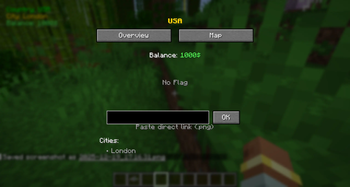
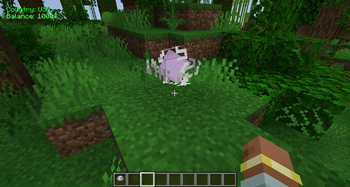
/politicscraft delete(Leader only, requires a second confirmation command). - Custom Flag — Set a PNG flag via URL that renders in-game over your buildings (
/flag set <url>). - Dashboard GUI — Press
K(or right-click the Founding Stone) to open the management screen with tabs for nation info, cities, map, diplomacy, and economy. - Roles — Four roles: Leader, Mayor, Citizen, Guest. Assign them with
/politicscraft setrole.
🏙️ Cities & Territory
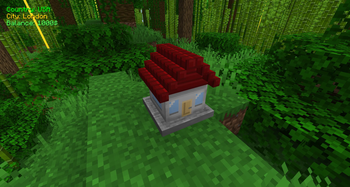
- City Stones — Place a City Stone to found a city within your territory.
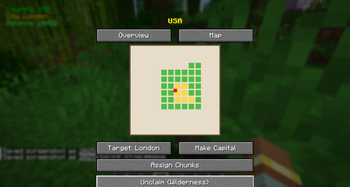
- Chunk Claiming — Claim and expand land from the Map tab. Visual border styles: Lines, Walls, Corners.
- Sell Territory — List chunks for sale with
/politicscraft sell <price>; other nations buy them with/politicscraft buy. - Tributes — Collect periodic income from occupied territories via
/tribute.
👥 Citizens & Invitations
- Invite players:
/politicscraft invite <player>(Leaders & Mayors) - Kick players:
/politicscraft kick <player>(Leaders only) - Promote / demote:
/politicscraft setrole <player> <role> - Info on any player:
/politicscraft info <player>
💰 Economy
- Treasury — Each nation holds a gold balance. View it in the Dashboard or via
/info. - Tax Blocks — Place up to 4 Tax Blocks per chunk inside your territory to generate passive income each economy cycle.
- Bank / Vault — The Vault block stores a gold reserve. Deposit and withdraw through commands; balance is displayed on right-click.
- Economy Cycle — Runs automatically on the server; taxes, building income, and tribute are collected and broadcast to all members.
- Residential Buildings — Simulate population; population size influences economy output.
🤝 Diplomacy
- Declare war:
/politicscraft war <country> - Form alliance:
/politicscraft ally <country> - Reset to neutral:
/politicscraft neutral <country> - View all relations in the Diplomacy tab of the Dashboard.
- Diplomacy status (Alliance / War / Neutral) displayed with colour-coded labels in all messages.
🏦 Embassy
- Place an Embassy block on your territory and link it to a partner nation.
- Linked embassies grant an income bonus each economy cycle.
- If the two nations are at war, the bonus is suspended.
- Right-click the block to see the linked country, war status, and current income bonus.
📡 Radar / Watchtower
- Place a Radar block on your territory.
- When a non-citizen enters a nearby chunk, a HUD alert is sent to all online members of that nation (5-second display, top-left HUD).
- Detects by team/country membership automatically — no configuration needed.
🛡️ Protection
- Players in Survival mode cannot interact with or break blocks inside claimed territory.
- Prevents unauthorised container access, door use, and block modifications.
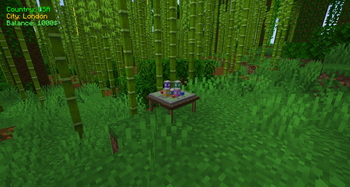
📊 HUD Overlay
- Always-visible overlay (top-left) showing:
- Current country & city you are standing in
- Your nation's treasury balance
- Active radar alert (if any)
🚀 Quick Start
- Switch to Creative Mode and find the Politics Craft tab in your inventory.
- Place the Founding Stone and right-click it — enter your country name.
- Place a City Stone in a new location and name your first city.
- Open the Dashboard (
K) → Map tab → claim the surrounding chunks. - Place Residential Buildings near houses with beds to grow population.
- Place Tax Blocks (up to 4 per chunk) to start earning income.
- Use
/politicscraft invite <player>to bring in your first citizens. - Place an Embassy and link it to an allied nation for extra income.
- Place a Radar to watch your borders.
🔧 Commands Reference
| Command | Who | Description |
|---|---|---|
/politicscraft info |
All | Show your nation info, role, balance, members |
/politicscraft info <player> |
All | Show another player's nation |
/politicscraft delete |
Leader | Dissolve your nation (requires confirmation) |
/politicscraft invite <player> |
Leader/Mayor | Invite a player |
/politicscraft kick <player> |
Leader | Remove a player |
/politicscraft setrole <player> <role> |
Leader | Set role (leader/mayor/citizen/guest) |
/politicscraft war <country> |
Leader | Declare war |
/politicscraft ally <country> |
Leader | Propose alliance |
/politicscraft neutral <country> |
Leader | Reset to neutral |
/politicscraft sell <price> |
Leader/Mayor | List current chunk for sale |
/politicscraft buy <country> |
Leader/Mayor | Buy listed chunk from a nation |
/tribute |
Leader | Collect tribute from occupied territories |
/flag set <url> |
Leader | Set nation flag (PNG URL) |
/embassy link <country> |
Leader/Mayor | Link the Embassy block you're looking at |
🌍 Localization
Fully localized in seven languages — all in-game messages, HUD, and GUI labels respect the player's language setting:
| Language | Code |
|---|---|
| English | en_us |
| Russian | ru_ru |
| Ukrainian | uk_ua |
| Polish | pl_pl |
| German | de_de |
| French | fr_fr |
| Spanish | es_es |
📦 Blocks
| Block | Description |
|---|---|
| Founding Stone | Creates / manages your nation |
| City Stone | Founds a city |
| Residential Building | Simulates housing & population |
| Tax Block | Generates passive income (max 4/chunk) |
| Embassy | Diplomatic link with income bonus |
| Radar / Watchtower | Detects non-citizens; sends HUD alert |
| Vault | National gold reserve (Bank) |
📋 Changelog
v0.2 — Diplomacy, Economy & Infrastructure
- New Blocks: Embassy (with income bonus & war suspension), Vault/Bank (gold reserve), Radar/Watchtower (border detection & HUD alert)
- Diplomacy System: War, Alliance, Neutral states with colour-coded status in all messages
- Economy: Tax Blocks, Tribute system, Vault deposit/withdraw, automatic economy cycle with nation-wide broadcast
- Territory Trading: Sell and buy chunks between nations
- Full i18n Refactor: All hardcoded Russian strings replaced with
Component.translatable(); 4 complete lang files (EN/RU/UK/PL) with ~175 keys each - Encoding Fix: Java compiler now uses UTF-8 — Cyrillic no longer garbled on Windows servers
- HUD: Fourth line added for active radar alerts
v0.1 — Foundation
- State Management: Founding Stone (create countries), City Stone (establish cities)
- Territory System: Chunk claiming with visual borders (Lines, Walls, Corners)
- Economy & Population: Residential Building for population simulation
- Commands:
/politicscraft deleteto dissolve a nation (with confirmation) - Protection: Block interactions disabled in Survival mode inside claimed territory
- Anti-Duplicate: Players cannot create multiple countries
- Dashboard GUI: Comprehensive screen for managing nations and cities
- HUD: Overlay showing current country, city, and balance
- Languages: English and Russian localization
⚖️ License
Licensed under the GNU General Public License v3.0 (GPL-3.0).
- Modpacks: Free to include in any modpack.
- Source Code: Available on GitHub. Free to view, modify, and distribute — any derivative work must also be released under GPL-3.0.
- Distribution: Redistribution permitted provided the source code is made available and the original license file is included.
🐛 Bug Reports & Suggestions
Found a bug or have a feature idea?
Please open an issue on the GitHub Issues Page.
Available Versions
How to Install PoliticsMod on Your Server
Order Server
Order a Minecraft Java server with at least 3 GB RAM (4 GB recommended).
Set neoforge Loader
In the panel under "Egg", select the neoforge loader and matching Minecraft version (1.21.1).
Install Mod
Open the mod browser in the dashboard and search for "PoliticsMod". Click "Install" – done! Alternatively, upload the .jar via SFTP to the /mods folder.
Compatibility
Mod Loaders
Minecraft Versions
1.21.1
Server-side
✓ RequiredRecommended RAM
4 GB(min. 3 GB)Frequently Asked Questions
PoliticsMod server crashes on startup – what to do?
Most common cause: wrong neoforge version or insufficient RAM. Check the server log (latest.log) for "OutOfMemoryError" or "Mixin" errors. With Mado Hosting: ensure at least 3 GB RAM is allocated and the loader matches the mod version (1.21.1). You can switch loaders with one click in the panel.
Is PoliticsMod compatible with neoforge?
PoliticsMod officially supports neoforge for Minecraft 1.21.1. The Mado dashboard automatically detects incompatible loader combinations.
Server lagging with PoliticsMod – how to optimize performance?
Recommended RAM: 4 GB (per 8 players). Use /spark profiler to check if PoliticsMod consumes the most tick time. Common fixes: reduce server view-distance to 8-10, install "performant" or "starlight" as supplementary mods on Forge. With Mado Hosting, your server runs on NVMe SSDs with dedicated CPU cores for minimal latency.
Similar Mods



![CobbleDollars [Cobblemon Addon]](https://cdn.modrinth.com/data/s7N7AsqL/684040a264fc1d7f9b856ec5d2da39767398c7ad.png)

Rent Modded Server
Install PoliticsMod with just one click on your server.