
Polymesh
Polymesh is a NeoForge 1.20.1 library for loading, rendering, animating, and using glTF/GLB models as gameplay-ready Minecraft assets.
Screenshots
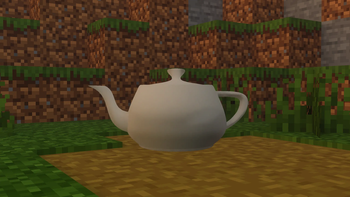
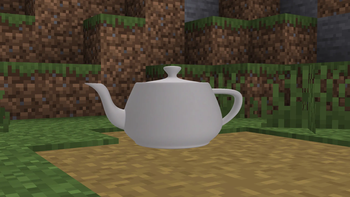
About this Mod
Everything is subject to change.
Polymesh is a NeoForge 1.20.1 library for mods that want to use real glTF 2.0 models in Minecraft.
Instead of converting everything into Minecraft cubes or a custom model format, Polymesh loads .gltf and .glb assets from your mod resources and renders them at runtime. It is built for high-detail items, animated models, Blender-made assets, and future gameplay systems that need access to model bones, morph targets, and metadata.
What It Does
- Loads glTF 2.0
.gltfand.glbfiles from mod assets. - Renders static item models through shared GPU buffers.
- Renders animated/skinned item models with persistent GPU buffers.
- Supports glTF node hierarchy, transforms, skins, inverse bind matrices, and animations.
- Supports morph targets/shape keys, including named morph targets exported by Blender.
- Preserves glTF normals and generates missing normals when needed.
- Preserves tangents and generates fallback tangents when UVs are available.
- Loads embedded
.glbtextures and relative.gltfimage files. - Exposes runtime model data for gameplay code: nodes, bones, posed transforms, morph weights, and glTF
extras.
Who It Is For
Polymesh is mainly for mod developers.
Use it if it suits you.
- Blender-authored models in Minecraft.
- Better mesh support than cube-only formats.
- Animated glTF items or entities.
- Runtime bone access for attachments, effects, hitboxes, or gameplay logic.
- A library that can grow into a full rendering and model-runtime layer.
Players only need to install Polymesh when another mod depends on it.
Current Status
Polymesh already supports static glTF item rendering, animated/skinned item rendering, model metadata, morph targets, and resource reload cleanup.
Entity and block renderer helpers are included, but they currently use the compatibility CPU path. Full GPU-backed entity rendering, physics, collision, and advanced gameplay integration are planned future work.
Test Mods
Demo jars for testing:
- The Utah Teapot: static glTF rendering test.
CesiumMan: animated skinned glTF rendering test.(UNAVAILABLE)
These are proof/demo mods, not required for normal gameplay unless you want to test Polymesh directly.
Notes
Polymesh keeps glTF-authored normals intact, but shader packs may still need their own support for custom mesh lighting. The library does not promise shader-pack-specific smooth-normal fixes.
Target version: NeoForge/Forge 1.20.1.
License: LGPL-3.0-or-later.
Available Versions
How to Install Polymesh on Your Server
Order Server
Order a Minecraft Java server with at least 3 GB RAM (4 GB recommended).
Set neoforge Loader
In the panel under "Egg", select the neoforge loader and matching Minecraft version (1.20.1).
Install Mod
Open the mod browser in the dashboard and search for "Polymesh". Click "Install" – done! Alternatively, upload the .jar via SFTP to the /mods folder.
Compatibility
Mod Loaders
Minecraft Versions
1.20.1
Server-side
✗ UnsupportedRecommended RAM
4 GB(min. 3 GB)Frequently Asked Questions
Polymesh server crashes on startup – what to do?
Most common cause: wrong neoforge version or insufficient RAM. Check the server log (latest.log) for "OutOfMemoryError" or "Mixin" errors. With Mado Hosting: ensure at least 3 GB RAM is allocated and the loader matches the mod version (1.20.1). You can switch loaders with one click in the panel.
Is Polymesh compatible with neoforge?
Polymesh officially supports neoforge for Minecraft 1.20.1. The Mado dashboard automatically detects incompatible loader combinations.
Server lagging with Polymesh – how to optimize performance?
Recommended RAM: 4 GB (per 8 players). Use /spark profiler to check if Polymesh consumes the most tick time. Common fixes: reduce server view-distance to 8-10, install "performant" or "starlight" as supplementary mods on Forge. With Mado Hosting, your server runs on NVMe SSDs with dedicated CPU cores for minimal latency.
Similar Mods



Rent Modded Server
Install Polymesh with just one click on your server.