
Pomelo's Shop
A feature-rich in-game shop mod for minecraft, allowing players to buy and sell items through a graphical interface with a built-in currency system.
Screenshots
About this Mod
A feature-rich in-game shop mod for minecraft, allowing players to buy and sell items through a graphical interface with a built-in currency system!!!
Features
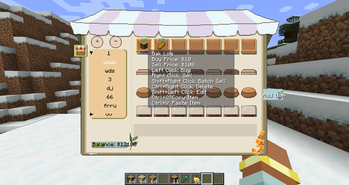
- Graphical Shop Interface — Browse items across categories with an intuitive GUI.
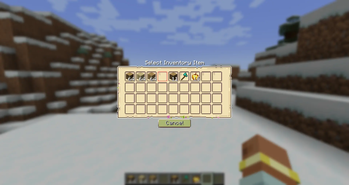
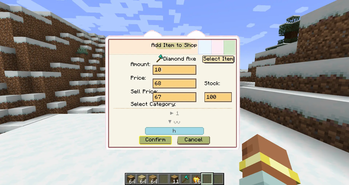
- Player Trading — Players can list their own items for sale and set both buy,sell prices, quantity, and inventory for buying and selling goods. All changes sync to all online players.
- Currency System — Built-in per-player money, stored persistently.
- Key Binding — Quick shop access with the "N" key, customizable in controls settings.
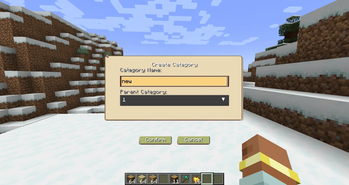
- Category Management — Create, delete, and manage shop categories, right-click to edit category name,parent-child category hierarchy support.
- Item Banning — Admins can ban specific items from being listed
- Configurable Permissions — Toggle which actions require admin privileges
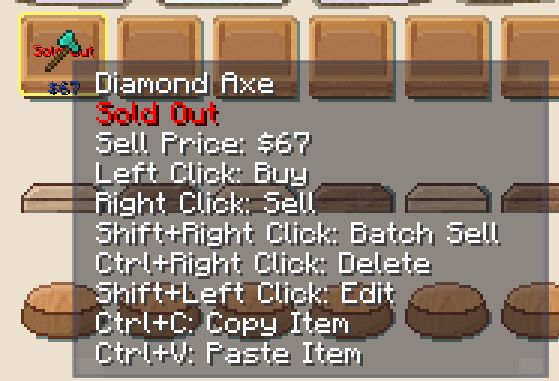
- Item Copy & Paste — Copy item info with Ctrl+C while hovering,paste item to current category with Ctrl+V or pasted items added at the end of category.Copies all item properties: item, prices, stock.
- Bilingual Support — Full Chinese and English translationuts
- Auto-Save — Automatic data persistence every 5 seconds, shop data saved to world directory.Reliable data recovery on server restart.
- Item Display — Price display overlay on items (buy/sell prices).
- Shop Data Import/Export — Export /shop export Import /shop import . Exported files are saved in /shop exports/.json.
- Category Sorting and Edit — Move Up /shop category moveup . Move Down /shop category movedown .Right mouse button to edit name.
Hotkey
| Hotkey | Description |
|---|---|
| Default: N | Open shop (configurable in Controls settings) |
Player Commands
| Command | Description | Example |
|---|---|---|
| /shop(This command does not exist in the 1.20.1 Forge version. Please press N.) | Open shop interface | /shop |
| /shop balance | Check current balance | /shop balance |
| /shop sell <price> [amount] | List item in hand for sale | /shop sell 100 or /shop sell 100 64 |
| /shop category create <ID> <name> | Create a new category | /shop category create blocks Blocks |
| /shop category list | List all categories | /shop category list |
Admin Commands (Requires Permission Level 2)
| Command | Description | Example |
|---|---|---|
| /shop add <player> <amount> | Add money to player's balance | /shop add Steve 1000 |
| /shop set <player> <amount> | Set player's balance | /shop set Steve 5000 |
| /shop reload | Reload shop data | /shop reload |
| /shop clear | Clear all shop items | /shop clear |
| /shop category moveup <category_name> | Move category up in order | /shop category moveup Blocks |
| /shop category movedown <category_name> | Move category down in order | /shop category movedown Blocks |
| /shop category setparent <child> <parent> | Set category's parent category | /shop category setparent "ChildName" ParentName |
| /shop category setparent <child> none | Remove category's parent | /shop category setparent "ChildName" none |
| /shop ban <item_id> | Ban an item from being listed | /shop ban minecraft:bedrock |
| /shop unban <item_id> | Unban a previously banned item | /shop unban minecraft:bedrock |
| /shop banlist | View list of banned items | /shop banlist |
| /shop export <filename> | Export shop data to JSON | /shop export shop_backup |
| /shop import <filename> | Import shop data from JSON | /shop import shop_backup |
Shop Interface Controls
| Action | Description |
|---|---|
| Left Click Item | Buy item(cannot buy if stock is 0) |
| Right Click Item | Sell 1 item(stock +1 after selling) |
| Shift + Right Click Item | Batch sell (sell all of that item in inventory,(stock +1 after selling) |
| Ctrl + Right Click Item | Delete your own listing |
| Shift + Left Click Item | Edit your own listing (amount, price, category, stock) |
| Ctrl + C (hover on item) | Copy item |
| Ctrl + V | Paste item to current category (added at the end) |
Available Versions
How to Install Pomelo's Shop on Your Server
Order Server
Order a Minecraft Java server with at least 3 GB RAM (4 GB recommended).
Set forge Loader
In the panel under "Egg", select the forge loader and matching Minecraft version (1.21.1).
Install Mod
Open the mod browser in the dashboard and search for "Pomelo's Shop". Click "Install" – done! Alternatively, upload the .jar via SFTP to the /mods folder.
Compatibility
Mod Loaders
Minecraft Versions
1.21.1, 1.20.1
Server-side
✓ RequiredRecommended RAM
4 GB(min. 3 GB)Frequently Asked Questions
Pomelo's Shop server crashes on startup – what to do?
Most common cause: wrong forge version or insufficient RAM. Check the server log (latest.log) for "OutOfMemoryError" or "Mixin" errors. With Mado Hosting: ensure at least 3 GB RAM is allocated and the loader matches the mod version (1.21.1). You can switch loaders with one click in the panel.
Is Pomelo's Shop compatible with forge and neoforge?
Pomelo's Shop officially supports forge, neoforge for Minecraft 1.21.1, 1.20.1. The Mado dashboard automatically detects incompatible loader combinations.
Server lagging with Pomelo's Shop – how to optimize performance?
Recommended RAM: 4 GB (per 8 players). Use /spark profiler to check if Pomelo's Shop consumes the most tick time. Common fixes: reduce server view-distance to 8-10, install "performant" or "starlight" as supplementary mods on Forge. With Mado Hosting, your server runs on NVMe SSDs with dedicated CPU cores for minimal latency.
Rent Modded Server
Install Pomelo's Shop with just one click on your server.