
Pookie Mod
Don't hurt your pookies! (anti friendly fire mod)
Screenshots
About this Mod
Pookie Mod
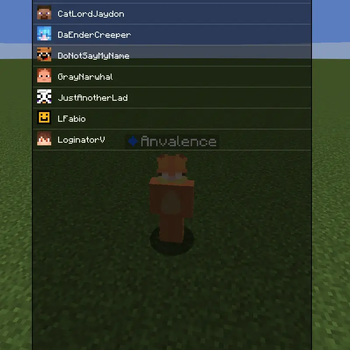
A lightweight anti friendly fire mod for PvP and anarchy. Mark players as pookies and it stops you from accidentally hitting them in combat.
What it does
Swinging a weapon at a pookie cancels the attack before it leaves your client. Bare hands, blocks, pearls, snowballs, and food still work, so boosting is fine. It also protects their pets (wolves, cats, horses, llamas) by owner UUID, with its own toggle. The pookie list is global across every server and singleplayer world.
Adding pookies
Three ways: look at someone and press the keybind (default semicolon) to toggle, type /pookie add NAME (tab-completes online players, falls back to a Mojang lookup for offline ones), or use the GUI via /pookie gui or Mod Menu.
The keybind has an optional hold-to-confirm timer. While holding, the target glows in your chosen color (depth-aware, won't shine through walls), with a sound and flash on commit. A second keybind opens the GUI, unbound by default.
Commands
/pookie add NAME- add a pookie/pookie remove NAME- remove a pookie/pookie list- chat list with heads, click to remove/pookie clear- remove all (click to confirm)/pookie clear online- remove only pookies on the current server/pookie gui- open the screen/pookie help- list commands
What counts as a weapon
Any item with an attack damage value is blocked against pookies. In 1.21.11 that means swords, axes, tridents, maces, hoes, and also pickaxes and shovels since vanilla gives them attack damage too. Modded weapons get blocked automatically with no item list needed. To hit a pookie on purpose, switch to bare hands or a non-weapon item, or toggle the mod off.
Settings
Master toggle, pet protection, clear confirmations, look-at tolerance, hold-to-add and hold-to-remove timers and colors, flash duration, and last-seen cache window (default one week).
Notes
Client-only, so the server never knows it exists. It only blocks your own attacks, not other players hitting your pookies. No projectile blocking, crystal protection, nametag coloring, waypoints, or alerts.
Requirements
Minecraft 1.21.11, Fabric Loader, Fabric API, Java 21+
Keywords: anti friendly fire, friends list, PvP, anarchy, teammate protection, pet protection, client-side Fabric mod.
Available Versions
How to Install Pookie Mod on Your Server
Order Server
Order a Minecraft Java server with at least 3 GB RAM (4 GB recommended).
Set fabric Loader
In the panel under "Egg", select the fabric loader and matching Minecraft version (1.21.11).
Install Mod
Open the mod browser in the dashboard and search for "Pookie Mod". Click "Install" – done! Alternatively, upload the .jar via SFTP to the /mods folder.
Compatibility
Mod Loaders
Minecraft Versions
1.21.11
Server-side
✗ UnsupportedRecommended RAM
4 GB(min. 3 GB)Frequently Asked Questions
Pookie Mod server crashes on startup – what to do?
Most common cause: wrong fabric version or insufficient RAM. Check the server log (latest.log) for "OutOfMemoryError" or "Mixin" errors. With Mado Hosting: ensure at least 3 GB RAM is allocated and the loader matches the mod version (1.21.11). You can switch loaders with one click in the panel.
Is Pookie Mod compatible with fabric?
Pookie Mod officially supports fabric for Minecraft 1.21.11. The Mado dashboard automatically detects incompatible loader combinations.
Server lagging with Pookie Mod – how to optimize performance?
Recommended RAM: 4 GB (per 8 players). Use /spark profiler to check if Pookie Mod consumes the most tick time. Common fixes: reduce server view-distance to 8-10, install "performant" or "starlight" as supplementary mods on Forge. With Mado Hosting, your server runs on NVMe SSDs with dedicated CPU cores for minimal latency.
Rent Modded Server
Install Pookie Mod with just one click on your server.