
Port-a-Chest
A mod that adds vanilla-friendly backpacks.
Screenshots
About this Mod
A mod that adds vanilla-friendly backpacks.
If you'd like to support the development of this mod, please consider donating on Ko-fi!
Portable Chests
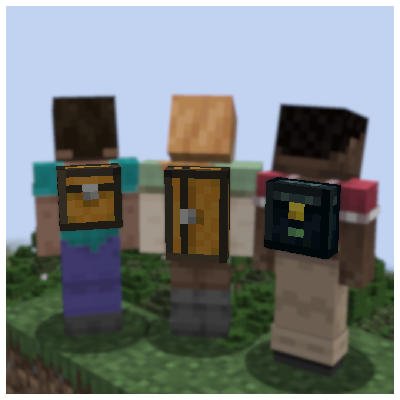
With Port-a-Chest you can craft Portable Chests, Portable Large Chests, and Portable Ender Chests that you can wear in your chest slot or in your back trinket slot.
To open an equipped Portable Chest, press your assigned keybinding (B by default).
To open a held Portable Chest instead, right click while crouching.
If you have multiple Portable Chests, priority defaults to the one in your chest slot, followed by your back trinket slot, main hand, and off hand. You can configure the priority order through the mod's settings in Mod Menu.
While hovering over a Portable Chest, hold Left Shift to preview its contents.
Note:
When used with Variant Vanilla Blocks, Port-a-Chest adds Portable Chests and Portable Large Chests for all vanilla wood types, plus a resource pack to replace the default versions with oak variants.
Recipes
Portable Chests can be crafted with two leads and one chest.
Portable Large Chests can be crafted by adding one more chest above or below the first one.
Alternatively, you can extend a Portable Chest into a Portable Large Chest without losing any items.
For developers
Feel free to make your own mods and resource packs to add or modify Portable Chests.
Port-a-Chest is available under the MIT license.
For modpack creators
You are free to include Port-a-Chest in any modpack, as long as you don't modify the contact information found in the fabric.mod.json file, and all downloads are hosted on Modrinth. Thank you for considering my mod for your modpack!
Available Versions
How to Install Port-a-Chest on Your Server
Order Server
Order a Minecraft Java server with at least 3 GB RAM (4 GB recommended).
Set fabric Loader
In the panel under "Egg", select the fabric loader and matching Minecraft version (1.20.1).
Install Mod
Open the mod browser in the dashboard and search for "Port-a-Chest". Click "Install" – done! Alternatively, upload the .jar via SFTP to the /mods folder.
Compatibility
Mod Loaders
Minecraft Versions
1.20.1
Server-side
✓ RequiredRecommended RAM
4 GB(min. 3 GB)Frequently Asked Questions
Port-a-Chest server crashes on startup – what to do?
Most common cause: wrong fabric version or insufficient RAM. Check the server log (latest.log) for "OutOfMemoryError" or "Mixin" errors. With Mado Hosting: ensure at least 3 GB RAM is allocated and the loader matches the mod version (1.20.1). You can switch loaders with one click in the panel.
Is Port-a-Chest compatible with fabric?
Port-a-Chest officially supports fabric for Minecraft 1.20.1. The Mado dashboard automatically detects incompatible loader combinations.
Server lagging with Port-a-Chest – how to optimize performance?
Recommended RAM: 4 GB (per 8 players). Use /spark profiler to check if Port-a-Chest consumes the most tick time. Common fixes: reduce server view-distance to 8-10, install "performant" or "starlight" as supplementary mods on Forge. With Mado Hosting, your server runs on NVMe SSDs with dedicated CPU cores for minimal latency.
Similar Mods




Rent Modded Server
Install Port-a-Chest with just one click on your server.