
PortalFriends | Портал Друзей
Integrates a full-fledged social network directly into Minecraft. Find friends, communicate and build your team regardless of whether you're playing on good old 1.7.10 or exploring the current 1.21.1.
Screenshots
About this Mod
Russian:
🌐 Глобальная социальная сеть в Minecraft. Играете на разных версиях? Предпочитаете разные загрузчики? PortalFriends стирает границы! ✨ Это мод, который интегрирует полноценную социальную сеть прямо в Minecraft. Находите друзей, общайтесь и собирайте команду 👥 независимо от того, играете ли вы на старой доброй 1.7.10 или исследуете актуальную 1.21.1.
📦 Добавлять в мод-паки можно и нужно! )))
🌟 Возможности
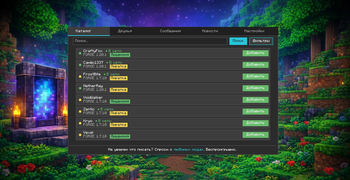
🔍 Каталог и поиск. Обширный каталог, который объединяет всех игроков. Ищите игроков по конкретной версии игры, типу загрузчика (Forge, Fabric, NeoForge) или даже по определённому модпаку.
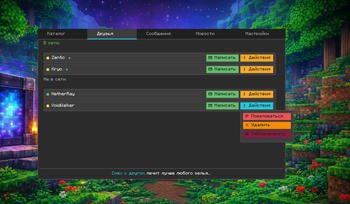
👫 Список друзей. Ваши друзья всегда на виду. Даже если ваш товарищ сидит с Fabric на 1.21.1, а вы играете с Forge на 1.12.2, вы будете видеть друг друга в онлайне и сможете общаться.
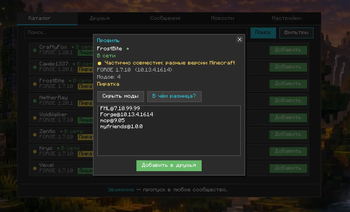
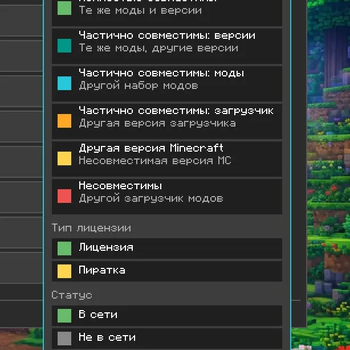
🎯 Индикатор совместимости. При просмотре профиля игрока сразу понятно, сможете ли вы сыграть вместе прямо сейчас:
🟢 Зелёный: Сборки полностью идентичны — можно смело идти на один сервер.
🟡 Жёлтый: Версии игры совпадают, но список модов немного отличается.
🔴 Красный: Совместная игра пока невозможна (разные версии игры или загрузчики).
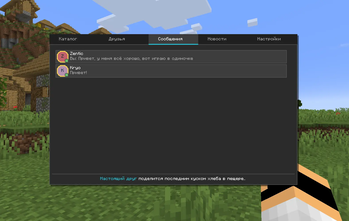
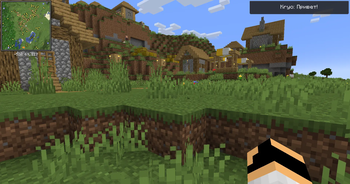
💬 Мессенджер. Удобный внутриигровой чат, который открывается прямо в мире по нажатию одной горячей клавиши Ё/~ ⌨️.
🚀 Любой лаунчер. PortalFriends работает на ВСЕХ лаунчерах. Все игроки находятся в едином пространстве.
👀 Не забудьте заглянуть в галерею со скриншотами мода! 🖼️
⚡ Установка
1️⃣ После установки .jar запускайте игру
2️⃣ Нажмите на кнопку «Портал Друзей» 🌀 в главном меню
3️⃣ При первом запуске ознакомьтесь с правилами модерации 📜 и укажите тип вашего аккаунта
4️⃣ Мод работает в фоновом режиме и не требует регистрации! 🎉
✅ Готово! Вы в сети.
🔧 Версии
🛠️ Forge: 1.7.10 · 1.12.2 · 1.16.5 · 1.20.1 · 1.21.1
🧵 Fabric: 1.16.5 · 1.18.2 · 1.19.2 · 1.20.1 · 1.21.1
🌿 NeoForge: 1.20.1 · 1.20.4 · 1.20.6
🔗 ВСЕ эти версии синхронизированы между собой! Один единый Портал для всех!
⚠️ Важно: PortalFriends — это социальный мод-мессенджер. Он не является голосовым чатом, программой для хостинга серверов или платным софтом.
Приватность и данные — можете почитать до установки
PortalFriends — бесплатный мод-мессенджер без регистрации по email и телефону: вместо этого мы привязываем профиль к устройству. Мы честно расписали, что именно это значит и что уходит с вашего компьютера (спойлер: ни сырых серийников, ни MAC-адреса, ни контактов, ни сторонних трекеров). Перед загрузкой можно прочитать полную Политику конфиденциальности на GitHub:
Русский: https://github.com/Disarray-pixel/myfriends-config/blob/main/PRIVACY_RU.md
Этот же документ показывается внутри мода при первом запуске, с отдельной галочкой «Принимаю» — без неё пользоваться модом нельзя. Ссылки выше — чтобы можно было ознакомиться заранее. ⚠️
English:
🌐 A global social network in Minecraft. Playing on different versions? Prefer different mod loaders? PortalFriends erases the boundaries! ✨ This mod integrates a full-fledged social network directly into Minecraft. Find friends, chat, and team up 👥 regardless of whether you are playing on the good old 1.7.10 or exploring the latest 1.21.1.
📦 Modpacks may include this mod freely!
🌟 Features
🔍 Catalog & Search. An extensive directory that unites all players. Search for players by specific game version, loader type (Forge, Fabric, NeoForge), or even by a specific modpack.
👫 Friends list. Your friends are always visible. Even if your buddy is using Fabric on 1.21.1 and you are playing with Forge on 1.12.2, you will see each other online and be able to chat.
🎯 Compatibility indicator. When viewing a player's profile, you can instantly see if you can play together right now:
🟢 Green: Modpacks are completely identical — you are good to join the same server.
🟡 Yellow: Game versions match, but the mod lists differ slightly.
🔴 Red: Co-op play is currently impossible (different game versions or loaders).
💬 Messenger. A convenient in-game chat that can be opened right in the world by pressing a single hotkey (~ / Tilde) ⌨️.
🚀 Any launcher. PortalFriends works on ALL launchers. All players share a single, unified space.
⚡ Installation
1️⃣ After installing the .jar file, launch the game.
2️⃣ Click the PortalFriends 🌀 button in the main menu.
3️⃣ On the first launch, read the moderation rules 📜 and specify your account type.
4️⃣ The mod runs in the background and requires no registration! 🎉
✅ Done! You are online.
🔧 Versions
🛠️ Forge: 1.7.10 · 1.12.2 · 1.16.5 · 1.20.1 · 1.21.1
🧵 Fabric: 1.16.5 · 1.18.2 · 1.19.2 · 1.20.1 · 1.21.1
🌿 NeoForge: 1.20.1 · 1.20.4 · 1.20.6
🔗 ALL these versions are synchronized with each other! One unified Portal for everyone!
⚠️ Important: PortalFriends is a social messenger mod. It is not a voice chat, server hosting software, or paid software.
Privacy & data — you can read it before installing
PortalFriends is a free chat mod with no email or phone sign-up: we anchor your profile to your device instead. We've been upfront about what exactly that means and what leaves your computer (spoiler: no raw serials, no MAC address, no contacts, no third-party trackers). Before you download, you can read the full Privacy Policy on GitHub:
English: https://github.com/Disarray-pixel/myfriends-config/blob/main/PRIVACY_EN.md
The same document is shown inside the mod on first launch, with a separate "I accept" checkbox — you cannot use the mod without it. The links above are there so you can read through it ahead of time. ⚠️
Available Versions
How to Install PortalFriends | Портал Друзей on Your Server
Order Server
Order a Minecraft Java server with at least 3 GB RAM (4 GB recommended).
Set fabric Loader
In the panel under "Egg", select the fabric loader and matching Minecraft version (1.21.1).
Install Mod
Open the mod browser in the dashboard and search for "PortalFriends | Портал Друзей". Click "Install" – done! Alternatively, upload the .jar via SFTP to the /mods folder.
Compatibility
Mod Loaders
Minecraft Versions
1.21.1, 1.20.6, 1.20.4 (+6 more)
Server-side
✗ UnsupportedRecommended RAM
4 GB(min. 3 GB)Frequently Asked Questions
PortalFriends | Портал Друзей server crashes on startup – what to do?
Most common cause: wrong fabric version or insufficient RAM. Check the server log (latest.log) for "OutOfMemoryError" or "Mixin" errors. With Mado Hosting: ensure at least 3 GB RAM is allocated and the loader matches the mod version (1.21.1). You can switch loaders with one click in the panel.
Is PortalFriends | Портал Друзей compatible with fabric and forge and neoforge?
PortalFriends | Портал Друзей officially supports fabric, forge, neoforge for Minecraft 1.21.1, 1.20.6, 1.20.4. Note: Forge and Fabric mods are NOT cross-compatible – pick one loader and stick with it. The Mado dashboard automatically detects incompatible loader combinations.
Server lagging with PortalFriends | Портал Друзей – how to optimize performance?
Recommended RAM: 4 GB (per 8 players). Use /spark profiler to check if PortalFriends | Портал Друзей consumes the most tick time. Common fixes: reduce server view-distance to 8-10, install "performant" or "starlight" as supplementary mods on Forge. With Mado Hosting, your server runs on NVMe SSDs with dedicated CPU cores for minimal latency.
Similar Mods





Rent Modded Server
Install PortalFriends | Портал Друзей with just one click on your server.