
PortalPeek
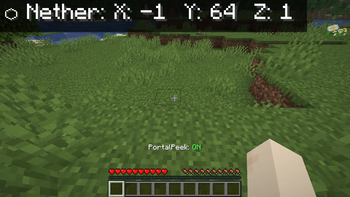
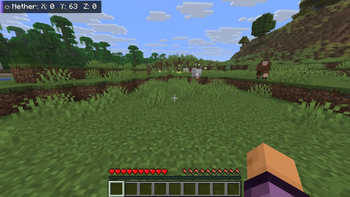
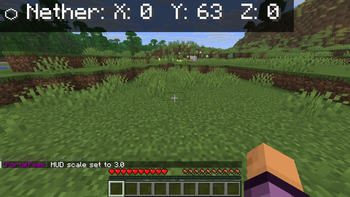
Automatically shows Nether/Overworld coordinate conversions on your HUD. Never do portal math again.
Screenshots
About this Mod
PortalPeek
PortalPeek is a lightweight, client-side Minecraft mod that takes the math out of Nether portal linking. It renders a clean HUD overlay showing your corresponding coordinates in the opposite dimension — so your portal links are always perfectly aligned.
Since it is entirely client-side, you can use it on any multiplayer server, realm, or singleplayer world without requiring any server-side installation.
Features
- Instant Coordinate Conversion — Displays your converted Nether coordinates when in the Overworld (divided by 8), and your converted Overworld coordinates when in the Nether (multiplied by 8).
- Clean HUD Overlay — Semi-transparent background with drop shadows for high contrast, readable on any texture pack or background.
- Proximity Mode — Only shows the HUD when you are within 5 blocks of a Nether Portal, keeping your screen clutter-free.
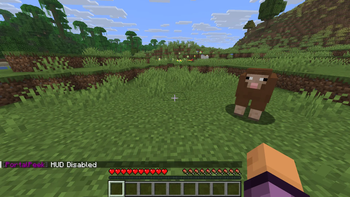
- Quick-Toggle Hotkey — Press H (rebindable in Controls) to instantly toggle the HUD overlay.
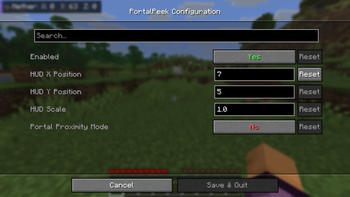
- In-Game Configuration — Full Cloth Config and ModMenu integration. Adjust HUD scale, position, and toggle settings without leaving the game.
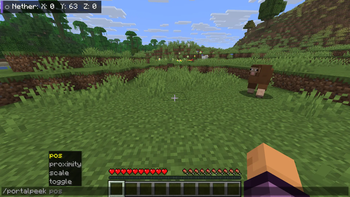
- Command Support — Full slash and dot-command support for flexibility on any server.
Commands
| Command | Description |
|---|---|
/portalpeek toggle |
Toggle the HUD on or off |
/portalpeek proximity [true/false] |
Toggle proximity mode |
/portalpeek pos <x> <y> |
Set custom HUD position |
/portalpeek scale <value> |
Set HUD scale (0.2 to 5.0) |
Dot-prefix support is also available — type .portalpeek toggle in chat to run commands client-side without sending anything to the server chat.
Requirements
| Platform | Fabric Loader 0.19.3+ |
| Side | Client-side only |
| Java | Java 21+ |
| Required | Fabric API, Cloth Config API |
| Recommended | ModMenu — required for the in-game settings screen. The mod may behave unexpectedly without it. |
Client-side only — works on any server.
My Other Mods
- AutoEater — Automatically eats food when your hunger drops. No more dying to starvation.
- AFK Fishing — Automatically reels in and recasts your fishing rod. Cast once and walk away.
Available Versions
How to Install PortalPeek on Your Server
Order Server
Order a Minecraft Java server with at least 3 GB RAM (4 GB recommended).
Set fabric Loader
In the panel under "Egg", select the fabric loader and matching Minecraft version (26.1.2).
Install Mod
Open the mod browser in the dashboard and search for "PortalPeek". Click "Install" – done! Alternatively, upload the .jar via SFTP to the /mods folder.
Compatibility
Mod Loaders
Minecraft Versions
26.1.2, 26.1.1, 26.1 (+12 more)
Server-side
✗ UnsupportedRecommended RAM
4 GB(min. 3 GB)Frequently Asked Questions
PortalPeek server crashes on startup – what to do?
Most common cause: wrong fabric version or insufficient RAM. Check the server log (latest.log) for "OutOfMemoryError" or "Mixin" errors. With Mado Hosting: ensure at least 3 GB RAM is allocated and the loader matches the mod version (26.1.2). You can switch loaders with one click in the panel.
Is PortalPeek compatible with fabric?
PortalPeek officially supports fabric for Minecraft 26.1.2, 26.1.1, 26.1. The Mado dashboard automatically detects incompatible loader combinations.
Server lagging with PortalPeek – how to optimize performance?
Recommended RAM: 4 GB (per 8 players). Use /spark profiler to check if PortalPeek consumes the most tick time. Common fixes: reduce server view-distance to 8-10, install "performant" or "starlight" as supplementary mods on Forge. With Mado Hosting, your server runs on NVMe SSDs with dedicated CPU cores for minimal latency.
Similar Mods




Rent Modded Server
Install PortalPeek with just one click on your server.