PotatoRender
a mod that achieves higher fps by taking visual drawbacks
Screenshots
About this Mod
PotatoRender
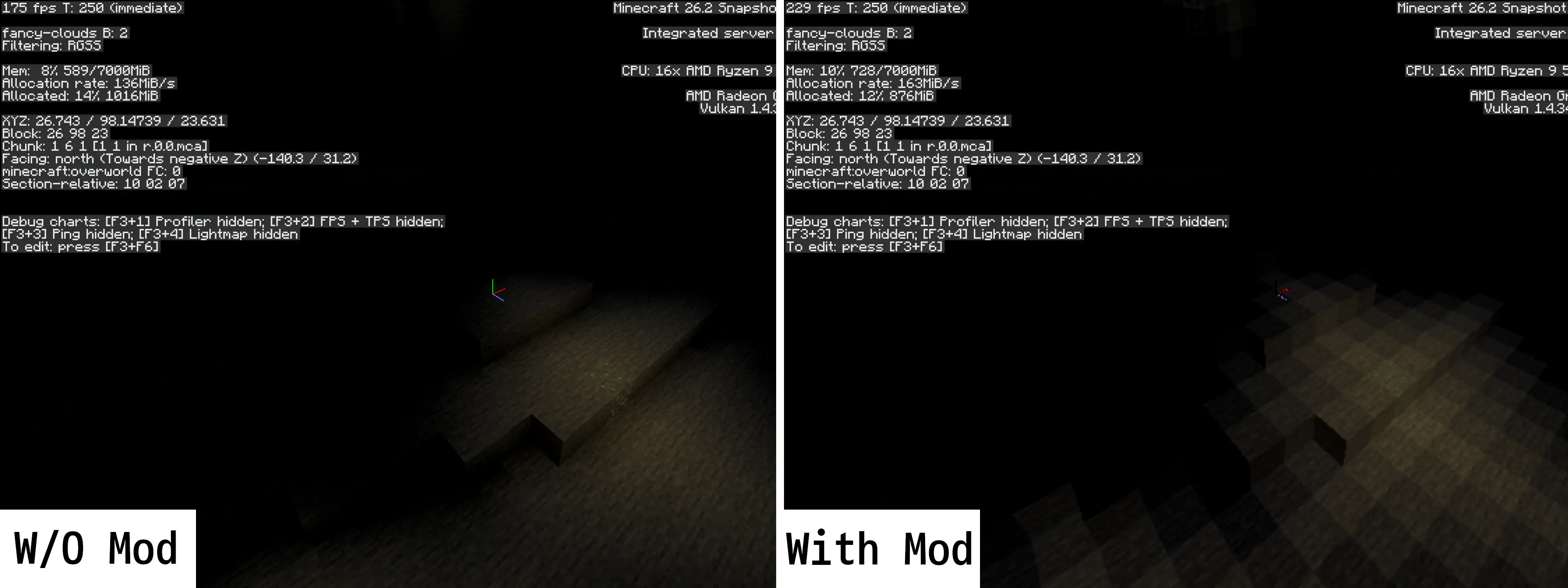
A mod that removes Ambient Occlusion and adds rendering resolution adjustment feature.
this can achieve higher FPS with significant visual tradeoffs.
Supports both OpenGL and Vulkan renderer.
DISCLAIMER
PotatoRender might not improve your rendering performance significantly. Performance difference might vary on hardwares and drivers, OS, etc. PotatoRender does not optimize graphic pipeline nor removes bottleneck. It just cuts some corners. It is mainly developed for experimental purposes and fun, not actual problem solving. In test setup with Ryzen 5900HX integrated graphics laptop, the performance only improved to 230FPS from 190FPS.
Requirements
- Minecraft 26.2 or later (see mod's release notes)
- Fabric Loader
- Fabric API
Mod configuration example
{
  // sets rendering resolution scaling. setting this as 0.5 in 1080p window should set rendering to 540p.
  "scale": 0.25,

  // disables Ambient Occlusion if set true. true is faster and looks unappealing.
  "disableAO": true,

  // Use linear filtering when upscaling (true) or nearest-neighbor (false). false is faster and looks unappealing.
  "linearFilter": true
}
Recommended Graphics Settings
VSync: OFF (IMPORTANT!)
VSync typically increases latency too much.
Preset: Fast
'Fast' graphics preset should set most of the features to potato-friendly value.
Mipmap: OFF
Mipmap increases frame time with distant object visual improvements. While the 'Fast' graphics preset will lower Mipmap level to 2x, it is better to turn it off entirely.
Texture Filtering: OFF
'Fast' graphics preset should shut this off, but double check it is turned off.
FPS Limit: depends
Double your display refresh rate on <=120Hz monitor, Unlimited on >120Hz monitor. Setting it so will keep lowest 1% FPS above your monitor's refresh rate.
Recommended mods
- C2ME: Concurrently builds up the chunks.
- Ksyxis: Removes 'Spawn Chunks' feature.
- fast noise: Speeds up perlin noise function used by world generation
Porting
i will not port this onto neoforge, forge, older versions, whatever.
Source
some sources are from RenderScale mod. affected files are marked with comments in source code.
Available Versions
How to Install PotatoRender on Your Server
Order Server
Order a Minecraft Java server with at least 3 GB RAM (4 GB recommended).
Set fabric Loader
In the panel under "Egg", select the fabric loader and matching Minecraft version (26.2).
Install Mod
Open the mod browser in the dashboard and search for "PotatoRender". Click "Install" – done! Alternatively, upload the .jar via SFTP to the /mods folder.
Compatibility
Mod Loaders
Minecraft Versions
26.2, 26.2-rc-2, 26.2-rc-1 (+9 more)
Server-side
✗ UnsupportedRecommended RAM
4 GB(min. 3 GB)Frequently Asked Questions
PotatoRender server crashes on startup – what to do?
Most common cause: wrong fabric version or insufficient RAM. Check the server log (latest.log) for "OutOfMemoryError" or "Mixin" errors. With Mado Hosting: ensure at least 3 GB RAM is allocated and the loader matches the mod version (26.2). You can switch loaders with one click in the panel.
Is PotatoRender compatible with fabric?
PotatoRender officially supports fabric for Minecraft 26.2, 26.2-rc-2, 26.2-rc-1. The Mado dashboard automatically detects incompatible loader combinations.
Server lagging with PotatoRender – how to optimize performance?
Recommended RAM: 4 GB (per 8 players). Use /spark profiler to check if PotatoRender consumes the most tick time. Common fixes: reduce server view-distance to 8-10, install "performant" or "starlight" as supplementary mods on Forge. With Mado Hosting, your server runs on NVMe SSDs with dedicated CPU cores for minimal latency.
Similar Mods





Rent Modded Server
Install PotatoRender with just one click on your server.