
PotionHud
A potionHud Mod Made for steamDecks. Works on pc aswell
Screenshots
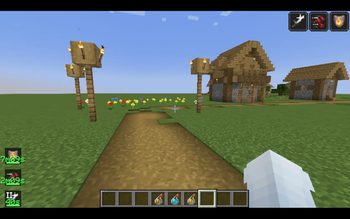
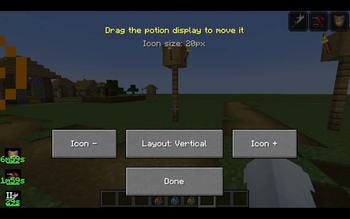
About this Mod
PotionTimer overlays countdown timers and progress bars directly on your potion effect icons — always know exactly when to repot, no guessing.
Features
- Vanilla potion sprites — every effect is instantly recognisable
- Countdown timer per effect — green when safe, yellow when fading, red when almost gone (thresholds configurable)
- Draining progress bar at the bottom of each icon
- Two icon styles: Default (colored panel matching potion color) and Transparent (minimal, just the icon)
- Roman numeral level indicator for amplified effects (Speed II, Strength III etc)
- Infinite effect support — shows ∞ instead of a timer
- Hide the vanilla top-right effect list so only PotionTimer shows
- Horizontal or vertical layout
- Icon size, padding, scale, background opacity — all adjustable
- Position saves automatically on drag release
Controls
,— open config screen.— open drag/move screen- Both configurable in Options → Controls under PotionTimer
Requirements
- Fabric Loader 0.16+
- Fabric API
- Minecraft 1.21
Designed with Steam Deck in mind — large touch-friendly icons and buttons, drag-to-move works with touch input.
Available Versions
How to Install PotionHud on Your Server
Order Server
Order a Minecraft Java server with at least 3 GB RAM (4 GB recommended).
Set fabric Loader
In the panel under "Egg", select the fabric loader and matching Minecraft version (1.21).
Install Mod
Open the mod browser in the dashboard and search for "PotionHud". Click "Install" – done! Alternatively, upload the .jar via SFTP to the /mods folder.
Compatibility
Mod Loaders
Minecraft Versions
1.21
Server-side
✗ UnsupportedRecommended RAM
4 GB(min. 3 GB)Frequently Asked Questions
PotionHud server crashes on startup – what to do?
Most common cause: wrong fabric version or insufficient RAM. Check the server log (latest.log) for "OutOfMemoryError" or "Mixin" errors. With Mado Hosting: ensure at least 3 GB RAM is allocated and the loader matches the mod version (1.21). You can switch loaders with one click in the panel.
Is PotionHud compatible with fabric?
PotionHud officially supports fabric for Minecraft 1.21. The Mado dashboard automatically detects incompatible loader combinations.
Server lagging with PotionHud – how to optimize performance?
Recommended RAM: 4 GB (per 8 players). Use /spark profiler to check if PotionHud consumes the most tick time. Common fixes: reduce server view-distance to 8-10, install "performant" or "starlight" as supplementary mods on Forge. With Mado Hosting, your server runs on NVMe SSDs with dedicated CPU cores for minimal latency.
Similar Mods




![[TaCZ] Timeless and Classics Zero](https://cdn.modrinth.com/data/SzzJttH8/fd27766d2bb8390d284696b1dbd358f87e081439_96.webp)

Rent Modded Server
Install PotionHud with just one click on your server.