
Potion Mod
PotionMod adds new potions to minecraft using vanilla effects.
Screenshots
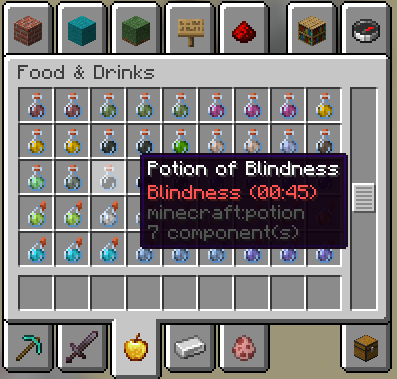
About this Mod
Potion Mod

PotionMod is a Fabric mod for Minecraft that adds new potions using vanilla effects.
Support for versions <1.20?
Support for versions below 1.20 will likely not be released.
Features [EN]
Realized potions:
- Blindness potion
- Darkness potion
- Mining Fatigue potion
- Luck potion
- Unluck potion
- Haste potion
- Hero of Village potion
Also added custom recipes for each potion.
Recipes
Flint + Awkward Potion -> Blindness Potion
Crying Obsidian + Awkward Potion -> Mining Fatigue potion
Sculk Shrieker + Awkward Potion -> Darkness Potion
Obsidian + Awkward Potion -> Haste Potion
Blue Orchid + Thick Potion -> Luck Potion
Wither Rose + Thick Potion -> Unluck Potion
Totem of Undying + Thick Potion -> Hero of Village Potion
Languages
English
Russian
Installation
Install Fabric:
- Download and install the Fabric Installer.
- Run the installer and select your current version of Minecraft.
Install Fabric API:
- Download the latest version of Fabric API for your Minecraft version and place it in your Minecraft mods folder.
Download PotionMod:
- Download the latest release of PotionMod from the Modrinth.
- Place the downloaded .jar file into your Minecraft mods folder.
License
This project is licensed under the MIT License - see the LICENSE file for details.
You can view the entire source code on my GitHub
Developer: Fantikk (Fantoooc)
Support
For support or issues, please open an issue on the GitHub Issues page.
Поддержка версий <1.20?
Добавление поддержки для версий ниже 1.20 не планируется.
Функции [RU]
Добавляемые зелья:
- Зелье Слепоты
- Зелье Тьмы
- Зелье Утомления
- Зелье Удачи
- Зелье Неудачи
- Зелье Спешки
- Зелье Героя Деревни
Также были добавлены кастомные рецепты для каждого зелья.
Рецепты
Кремень + Мутное Зелье -> Зелье Слепоты
Плачущий Обсидиан + Мутное Зелье -> Зелье Утомления
Скалк Крикун + Мутное Зелье -> Зелье Тьмы
Обсидиан + Мутное Зелье -> Зелье Спешки
Синяя Орхидея + Густое Зелье -> Зелье Удачи
Роза Визера + Густое Зелье -> Зелье Неудачи
Тотем Бессмертия + Густое Зелье -> Зелье Героя Деревни
Языки
English
Русский
Установка
Установка Fabric:
- Скачайте и установите Установщик Fabric.
- Запустите установщик и выберите вашу версию Minecraft.
Установка Fabric API:
- Скачайте последнюю версию Fabric API для вашей версии Minecraft и поместите ее в папку модов.
Скачивание PotionMod:
- .Скачайте последнюю версию PotionMod с Modrinth
- Переместите скачанный файл мода в папку модов.
Лицензия
Этот проект лицензирован по лицензии MIT - LICENSE.
Весь исходный код мода доступен на моем GitHub.
Разработчик: Fantikk (Fantoooc)
Поддержка
Если у вас возникли проблемы, создайте обращение на странице GitHub Issues.
Available Versions
How to Install Potion Mod on Your Server
Order Server
Order a Minecraft Java server with at least 3 GB RAM (4 GB recommended).
Set fabric Loader
In the panel under "Egg", select the fabric loader and matching Minecraft version (1.21.11).
Install Mod
Open the mod browser in the dashboard and search for "Potion Mod". Click "Install" – done! Alternatively, upload the .jar via SFTP to the /mods folder.
Compatibility
Mod Loaders
Minecraft Versions
1.21.11, 1.21.10, 1.21.7 (+12 more)
Server-side
✓ RequiredRecommended RAM
4 GB(min. 3 GB)Frequently Asked Questions
Potion Mod server crashes on startup – what to do?
Most common cause: wrong fabric version or insufficient RAM. Check the server log (latest.log) for "OutOfMemoryError" or "Mixin" errors. With Mado Hosting: ensure at least 3 GB RAM is allocated and the loader matches the mod version (1.21.11). You can switch loaders with one click in the panel.
Is Potion Mod compatible with fabric?
Potion Mod officially supports fabric for Minecraft 1.21.11, 1.21.10, 1.21.7. The Mado dashboard automatically detects incompatible loader combinations.
Server lagging with Potion Mod – how to optimize performance?
Recommended RAM: 4 GB (per 8 players). Use /spark profiler to check if Potion Mod consumes the most tick time. Common fixes: reduce server view-distance to 8-10, install "performant" or "starlight" as supplementary mods on Forge. With Mado Hosting, your server runs on NVMe SSDs with dedicated CPU cores for minimal latency.
Similar Mods



Rent Modded Server
Install Potion Mod with just one click on your server.