
Power Networks
Adds the ability to create networks of wires and coils for a more interesting and slightly more realistic power transfer
Screenshots
About this Mod
Power Networks




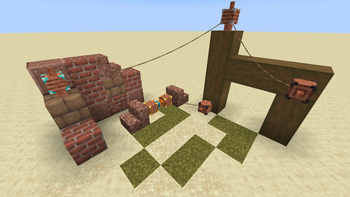
This mod adds coils and wires that you can use to build energy transfer networks.
There are four tiers of coils: basic, improved, advanced and ultimate.
You can configure coils to input or output exclusively, or do both.
Getting Started
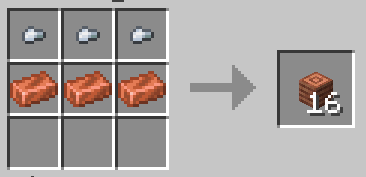
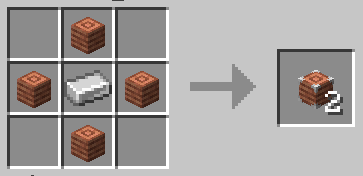
To get started with the mod you should craft some wire and coils.
I recommend that you use a recipe viewer like REI, JEI or EMI to view the recipes as modpacks often change them.
If in doubt, you should use REI as it has the best mod compatibility on fabric.
Once you have your coils you can place them on your energy sources and consumers.
Then use the wire to connect the coils by first clicking on one and then the other.
You can configure nodes to only transfer in one direction by clicking on them.
Different tiers of coils have different capacities. See the next section for more details.
How It Works
When building optimized power delivery systems it's useful to know how ones mods work.
This section documents how coils behave to avoid unnecessary confusion.
Coils internally have two energy buffers, both with the size of the transfer rate of the tier, one for input and one for output.
Whenever another mod pushes energy into a coil it goes into the energy buffer and whenever other mods pull energy it comes from the output buffer.
Coils also push the energy from the output buffer once per tick.
Because of the dual buffers you often see coils that appear to only be half full of energy, when their output buffer is full.
When the first coil on a network ticks, after having pushed its energy, it ticks the network.
During a network tick all the energy that can be is moved from the input buffers to the output buffers.
The energy is evenly distributed to all output buffers, but the removal from the input buffers is in an arbitrary order.
Modpacks
You may use this mod in any modpacks you create. I'd prefer if you don't distribute the jar directly, but instead link to it.
For curseforge and modrinth packs you should use the mod on the respective platform.
If you create a modpack outside of that you can get a direct download link from modrinth.
I recommend that modpack developers change the recipes of coils to better integrate with the progression of tech mods in the pack.
You can also change the textures if you want to have them match changed recipes.
Configuration
The mods config can be edited in the json file at config/power_networks.json or in game with a YACL based gui from modmenu.
To reload changes from file use /power_networks reload.
If your config at any point becomes invalid you can attempt a repair by setting "repair" to true on the root of the file.
This will try to keep as much as possible of your config while ensuring that it becomes valid.
It can not repair json syntax errors, but a good text editor like vscode will allow you to easily do it yourself.
Transfer Rates
The transfer rates section allows you to change the capacity of the energy buffers of coils.
The size of the buffer directly translates to the maximum transfer rate of a coil.
Textures
The textures section allows you to change the textures of all player heads used in the mod.
The textures are in the base64 encoded json form seen in player head items.
You can decode it if you want to understand the format.
Due to how the client loads textures the url in the texture almost always has to point to Mojangs skin servers.
You can look up online how to upload the textures for player heads by setting your skin.
For texture changes to fully apply you have to leave and rejoin the game.
On servers each client has to leave to get the new textures to fully apply.
Misc
The misc section of the config currently has one option to enable double lead rendering.
Double leads can help if you are having issues with connections not rendering, but causes some z-fighting.
Porting and Forking
You can read my policy on forking and porting mods.
This mod will not be ported to anything older than 1.19.4 due to that version adding necessary client features.
Available Versions
How to Install Power Networks on Your Server
Order Server
Order a Minecraft Java server with at least 3 GB RAM (4 GB recommended).
Set fabric Loader
In the panel under "Egg", select the fabric loader and matching Minecraft version (1.20.6).
Install Mod
Open the mod browser in the dashboard and search for "Power Networks". Click "Install" – done! Alternatively, upload the .jar via SFTP to the /mods folder.
Compatibility
Mod Loaders
Minecraft Versions
1.20.6, 1.20.4, 1.20.2 (+2 more)
Server-side
✓ RequiredRecommended RAM
4 GB(min. 3 GB)Frequently Asked Questions
Power Networks server crashes on startup – what to do?
Most common cause: wrong fabric version or insufficient RAM. Check the server log (latest.log) for "OutOfMemoryError" or "Mixin" errors. With Mado Hosting: ensure at least 3 GB RAM is allocated and the loader matches the mod version (1.20.6). You can switch loaders with one click in the panel.
Is Power Networks compatible with fabric and quilt?
Power Networks officially supports fabric, quilt for Minecraft 1.20.6, 1.20.4, 1.20.2. The Mado dashboard automatically detects incompatible loader combinations.
Server lagging with Power Networks – how to optimize performance?
Recommended RAM: 4 GB (per 8 players). Use /spark profiler to check if Power Networks consumes the most tick time. Common fixes: reduce server view-distance to 8-10, install "performant" or "starlight" as supplementary mods on Forge. With Mado Hosting, your server runs on NVMe SSDs with dedicated CPU cores for minimal latency.
Similar Mods





Rent Modded Server
Install Power Networks with just one click on your server.