
Powered Signs
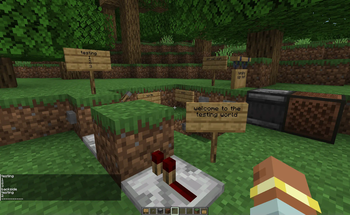
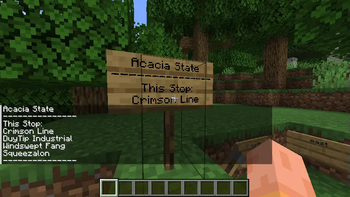
Signs powered by a redstone wire will print out the contents of the sign to players nearby.
Screenshots
About this Mod
Powered Signs
This is a simple mod that adds one thing; when signs are powered, they broadcast their contents to nearby players.
When the block below a sign is powered, it will print its contents to any player's chat who is within 32 blocks of the sign.
The sign is then unable to print for the next second, or 20 ticks. If the redstone power is constant, it will continually print to nearby players.
The signs check for Weak and Strong redstone power, so be careful where you put them!
Quick Tutorial:
- Place a sign, and write on the front side, then back
- If you power the block below the sign, the contents of the sign will be printed
- Even if the sign is on a wall, the block below it is still the block you need to power. This will be tweaked later.
- The order of what is printed is front side top to bottom, back side top to bottom
- There are a few config options located at
./config/poweredsign.tomlas well;playerDistance: Is how many blocks away, in a square shape, the sign can print to player's chat (Default: 32),coolDownTicks: Is the amount of ticks that a sign as to wait before printing again (Default: 20, or 1 second),logSignPositions: An option for server moderators and as a light debugging tool; prints the location of signs in the world when they are powered (Default: false),particles: Redstone particles are spawned when the sign is powered (Default: true),audio: Powered signs make the lever clicking sound when powered (Default: true),
Available Versions
How to Install Powered Signs on Your Server
Order Server
Order a Minecraft Java server with at least 3 GB RAM (4 GB recommended).
Set fabric Loader
In the panel under "Egg", select the fabric loader and matching Minecraft version (1.20.4).
Install Mod
Open the mod browser in the dashboard and search for "Powered Signs". Click "Install" – done! Alternatively, upload the .jar via SFTP to the /mods folder.
Compatibility
Mod Loaders
Minecraft Versions
1.20.4, 1.20.3, 1.20.2
Server-side
✓ RequiredRecommended RAM
4 GB(min. 3 GB)Frequently Asked Questions
Powered Signs server crashes on startup – what to do?
Most common cause: wrong fabric version or insufficient RAM. Check the server log (latest.log) for "OutOfMemoryError" or "Mixin" errors. With Mado Hosting: ensure at least 3 GB RAM is allocated and the loader matches the mod version (1.20.4). You can switch loaders with one click in the panel.
Is Powered Signs compatible with fabric?
Powered Signs officially supports fabric for Minecraft 1.20.4, 1.20.3, 1.20.2. The Mado dashboard automatically detects incompatible loader combinations.
Server lagging with Powered Signs – how to optimize performance?
Recommended RAM: 4 GB (per 8 players). Use /spark profiler to check if Powered Signs consumes the most tick time. Common fixes: reduce server view-distance to 8-10, install "performant" or "starlight" as supplementary mods on Forge. With Mado Hosting, your server runs on NVMe SSDs with dedicated CPU cores for minimal latency.
Similar Mods





Rent Modded Server
Install Powered Signs with just one click on your server.