
Pozitification
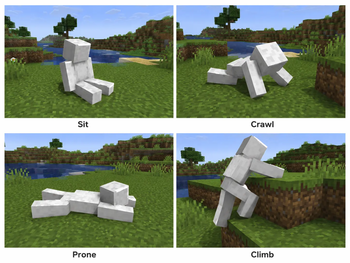
Adds crawling, sitting, lying down and other poses
Screenshots
About this Mod
Pozitification







📌 What is this?
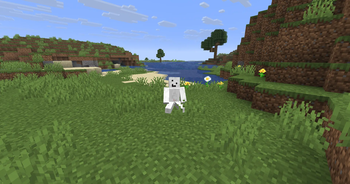
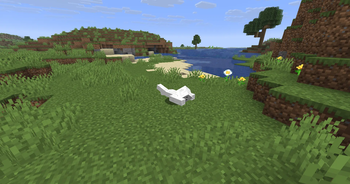
Pozitification is a lightweight Fabric mod for Minecraft 26.1 that adds synchronized player poses — sit, crawl, and more.
Just press a key and your character actually sits down. Or crawls. Other players with the mod can see it too.
No more faking it with crouching or boats.
✨ Features
- Sit down — press a key, sit anywhere
- Crawl — press a key, move low
- Stand back up — anytime, instantly
- Multiplayer sync — other players with the mod see your poses
- Customizable keybinds — through vanilla Controls menu
- Client + server — works best when installed on both sides
🎮 Default Controls
| Action | Key |
|---|---|
| Sit | X |
| Crawl | Z |
| Stand up | Left Shift |
All keys can be changed in the standard Controls menu.
🎯 What's in version 0.1?
This first release is intentionally focused on the essentials:
- stable sitting
- stable crawling
- proper standing up
- pose sync in multiplayer
- clean, lightweight code
The goal is a solid foundation before adding more advanced movement systems.
🌍 Multiplayer
Pozitification is designed for multiplayer.
- Poses are synchronized between players
- Others with the mod see when you sit or crawl
- Works best when installed on both client and server
💡 Why Pozitification?
Minecraft movement feels limited — especially for:
- roleplay
- immersion
- screenshots & machinima
- casual social play
This mod adds player expression without turning Minecraft into a complicated animation system. It's meant to feel lightweight, practical, and easy to use.
🛣️ Planned Improvements
Version 0.1 is just the beginning. Future updates may include:
- smoother pose transitions
- better animation polish
- improved multiplayer edge-case handling
- more pose states
- better visual alignment with ground
- wider mod compatibility
- configurable behavior
🔧 Technical Direction
Pozitification focuses on:
- Fabric 26.1 support
- clean gameplay integration
- multiplayer sync
- lightweight implementation
- practical use in normal gameplay
📥 Installation
- Install Fabric Loader for Minecraft 26.1
- Put Fabric API and Pozitification in your
mods/folder - Launch the game
For multiplayer, install the mod on both client and server.
⚙️ Requirements
- Minecraft 26.1
- Fabric Loader
- Fabric API
- Java 21
📦 Dependencies
Required:
- Fabric API
Optional:
- None
❓ FAQ
Does it work on servers?
Yes, but other players need the mod to see your poses. Without the mod, you'll just look like you're crouching.Can I change the keybinds?
Yes — all keybinds are customizable in the standard Controls menu.Does it work with other mods?
Generally yes. If you find incompatibilities, report them.Why are there no animations yet?
Version 0.1 focuses on core mechanics. Animation polish is planned for future updates.Forge version?
Not planned at the moment. Fabric only for 26.1.🔗 Links

© 2026 kasperoid — All Rights Reserved
Available Versions
How to Install Pozitification on Your Server
Order Server
Order a Minecraft Java server with at least 3 GB RAM (4 GB recommended).
Set fabric Loader
In the panel under "Egg", select the fabric loader and matching Minecraft version (26.1.2).
Install Mod
Open the mod browser in the dashboard and search for "Pozitification". Click "Install" – done! Alternatively, upload the .jar via SFTP to the /mods folder.
Compatibility
Mod Loaders
Minecraft Versions
26.1.2, 26.1.1, 26.1
Server-side
✓ RequiredRecommended RAM
4 GB(min. 3 GB)Frequently Asked Questions
Pozitification server crashes on startup – what to do?
Most common cause: wrong fabric version or insufficient RAM. Check the server log (latest.log) for "OutOfMemoryError" or "Mixin" errors. With Mado Hosting: ensure at least 3 GB RAM is allocated and the loader matches the mod version (26.1.2). You can switch loaders with one click in the panel.
Is Pozitification compatible with fabric?
Pozitification officially supports fabric for Minecraft 26.1.2, 26.1.1, 26.1. The Mado dashboard automatically detects incompatible loader combinations.
Server lagging with Pozitification – how to optimize performance?
Recommended RAM: 4 GB (per 8 players). Use /spark profiler to check if Pozitification consumes the most tick time. Common fixes: reduce server view-distance to 8-10, install "performant" or "starlight" as supplementary mods on Forge. With Mado Hosting, your server runs on NVMe SSDs with dedicated CPU cores for minimal latency.
Similar Mods




Rent Modded Server
Install Pozitification with just one click on your server.