
Primus: AlienEvo AddonPack
An Addon for Ad Astra that brings ben 10 related planets and systems to the mod
Screenshots
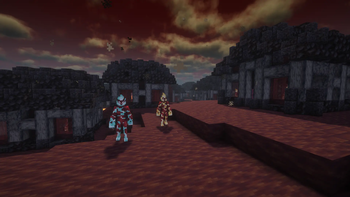

About this Mod

DISCLAIMER
The addon is still currently in active development, expect bugs and lag
Don't expect to be able to live on Pyros as Heatblast as of right now
If you decide to travel to Pyros MAKE SURE YOUR Y LEVEL IS HIGHER THAN 70 UNLESS YOU WANT TO LAND IN LAVA
Content
This addon will, in the future, bring all of the Ben 10 classic alien homeworlds to Ad Astra with unique mounts blocks trees mobs and other cool stuff. (Currently the addon is not really compatible with Alien Evo itself)
Pyros
Spoiler
When traveling to Pyros, you must be careful since if your Y level is lower than 70, you will end up in lava.
Since the addon in the 0.1.0 version doesn't make Heatblast live on Pyros, I would suggest using either the ITO Suit or Jet Suit from Ad Astra.
While wandering Pyros, you will find one of the three important things on the planet : a wild Crabdozer, a Pyronite Village, or volcanoes, which are the most popular things to find.
When you find a village , you will discover some neat loot like iron and gold or frigyd shards, which you can use to trade with Pyronites. Using a brush on the employed Pyronites will make them drop Pyronite flakes.
Using those Pyronite flakes, you can tame a Crabdozer, which works like a horse/dog hybrid, meaning you can mount it , and if someone attacks you or you attack something, they will start attacking it too. You can also make them sit.
Volcanoes are just there to add a hellish vibe to Pyros and to give the player some useful resources
How to travel to those homeworlds
To travel to the homeworlds, you first need to get a tier 4 rocket. Then by using it you should be able to reach those homeworlds (It's recommended to also have the Jet Suit)
Dependencies
Special Thanks to
Zero - For the main structures(goat)
Panniecake - For the world generation
WildFire905 - For block/item textures
AmiSlayz - For the main idea of the addon
AymanRiad - For helping with structures
ItsVlad05 - For the first item texture
In case you want to support me check - ☕Ko-fi Page☕
Available Versions
How to Install Primus: AlienEvo AddonPack on Your Server
Order Server
Order a Minecraft Java server with at least 3 GB RAM (4 GB recommended).
Set forge Loader
In the panel under "Egg", select the forge loader and matching Minecraft version (1.20.1).
Install Mod
Open the mod browser in the dashboard and search for "Primus: AlienEvo AddonPack". Click "Install" – done! Alternatively, upload the .jar via SFTP to the /mods folder.
Compatibility
Mod Loaders
Minecraft Versions
1.20.1
Server-side
✓ RequiredRecommended RAM
4 GB(min. 3 GB)Frequently Asked Questions
Primus: AlienEvo AddonPack server crashes on startup – what to do?
Most common cause: wrong forge version or insufficient RAM. Check the server log (latest.log) for "OutOfMemoryError" or "Mixin" errors. With Mado Hosting: ensure at least 3 GB RAM is allocated and the loader matches the mod version (1.20.1). You can switch loaders with one click in the panel.
Is Primus: AlienEvo AddonPack compatible with forge?
Primus: AlienEvo AddonPack officially supports forge for Minecraft 1.20.1. The Mado dashboard automatically detects incompatible loader combinations.
Server lagging with Primus: AlienEvo AddonPack – how to optimize performance?
Recommended RAM: 4 GB (per 8 players). Use /spark profiler to check if Primus: AlienEvo AddonPack consumes the most tick time. Common fixes: reduce server view-distance to 8-10, install "performant" or "starlight" as supplementary mods on Forge. With Mado Hosting, your server runs on NVMe SSDs with dedicated CPU cores for minimal latency.
Rent Modded Server
Install Primus: AlienEvo AddonPack with just one click on your server.