Progressive Smithing
A Minecraft mod that upgrades the Smithing Table to be more useful and have a proper progression system.
Screenshots
About this Mod
Progressive Smithing
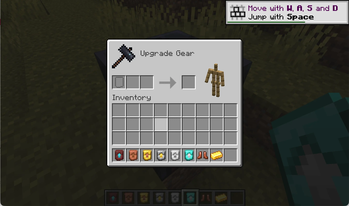
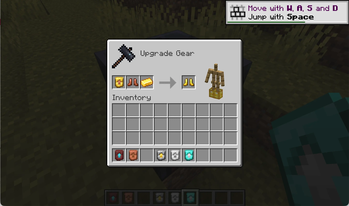
Progressive Smithing is a vanilla‑plus progression mod that expands the Smithing Table into a true upgrade path for tools, weapons, and armor. Instead of jumping straight from iron to diamond, players now advance through a tiered material ladder that feels natural, rewarding, and fully integrated into Minecraft’s world generation.
What the Mod Adds
- A full upgrade progression: leather -> copper -> gold -> chainmail -> iron -> diamond
- Custom smithing templates for every upgrade step
- Naturally generated loot placement for templates (dungeons, ruins, structures, etc.)
- New smithing recipes for all armor pieces, tools, and weapons
- Balanced, vanilla‑style progression that feels like it could be part of the base game
- Cross‑loader support via Architectury (Fabric + NeoForge)
Why Use Progressive Smithing
Players who enjoy vanilla‑friendly progression will appreciate how this mod:
- Makes early‑ and mid‑game gear meaningful again
- Encourages exploration to find upgrade templates
- Gives the Smithing Table a real purpose before Netherite
- Adds depth without adding grind or complexity
It’s a lightweight, intuitive enhancement that fits seamlessly into survival gameplay.
Dependencies
This mod requires:
- Architectury API: https://modrinth.com/mod/architectury-api
- Fabric Loader or NeoForge, depending on the version
Be sure to install the correct version for your mod loader.
Installation
- Works on Minecraft 1.21.1
- Download the appropriate JAR from Modrinth
- Place it in your
modsfolder along with Architectury API
Development
export JAVA_HOME="$(brew --prefix openjdk@21)/libexec/openjdk.jdk/Contents/Home"
./gradlew build
Artifacts are generated in each platform’s build/libs directory.
License
Licensed under the MIT License.
Available Versions
How to Install Progressive Smithing on Your Server
Order Server
Order a Minecraft Java server with at least 3 GB RAM (4 GB recommended).
Set fabric Loader
In the panel under "Egg", select the fabric loader and matching Minecraft version (1.21.11).
Install Mod
Open the mod browser in the dashboard and search for "Progressive Smithing". Click "Install" – done! Alternatively, upload the .jar via SFTP to the /mods folder.
Compatibility
Mod Loaders
Minecraft Versions
1.21.11, 1.21.10
Server-side
✓ RequiredRecommended RAM
4 GB(min. 3 GB)Frequently Asked Questions
Progressive Smithing server crashes on startup – what to do?
Most common cause: wrong fabric version or insufficient RAM. Check the server log (latest.log) for "OutOfMemoryError" or "Mixin" errors. With Mado Hosting: ensure at least 3 GB RAM is allocated and the loader matches the mod version (1.21.11). You can switch loaders with one click in the panel.
Is Progressive Smithing compatible with fabric and neoforge?
Progressive Smithing officially supports fabric, neoforge for Minecraft 1.21.11, 1.21.10. The Mado dashboard automatically detects incompatible loader combinations.
Server lagging with Progressive Smithing – how to optimize performance?
Recommended RAM: 4 GB (per 8 players). Use /spark profiler to check if Progressive Smithing consumes the most tick time. Common fixes: reduce server view-distance to 8-10, install "performant" or "starlight" as supplementary mods on Forge. With Mado Hosting, your server runs on NVMe SSDs with dedicated CPU cores for minimal latency.
Similar Mods




![[TaCZ] Timeless and Classics Zero](https://cdn.modrinth.com/data/SzzJttH8/fd27766d2bb8390d284696b1dbd358f87e081439_96.webp)

Rent Modded Server
Install Progressive Smithing with just one click on your server.