
project execute
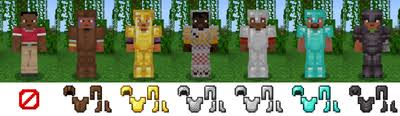
This mod enhances the armor system in Minecraft by enabling players to upgrade their armor and apply enchantments upon certain events, such as killing or being killed.
Screenshots
About this Mod
 "Project Execute" is a comprehensive Minecraft mod designed to elevate the armor mechanics within the game, providing players with enhanced customization and strategic depth. This mod introduces a dynamic system that allows players to evolve their armor over time, offering both functional and aesthetic upgrades as they progress through their Minecraft journey.
At its core, "Project Execute" empowers players to take greater control over their armor progression. Through a series of in-game events, such as defeating enemies or surviving challenging encounters, players can unlock the ability to upgrade their existing armor to higher tiers. This upgrade system not only improves the defensive capabilities of the armor but also introduces visual enhancements, reflecting the player's evolving status and prowess.
Additionally, "Project Execute" introduces an enchantment system specifically tailored to armor pieces. By leveraging the mod's unique mechanics, players can strategically apply powerful enchantments to their armor, further augmenting their defensive capabilities and providing valuable buffs in combat situations. These enchantments can be acquired through various means, encouraging players to explore different strategies and playstyles.
One of the key features of "Project Execute" is its seamless integration into both single-player and multiplayer experiences. Whether embarking on solo adventures or engaging in cooperative gameplay with friends, players can enjoy the benefits of this mod across various game modes and environments.
Furthermore, "Project Execute" is designed with compatibility and customization in mind. The mod seamlessly integrates with existing Minecraft mechanics and content, ensuring a smooth and immersive experience for all players. Additionally, "Project Execute" offers extensive configuration options, allowing server administrators and modpack creators to tailor the mod to their specific preferences and requirements.
In summary, "Project Execute" represents a significant evolution in Minecraft's armor system, offering players unprecedented control and flexibility over their gear progression. With its innovative mechanics, engaging gameplay features, and robust customization options, this mod promises to enhance the Minecraft experience for players of all skill levels.
Available Versions
How to Install project execute on Your Server
Order Server
Order a Minecraft Java server with at least 3 GB RAM (4 GB recommended).
Set fabric Loader
In the panel under "Egg", select the fabric loader and matching Minecraft version (1.20.2).
Install Mod
Open the mod browser in the dashboard and search for "project execute". Click "Install" – done! Alternatively, upload the .jar via SFTP to the /mods folder.
Compatibility
Mod Loaders
Minecraft Versions
1.20.2, 1.20
Server-side
✓ RequiredRecommended RAM
4 GB(min. 3 GB)Frequently Asked Questions
project execute server crashes on startup – what to do?
Most common cause: wrong fabric version or insufficient RAM. Check the server log (latest.log) for "OutOfMemoryError" or "Mixin" errors. With Mado Hosting: ensure at least 3 GB RAM is allocated and the loader matches the mod version (1.20.2). You can switch loaders with one click in the panel.
Is project execute compatible with fabric?
project execute officially supports fabric for Minecraft 1.20.2, 1.20. The Mado dashboard automatically detects incompatible loader combinations.
Server lagging with project execute – how to optimize performance?
Recommended RAM: 4 GB (per 8 players). Use /spark profiler to check if project execute consumes the most tick time. Common fixes: reduce server view-distance to 8-10, install "performant" or "starlight" as supplementary mods on Forge. With Mado Hosting, your server runs on NVMe SSDs with dedicated CPU cores for minimal latency.
Similar Mods



![[TaCZ] Timeless and Classics Zero](https://cdn.modrinth.com/data/SzzJttH8/fd27766d2bb8390d284696b1dbd358f87e081439_96.webp)


Rent Modded Server
Install project execute with just one click on your server.