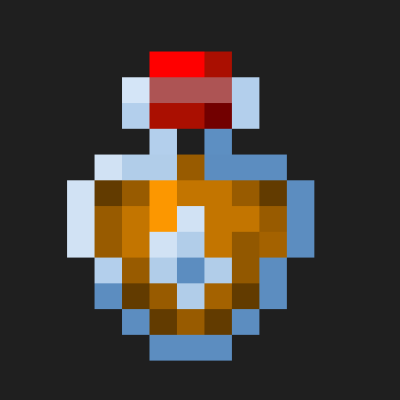
Project MMO XP Bottles
Add-on mod for PMMO to sell XP! good for servers with shops!
Screenshots
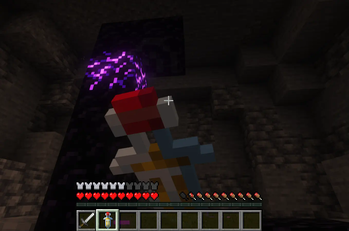
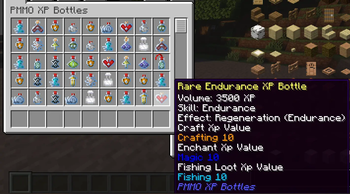
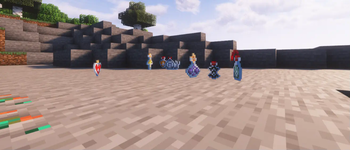
About this Mod

PMMO XP Bottles
Overview
Welcome to PMMO XP Bottles, an immersive and rewarding mod designed to enhance your Minecraft experience by integrating seamlessly with the Project MMO (PMMO) mod. This mod introduces a variety of custom XP bottles, each tailored to specific skills in PMMO, offering unique effects and benefits to enrich your gameplay. Whether you're delving into the depths of the mines, engaging in fierce combat, or honing your crafting skills, PMMO XP Bottles has something to offer for every adventurer.
Key Features
Custom XP Bottles
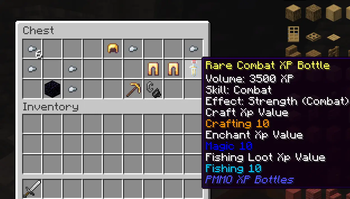
PMMO XP Bottles introduces a comprehensive collection of custom XP bottles, each corresponding to a different skill in Project MMO. These bottles come in three tiers: Common, Rare, and Epic, providing varying amounts of XP and benefits:
Common Bottles: Grant 500 XP and basic effects.
Rare Bottles: Grant 3,500 XP and enhanced effects.
Epic Bottles: Grant 9,000 XP and powerful effects.
Skill-Specific Effects
Each XP bottle not only grants experience points but also bestows beneficial effects tailored to the associated skill, helping you become a master in your chosen disciplines:
Mining: Receive a Haste effect to speed up your mining endeavors.
Combat: Gain a Strength effect to overpower your foes.
Farming: Enjoy a Luck effect, increasing your chances of finding rare drops.
Fishing: Boost your fishing luck with an enhanced Luck effect.
Endurance: Experience regeneration, keeping you healthy during long battles.
Agility: Get a Speed boost to navigate the world swiftly.
Magic: Benefit from Night Vision, illuminating your surroundings.
Swimming: Gain Water Breathing to explore underwater realms with ease.
Integration with Project MMO
PMMO XP Bottles is designed to work seamlessly with Project MMO, enhancing the progression and leveling experience:
XP Bottles for All PMMO Skills: XP bottles are available for all PMMO skills, including Archery, Woodcutting, Building, Excavation, Gunslinging, Smithing, Crafting, Slayer, Hunter, Taming, Cooking, Alchemy, Engineering, Sailing, and more.
Balanced Gameplay: The varying tiers of XP bottles ensure a balanced progression system, allowing players to gradually enhance their skills without overpowering the game.
Loot Integration
Find these custom XP bottles as rare treasures throughout your Minecraft world:
Mob Drops: Certain mobs, such as zombies and skeletons, have a chance to drop combat-related XP bottles.
Chest Loot: Discover XP bottles in various chests, including village chests, dungeon chests, and more. The drop rates are balanced to provide an exciting and rewarding exploration experience.
How to Use
Craft or Find XP Bottles: XP bottles can be crafted or found as loot in chests and from mob drops.
Drink the XP Bottles: Right-click to drink the XP bottle and receive the corresponding XP and skill-specific effects.
Enhance Your Skills: Use the gained XP to level up your PMMO skills and enjoy the benefits of the applied effects.
Installation
Install Minecraft Forge: Ensure you have Minecraft Forge installed for the corresponding Minecraft version.
Install Project MMO: Download and install the Project MMO mod.
Download PMMO XP Bottles: Download the latest version of PMMO XP Bottles from CurseForge.
Place in Mods Folder: Place the downloaded jar file into your Minecraft mods folder.
Launch Minecraft: Start Minecraft with the Forge profile to enjoy your enhanced gameplay.
Future Plans
PMMO XP Bottles is an evolving project with plans for future updates and enhancements:
Additional Effects: Introducing more unique effects for different skills.
Expanded Loot Integration: Further balancing and expanding the loot system.
Community Suggestions: Incorporating feedback and suggestions from the community to continuously improve the mod.
Available Versions
How to Install Project MMO XP Bottles on Your Server
Order Server
Order a Minecraft Java server with at least 3 GB RAM (4 GB recommended).
Set forge Loader
In the panel under "Egg", select the forge loader and matching Minecraft version (1.20.1).
Install Mod
Open the mod browser in the dashboard and search for "Project MMO XP Bottles". Click "Install" – done! Alternatively, upload the .jar via SFTP to the /mods folder.
Compatibility
Mod Loaders
Minecraft Versions
1.20.1
Server-side
✓ RequiredRecommended RAM
4 GB(min. 3 GB)Frequently Asked Questions
Project MMO XP Bottles server crashes on startup – what to do?
Most common cause: wrong forge version or insufficient RAM. Check the server log (latest.log) for "OutOfMemoryError" or "Mixin" errors. With Mado Hosting: ensure at least 3 GB RAM is allocated and the loader matches the mod version (1.20.1). You can switch loaders with one click in the panel.
Is Project MMO XP Bottles compatible with forge?
Project MMO XP Bottles officially supports forge for Minecraft 1.20.1. The Mado dashboard automatically detects incompatible loader combinations.
Server lagging with Project MMO XP Bottles – how to optimize performance?
Recommended RAM: 4 GB (per 8 players). Use /spark profiler to check if Project MMO XP Bottles consumes the most tick time. Common fixes: reduce server view-distance to 8-10, install "performant" or "starlight" as supplementary mods on Forge. With Mado Hosting, your server runs on NVMe SSDs with dedicated CPU cores for minimal latency.
Similar Mods




Rent Modded Server
Install Project MMO XP Bottles with just one click on your server.