
proxy-mod
This mod is made for users who want to use proxy to join multiplayer servers and stay private , using proxy mod You can join multiplayer servers with a private / alternate ip
Screenshots
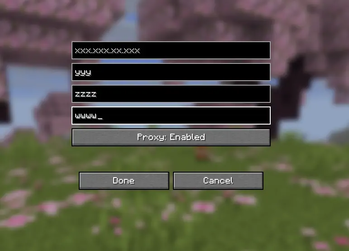
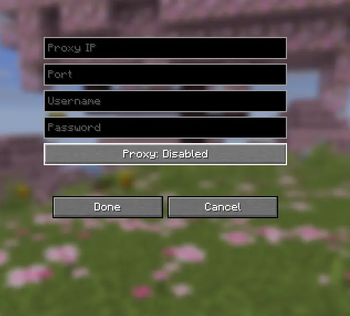
About this Mod
Proxy-Mod
(ai was used to make this mod)
Usage for proxy mod
This Mod is used for people who want to not show their own IP address to the server
This mod uses the ip and port YOU have provided In the mod , if not the provided with ip to the mod / Disabled the mod through its gui , your ip address will be shown .
The mod acts as a layer between user and server i.e instead of connecting from user to server it goes from user -> proxy server -> Minecraft server , which makes the minecraft server think the proxy server is the player joining the server
Why socks 5
Minecraft uses a protocol that requires UDP (for things like "ping" and fast movement data) and TCP (for logging in and chat).
----> HTTP Proxies usally on provide TCP , which can make Minecraft lag or fail to connect.
(and most of the providers provide SOCKS5)
Authentication Support: SOCKS5 (most of the times) requires a username and password, the mod has fields for these.
Mod's GUI is in Multiplayer section and click on it shows the gui with feilds to input IP / Port and User / pass (if required)
This mod is made for privacy reasons make sure that the server you want to use this mod on allows usage of proxy/vpn .
If you want to Support me you can donte through ltc : LYjAMXrx2mPb4LTGTiN5jyjSJ8juBR9xCj
More info About me / Discord : addrest
Available Versions
How to Install proxy-mod on Your Server
Order Server
Order a Minecraft Java server with at least 3 GB RAM (4 GB recommended).
Set fabric Loader
In the panel under "Egg", select the fabric loader and matching Minecraft version (26.1.2).
Install Mod
Open the mod browser in the dashboard and search for "proxy-mod". Click "Install" – done! Alternatively, upload the .jar via SFTP to the /mods folder.
Compatibility
Mod Loaders
Minecraft Versions
26.1.2
Server-side
✗ UnsupportedRecommended RAM
4 GB(min. 3 GB)Frequently Asked Questions
proxy-mod server crashes on startup – what to do?
Most common cause: wrong fabric version or insufficient RAM. Check the server log (latest.log) for "OutOfMemoryError" or "Mixin" errors. With Mado Hosting: ensure at least 3 GB RAM is allocated and the loader matches the mod version (26.1.2). You can switch loaders with one click in the panel.
Is proxy-mod compatible with fabric?
proxy-mod officially supports fabric for Minecraft 26.1.2. The Mado dashboard automatically detects incompatible loader combinations.
Server lagging with proxy-mod – how to optimize performance?
Recommended RAM: 4 GB (per 8 players). Use /spark profiler to check if proxy-mod consumes the most tick time. Common fixes: reduce server view-distance to 8-10, install "performant" or "starlight" as supplementary mods on Forge. With Mado Hosting, your server runs on NVMe SSDs with dedicated CPU cores for minimal latency.
Similar Mods






Rent Modded Server
Install proxy-mod with just one click on your server.