
PS-Suitcase
A high-tech, 54-slot portable storage solution for NeoForge 1.21.1 that allows instant access via keybind from anywhere in your inventory.
Screenshots
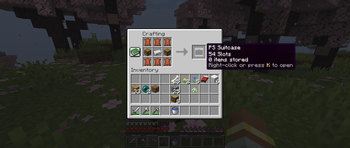
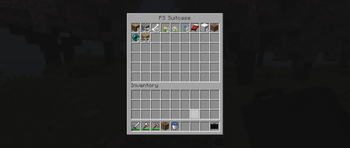
About this Mod
PS Suitcase - Smart Portable Storage
PS Suitcase is a lightweight, Vanilla-style utility mod for NeoForge. It solves the age-old problem of a cluttered inventory by adding a portable, high-capacity suitcase that you can manage directly from your pocket.
Core Features
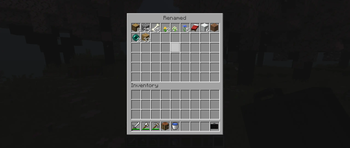
Double Chest Capacity
Each suitcase provides 54 slots of storage space. This is equivalent to a vanilla Double Chest, allowing you to carry massive amounts of blocks, ores, or loot without bulky backpacks.
Instant Access (Hotkey 'K')
Stop placing chests on the ground!
- Open your suitcase instantly by pressing the 'K' key.
- The mod automatically detects the suitcase in your inventory—you don't even need to hold it in your hand.
Smart-Switch System
If you carry multiple suitcases, you can cycle through them effortlessly:
- While the GUI is open, use the Left & Right Arrow Keys to switch between all suitcases in your inventory.
- Perfect for organizing your items into categories like "Mining", "Building", and "Food".
Dynamic In-Game Renaming
Personalize your storage without the need for an anvil:
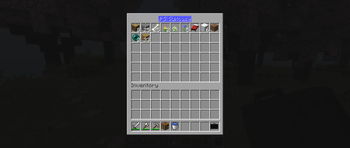
- To Rename: Click the suitcase name at the top of the interface.
- To Save: Press Enter or click anywhere outside the text field.
- To Cancel: Press ESC to discard your changes.
The custom name will be saved to the item and displayed in your inventory!
Crafting Recipe
The PS Suitcase is balanced for survival gameplay and can be crafted early on:
| Leather | Leather | Leather |
| Chest | Iron Ingot | Chest |
| Leather | Leather | Leather |
Technical Information
- Mod Loader: NeoForge
- Supported Version: 1.21.1
- Design: Clean, "Basic" Vanilla+ interface that fits perfectly into any modpack.
How to Use
- Craft your suitcase.
- Keep it anywhere in your inventory.
- Press 'K' to open.
- Click the title to rename it.
- Use Arrow Keys to switch between multiple suitcases.
Found a bug or have a suggestion? Feel free to leave a comment or report issues on the project page!
Available Versions
How to Install PS-Suitcase on Your Server
Order Server
Order a Minecraft Java server with at least 3 GB RAM (4 GB recommended).
Set neoforge Loader
In the panel under "Egg", select the neoforge loader and matching Minecraft version (1.21.1).
Install Mod
Open the mod browser in the dashboard and search for "PS-Suitcase". Click "Install" – done! Alternatively, upload the .jar via SFTP to the /mods folder.
Compatibility
Mod Loaders
Minecraft Versions
1.21.1
Server-side
✓ RequiredRecommended RAM
4 GB(min. 3 GB)Frequently Asked Questions
PS-Suitcase server crashes on startup – what to do?
Most common cause: wrong neoforge version or insufficient RAM. Check the server log (latest.log) for "OutOfMemoryError" or "Mixin" errors. With Mado Hosting: ensure at least 3 GB RAM is allocated and the loader matches the mod version (1.21.1). You can switch loaders with one click in the panel.
Is PS-Suitcase compatible with neoforge?
PS-Suitcase officially supports neoforge for Minecraft 1.21.1. The Mado dashboard automatically detects incompatible loader combinations.
Server lagging with PS-Suitcase – how to optimize performance?
Recommended RAM: 4 GB (per 8 players). Use /spark profiler to check if PS-Suitcase consumes the most tick time. Common fixes: reduce server view-distance to 8-10, install "performant" or "starlight" as supplementary mods on Forge. With Mado Hosting, your server runs on NVMe SSDs with dedicated CPU cores for minimal latency.
Similar Mods


Rent Modded Server
Install PS-Suitcase with just one click on your server.