
PteroControl
PteroControl is a powerful, client-side Minecraft mod that seamlessly integrates your Pterodactyl game server panel directly into the multiplayer screen. Manage your servers without ever leaving the game!
Screenshots
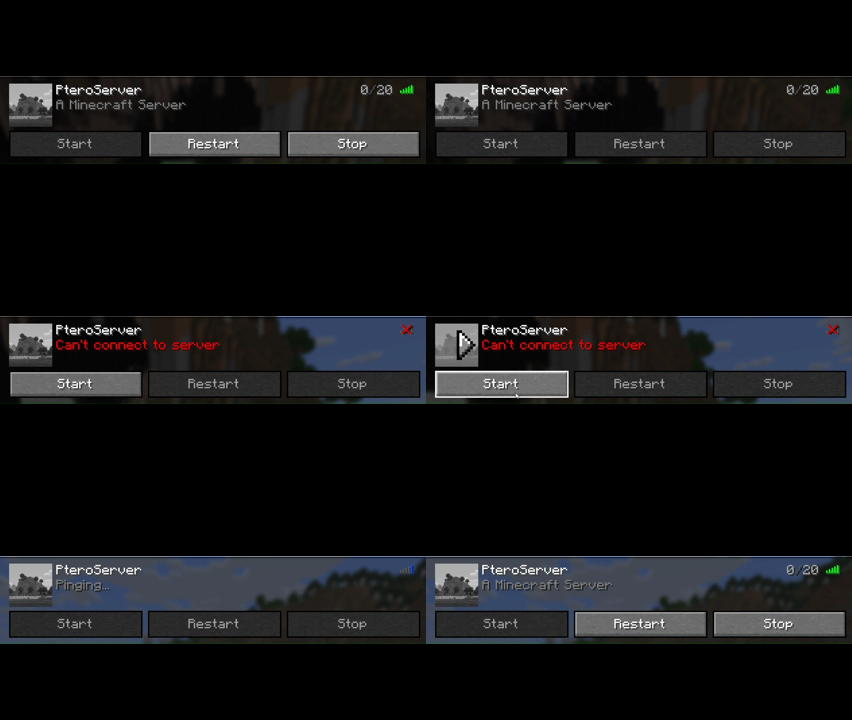
About this Mod
Tired of alt-tabbing to a web browser just to start, stop, or restart your Pterodactyl-hosted game server? PteroControl is the solution!
This powerful, client-side utility mod seamlessly integrates your Pterodactyl panel directly into Minecraft's multiplayer screen, giving you essential server controls right where you need them.
Watch a short video about the features in the gallery.
✨ Key Features
- In-Game Server Controls: Adds Start, Stop, and Restart buttons directly to your server entries in the multiplayer list.
- Smart Display: Buttons only appear for servers that match the configurable node address, keeping your server list clean.
- Dynamic Status: The buttons are intelligent! They automatically enable or disable based on the server's live ping status in Minecraft (Online, Offline, or Pinging) to prevent mistakes.
- Offline? Only the "Start" button is active.
- Online? Only "Restart" and "Stop" are active.
- Pinging? All buttons are temporarily disabled.
- Automatic Refresh: After sending a command, the buttons will temporarily disable and then automatically update to reflect the server's new state after a few seconds.
- Easy Configuration: A simple in-game settings screen (via Mod Menu) lets you set up your Pterodactyl panel URL, API key, and node address in seconds.
⚙️ How to Set Up
- Install the mod and all required dependencies (see below).
- Launch Minecraft and go to the Mods menu from the main screen.
- Find PteroControl in the list and click the gear icon (⚙️).
- Enter your Pterodactyl Panel URL (e.g.,
https://panel.yourdomain.com). - Enter your Client API Key. This must be generated from your user account's "API Credentials" page on the panel and usually starts with
ptlc_. - Enter the Node Address of your servers (e.g.,
node.yourdomain.com). The buttons will only appear for servers matching this address. - Click Save, and you're all set!
⚠️ Requirements
This mod is for the Fabric modloader. It requires the following mods to be installed:
📜 License
PteroControl is licensed under CC0-1.0 Universal. It is in the public domain, meaning you are free to use, modify, and distribute it as you see fit.
Available Versions
How to Install PteroControl on Your Server
Order Server
Order a Minecraft Java server with at least 3 GB RAM (4 GB recommended).
Set fabric Loader
In the panel under "Egg", select the fabric loader and matching Minecraft version (1.21.11).
Install Mod
Open the mod browser in the dashboard and search for "PteroControl". Click "Install" – done! Alternatively, upload the .jar via SFTP to the /mods folder.
Compatibility
Mod Loaders
Minecraft Versions
1.21.11, 1.21.8
Server-side
✗ UnsupportedRecommended RAM
4 GB(min. 3 GB)Frequently Asked Questions
PteroControl server crashes on startup – what to do?
Most common cause: wrong fabric version or insufficient RAM. Check the server log (latest.log) for "OutOfMemoryError" or "Mixin" errors. With Mado Hosting: ensure at least 3 GB RAM is allocated and the loader matches the mod version (1.21.11). You can switch loaders with one click in the panel.
Is PteroControl compatible with fabric?
PteroControl officially supports fabric for Minecraft 1.21.11, 1.21.8. The Mado dashboard automatically detects incompatible loader combinations.
Server lagging with PteroControl – how to optimize performance?
Recommended RAM: 4 GB (per 8 players). Use /spark profiler to check if PteroControl consumes the most tick time. Common fixes: reduce server view-distance to 8-10, install "performant" or "starlight" as supplementary mods on Forge. With Mado Hosting, your server runs on NVMe SSDs with dedicated CPU cores for minimal latency.
Similar Mods






Rent Modded Server
Install PteroControl with just one click on your server.