
Pushdozer
A tool to quickly edit terrain in minecraft like a bulldozer.
Screenshots
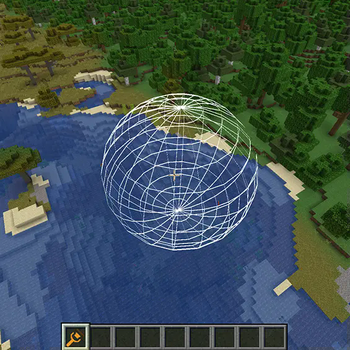
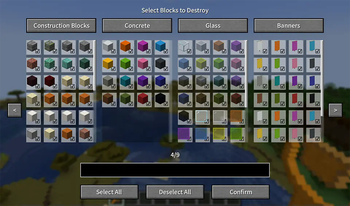


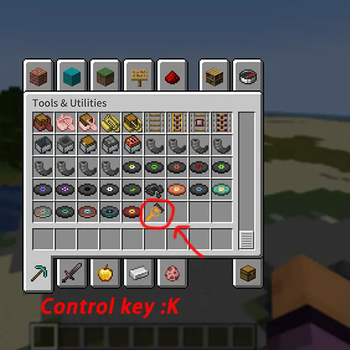
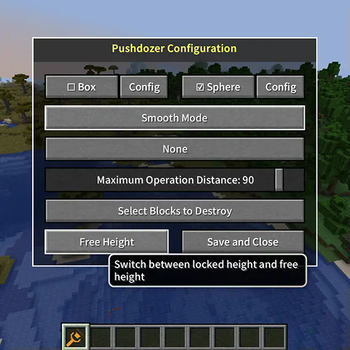
About this Mod
Pushdozer - Terrain Editing Tool

✨ Overview
Pushdozer is a powerful terrain editing mod designed specifically for Minecraft builders and creators. It makes terrain editing as simple and efficient as operating a bulldozer, providing intuitive multi-mode terrain operations, rich brush geometries, flexible elevation systems, and server-authoritative multiplayer synchronization with undo/redo functionality. Whether you're leveling mountains, digging tunnels, batch planting, or creating natural shorelines, Pushdozer makes all these tasks effortless.
🎯 Key Features
🛠️ Eight Working Modes
- Excavate Mode - Quickly clear large areas with support for layered excavation and block filtering
- Place Mode - Intelligently place surface blocks with adaptive biome support
- Smooth Mode - Intelligent terrain smoothing for handling steep edges and rough surfaces
- Surface Roughen - Add natural textures and roughness effects to terrain
- Surface Convert - Convert surface blocks to other types with multi-block mixing support
- Bone Meal - Use bone meal to promote plant growth
- Batch Plant - Intelligently plant trees, flowers, and grass with biome-adaptive support
- Shoreline Process - Create natural shorelines with support for beaches, embankments, and more
🎨 Eight Brush Geometries
- Sphere\Box\Octahedron\Cylinder\Cone\Ellipsoid\Tetrahedron\Triangular Prism
📐 Four Elevation Systems
- No Limit - Edit at any height freely, suitable for complex terrain
- Follow Player - Operation elevation follows player position
- Locked Once - Precise height control, perfect for leveling terrain
- Custom - Manually set specific heights
🖥️ Three Display Modes
- Wireframe - Display brush outlines with best performance
- Point Cloud - Show point cloud preview for intuitive visualization
- Hidden - No preview display, focus on operations
🔄 Undo/Redo System
- Support for 30-step operation history
- Real-time operation record saving
- Cooldown mechanism to prevent frequent undo/redo
⚙️ Installation:
Make sure you have:
- Installed Fabric Mod Loader (version >= 0.16.9)
- Downloaded and installed Fabric API
- Download the latest version of Pushdozer from the releases page
- Place the downloaded JAR file in your
.minecraft/modsfolder - Launch Minecraft and enjoy Pushdozer!
Available Versions
How to Install Pushdozer on Your Server
Order Server
Order a Minecraft Java server with at least 3 GB RAM (4 GB recommended).
Set fabric Loader
In the panel under "Egg", select the fabric loader and matching Minecraft version (1.21.8).
Install Mod
Open the mod browser in the dashboard and search for "Pushdozer". Click "Install" – done! Alternatively, upload the .jar via SFTP to the /mods folder.
Compatibility
Mod Loaders
Minecraft Versions
1.21.8, 1.21.7, 1.21.6 (+6 more)
Server-side
✗ UnsupportedRecommended RAM
4 GB(min. 3 GB)Frequently Asked Questions
Pushdozer server crashes on startup – what to do?
Most common cause: wrong fabric version or insufficient RAM. Check the server log (latest.log) for "OutOfMemoryError" or "Mixin" errors. With Mado Hosting: ensure at least 3 GB RAM is allocated and the loader matches the mod version (1.21.8). You can switch loaders with one click in the panel.
Is Pushdozer compatible with fabric?
Pushdozer officially supports fabric for Minecraft 1.21.8, 1.21.7, 1.21.6. The Mado dashboard automatically detects incompatible loader combinations.
Server lagging with Pushdozer – how to optimize performance?
Recommended RAM: 4 GB (per 8 players). Use /spark profiler to check if Pushdozer consumes the most tick time. Common fixes: reduce server view-distance to 8-10, install "performant" or "starlight" as supplementary mods on Forge. With Mado Hosting, your server runs on NVMe SSDs with dedicated CPU cores for minimal latency.
Similar Mods





Rent Modded Server
Install Pushdozer with just one click on your server.