
PVP Stats+
The mod offers a customizable HUD, detailed match tracking, tiered progression, and performance analytics for PvP, allowing players to optimize their interface, track stats, and refine their combat skills.
Screenshots
About this Mod
HUD Editor 🖥️
The HUD Editor gives you complete control over your PvP interface, letting you arrange and toggle visual elements for maximum clarity and comfort.
Features
- Visibility Control
- Toggle elements like the scoreboard or recording indicator on or off.
- Great for reducing screen clutter or tailoring your view to your playstyle.
Click to watch video
- Score Elements GUI
- Right-click the scoreboard to open a configuration menu.
- Reset Scores between matches or tournaments.
- Customize the view:
- Scores Only
- Heads + Scores
Click to watch video
- Resizable HUD
- Use the mouse scroll wheel to resize HUD elements like the scoreboard and recorder.
- Easy access to the GUI with right-click makes in-game adjustments quick and intuitive.
Click to watch video
Recorder GUI 🕹️
Track stats precisely with the Recorder GUI, designed for all PvP modes.
How It Works
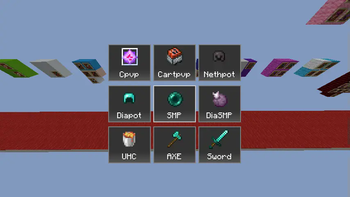
9-Box Interface
- Choose from modes like:
- Crystal PvP
- Cart PvP
- Netherite Pot
- Diamond Pot
- SMP
- UHC
- Axe PvP
- Sword PvP
- Choose from modes like:
Quick Activation
- After selecting a mode, your stats begin tracking the moment you hit another player.
Auto-Save
- After a match, your stats are automatically sent to the Stats GUI.
Click to watch video
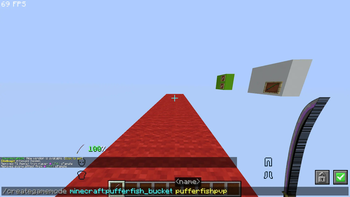
- Custom Modes
- Use
/creategamemode {item} {name}to add your own game modes.
- Use
Click to watch video
- Delete Options
- Ctrl + Delete: Removes all hotkeys.
Click to watch video
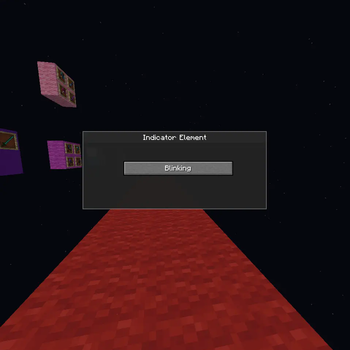
Indicator Element 💡
A clear, blinking icon lets you know when you're recording.
Features
- Blinks when recording is active, stops when paused.
- Right-click the bar to toggle manually.
Click to watch video
Stats GUI 📊
Your personal analytics dashboard for PvP matches.
Features
- Match Overview
- Win (🟢) or lose (🔴) indicators
- Player heads, usernames
- Sort using Ascending or Descending buttons
Click to watch video
- Detailed Match Stats
- Mode-specific tracking:
- Items used
- Damage dealt
- Attack types
- Match duration ⏱️
- Unique Match ID
- Mode-specific tracking:
Click to watch video
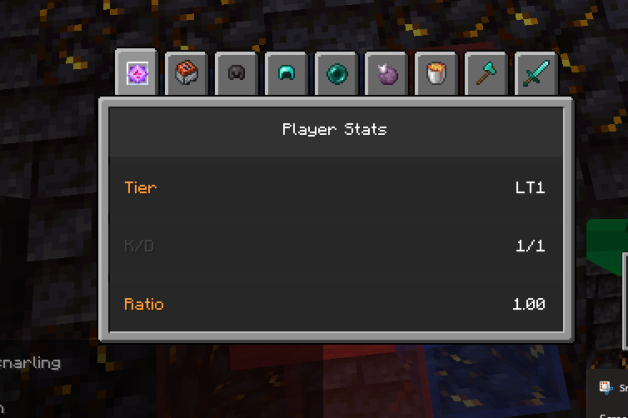
K/D Ratio
- Automatically calculated and displayed
Tiers & Progression System
- Shows your current tier and recent changes
Click to watch video
- Deletion Options
- Ctrl + Delete: Delete all game modes
- Hover + Delete: Delete a specific mode
Click to watch video
Tiers & Progression System 🏅
Earn recognition for your skill and growth in PvP.
Tier Breakdown
- High Tier (HT1–HT5): Top performers
- Low Tier (LT1–LT5): New or learning players
Progression
- Climb tiers with wins and kills
- Fall back after frequent losses
- Tiers are color-coded in the Stats GUI
- Exclusive rewards at HT1
Why Use This Mod? 💡
- 📈 Analyze your progress
- 🔍 Improve your combat strategy
- 🎨 Customize your HUD
- 🏆 Track & show off your K/D and tier rank
Available Versions
How to Install PVP Stats+ on Your Server
Order Server
Order a Minecraft Java server with at least 3 GB RAM (4 GB recommended).
Set fabric Loader
In the panel under "Egg", select the fabric loader and matching Minecraft version (1.21.4).
Install Mod
Open the mod browser in the dashboard and search for "PVP Stats+". Click "Install" – done! Alternatively, upload the .jar via SFTP to the /mods folder.
Compatibility
Mod Loaders
Minecraft Versions
1.21.4, 1.21.1, 1.21
Server-side
✗ UnsupportedRecommended RAM
4 GB(min. 3 GB)Frequently Asked Questions
PVP Stats+ server crashes on startup – what to do?
Most common cause: wrong fabric version or insufficient RAM. Check the server log (latest.log) for "OutOfMemoryError" or "Mixin" errors. With Mado Hosting: ensure at least 3 GB RAM is allocated and the loader matches the mod version (1.21.4). You can switch loaders with one click in the panel.
Is PVP Stats+ compatible with fabric?
PVP Stats+ officially supports fabric for Minecraft 1.21.4, 1.21.1, 1.21. The Mado dashboard automatically detects incompatible loader combinations.
Server lagging with PVP Stats+ – how to optimize performance?
Recommended RAM: 4 GB (per 8 players). Use /spark profiler to check if PVP Stats+ consumes the most tick time. Common fixes: reduce server view-distance to 8-10, install "performant" or "starlight" as supplementary mods on Forge. With Mado Hosting, your server runs on NVMe SSDs with dedicated CPU cores for minimal latency.
Similar Mods




![[TaCZ] Timeless and Classics Zero](https://cdn.modrinth.com/data/SzzJttH8/fd27766d2bb8390d284696b1dbd358f87e081439_96.webp)

Rent Modded Server
Install PVP Stats+ with just one click on your server.