
Screenshots
About this Mod
IMPORTANT
I have abandoned this as the code got a little messy and I can't fix it.
Intro
This mod aims to shake up the PvP game, and make it a bit more exciting as well as interactive. This mod will be updated as time permits with:
Currently
- New Weapons
- New Totems
Possibly
- New Enchantments
- New Effects
- New Potions
Overview
This mod currently adds two weapons to the game, as well as two new Totems.
The current Weapons:
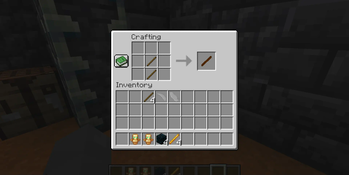
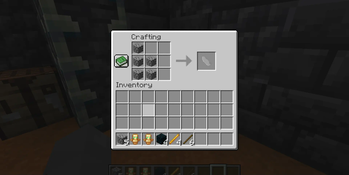
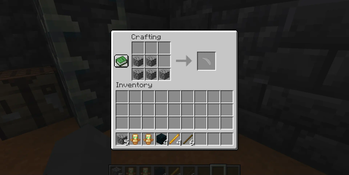
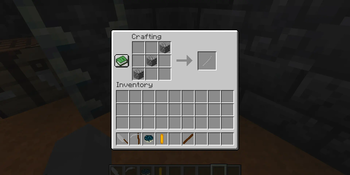
- The Scythe is a faster but weaker weapon than the Vanilla Sword
- The Buster Sword is a slower but more powerful weapon than the Vanilla Axe
- The Masamune is even faster than the scythe at the cost of less damage
The current Materials:
- The Rotting Soul and a Netherite Template upgrades your Diamond tools or weapons into Rotting items.
The current Totems:
- The Totem of Silence adds another 20 hearts to your health for a minute and instantly heals you for around 16 hearts. The drawback is you get the Darkness effect for a minute as well
- The Totem of Fear makes you nearly invincible, as well as faster and stronger
- The Rotting Soul makes you nearly invincible as the Totem of Fear does, but also allows for you to see inn the dark and the mending of flesh and bones.
Crafting
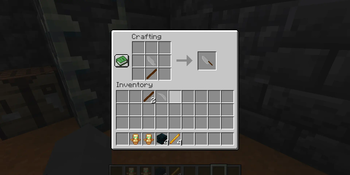
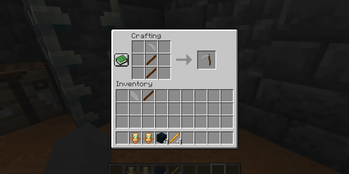
The crafting recipes are shown in the gallery
Video Showcase
Credits
Coding - DragonFlamesEnd
Visual Design - StolenCraft
Available Versions
How to Install PvPChaos on Your Server
Order Server
Order a Minecraft Java server with at least 3 GB RAM (4 GB recommended).
Set fabric Loader
In the panel under "Egg", select the fabric loader and matching Minecraft version (1.21.4).
Install Mod
Open the mod browser in the dashboard and search for "PvPChaos". Click "Install" – done! Alternatively, upload the .jar via SFTP to the /mods folder.
Compatibility
Mod Loaders
Minecraft Versions
1.21.4
Server-side
✓ RequiredRecommended RAM
4 GB(min. 3 GB)Frequently Asked Questions
PvPChaos server crashes on startup – what to do?
Most common cause: wrong fabric version or insufficient RAM. Check the server log (latest.log) for "OutOfMemoryError" or "Mixin" errors. With Mado Hosting: ensure at least 3 GB RAM is allocated and the loader matches the mod version (1.21.4). You can switch loaders with one click in the panel.
Is PvPChaos compatible with fabric?
PvPChaos officially supports fabric for Minecraft 1.21.4. The Mado dashboard automatically detects incompatible loader combinations.
Server lagging with PvPChaos – how to optimize performance?
Recommended RAM: 4 GB (per 8 players). Use /spark profiler to check if PvPChaos consumes the most tick time. Common fixes: reduce server view-distance to 8-10, install "performant" or "starlight" as supplementary mods on Forge. With Mado Hosting, your server runs on NVMe SSDs with dedicated CPU cores for minimal latency.
Similar Mods



![[TaCZ] Timeless and Classics Zero](https://cdn.modrinth.com/data/SzzJttH8/fd27766d2bb8390d284696b1dbd358f87e081439_96.webp)


Rent Modded Server
Install PvPChaos with just one click on your server.