
Q.C.V.S.E
QCVSE adds a dynamic economic system to Minecraft. Trade through the Minazon app, invest your capital, manage a bank account, and face real market fluctuations including crashes and booms.
Screenshots
About this Mod
🌍 QCVSE
💰 Survival Expansion & A Complete Economic
QCVSE transforms your Minecraft world into a living economic system with trading, investment, structures and dozens of new items.
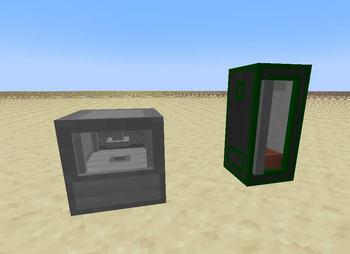
⚙️ Resource Generation Machines
Automate your production with powerful industrial machines:
- ⛏️ Drill – Extract valuable underground resources over time.
- 🪴 Grow Tent – Produce crops and organic materials efficiently indoors.
🛒 Minazon App
A fully functional in-game shopping app.
• 📦 Buy resources dynamically
• 💵 Instability price system
• 📈 Market fluctuations
🏗️ Merchant Structures
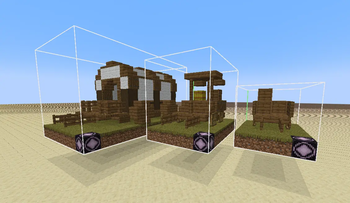
Three tiers of trading carts spawn in the world:
• 🪵 Small Wagon (Tier I)
• 🛒 Little Wagon (Tier II)
• 🚚 Big Wagon (Tier III)
📱 In-Game Applications
• 📊 Investment system with dynamic rates
• 🏦 Player bank account system
• 💸 Weekly tax mechanics
• 📉 Market crashes & rebounds
The economy is alive and constantly evolving.
🧱 Massive Content Additions
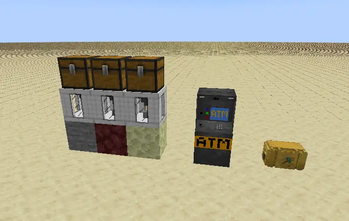
• 🪙 New currencies & coins
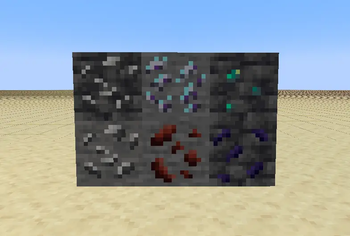
• 💎 New ores & materials
• 🧰 Tools & utilities
• 📦 Loot crates
• 🍖 Dozens of new foods
• 🧪 Crafting components
• 🏛️ Economic blocks & machines
🎯 Designed For
• Survival players
• Economy servers
• Roleplay worlds
• Trading-focused gameplay
Build your empire.
Control your wealth.
Survive the crash.
Don't be greedy !
Available Versions
How to Install Q.C.V.S.E on Your Server
Order Server
Order a Minecraft Java server with at least 3 GB RAM (4 GB recommended).
Set neoforge Loader
In the panel under "Egg", select the neoforge loader and matching Minecraft version (1.21.1).
Install Mod
Open the mod browser in the dashboard and search for "Q.C.V.S.E". Click "Install" – done! Alternatively, upload the .jar via SFTP to the /mods folder.
Compatibility
Mod Loaders
Minecraft Versions
1.21.1
Server-side
✓ RequiredRecommended RAM
4 GB(min. 3 GB)Frequently Asked Questions
Q.C.V.S.E server crashes on startup – what to do?
Most common cause: wrong neoforge version or insufficient RAM. Check the server log (latest.log) for "OutOfMemoryError" or "Mixin" errors. With Mado Hosting: ensure at least 3 GB RAM is allocated and the loader matches the mod version (1.21.1). You can switch loaders with one click in the panel.
Is Q.C.V.S.E compatible with neoforge?
Q.C.V.S.E officially supports neoforge for Minecraft 1.21.1. The Mado dashboard automatically detects incompatible loader combinations.
Server lagging with Q.C.V.S.E – how to optimize performance?
Recommended RAM: 4 GB (per 8 players). Use /spark profiler to check if Q.C.V.S.E consumes the most tick time. Common fixes: reduce server view-distance to 8-10, install "performant" or "starlight" as supplementary mods on Forge. With Mado Hosting, your server runs on NVMe SSDs with dedicated CPU cores for minimal latency.
Similar Mods




![CobbleDollars [Cobblemon Addon]](https://cdn.modrinth.com/data/s7N7AsqL/684040a264fc1d7f9b856ec5d2da39767398c7ad.png)
Rent Modded Server
Install Q.C.V.S.E with just one click on your server.