
Quantified
Your Minecraft statistics, Quantified. Share your hard earned statistics with your unique shareable link with your friends, community and more.
Screenshots
About this Mod
Quantified
Your Minecraft statistics, Quantified.

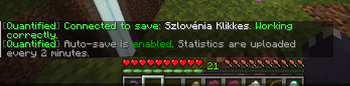
Quantified is a Minecraft Fabric mod that automatically syncs all online player statistics to the Quantified web interface — every 2 minutes, whether you're playing in singleplayer or on a Fabric-based server.
Checkout demo here: My survival world's statistics
🔍 What does it do?
With Quantified, you can:
- ⏱️ Automatically sync your in-game stats every 2 minutes
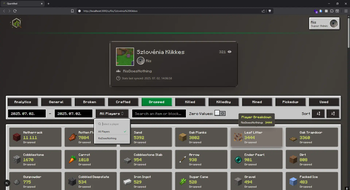
- 🌐 View your progress on a beautiful web dashboard
- 🔗 Get a unique shareable link to your personal stats page
- 🧭 Connect your save to a singleplayer world or Fabric server
- 📣 Share your world’s progress with friends, viewers, or your community
🎯 Perfect for:
- Streamers who want to show real-time progress
- Hardcore players tracking every move
- SMP servers looking for an easy way to visualize player data
- Anyone who wants to quantify their Minecraft journey
❓ How do I start using it?
- Download the mod and the Fabric-API and place it in your mods folder.
- Head to quantifiedmc.com, login with Discord or Google.
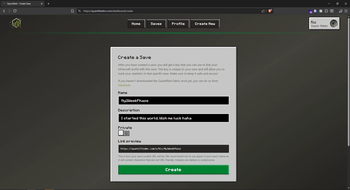
- Create a new Save.
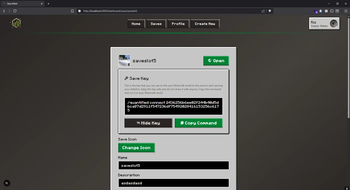
- Go in-game into your world and copy the connect command with your save's key.
- Your stats will be visible at quantifiedmc.com/
/<Your Save's name> - Share your statistics, and enjoy.
⭐Feature list
- Unique link for your own statistics page.
- You can edit your profile's and your save's description at anytime.
- Connect your social media accounts to your profile.
- The mod syncs your world's icon (the icon that is in the singleplayer browser menu) and displays it. You can change this icon at anytime.
- The mod doesn't effect vanilla gameplay. The only thing it does it collects player's statistics then sends it to the web server.
- You can enable and disable the saving task.
- Easily explore past statistics by choosing a start and end date. Stats are updated every 2 minutes.
✨ Visit quantifiedmc.com to create your save and start syncing today!
🧵 Built for Minecraft Fabric
🛠️ Open source & privacy-conscious
Available Versions
How to Install Quantified on Your Server
Order Server
Order a Minecraft Java server with at least 3 GB RAM (4 GB recommended).
Set fabric Loader
In the panel under "Egg", select the fabric loader and matching Minecraft version (1.21.8).
Install Mod
Open the mod browser in the dashboard and search for "Quantified". Click "Install" – done! Alternatively, upload the .jar via SFTP to the /mods folder.
Compatibility
Mod Loaders
Minecraft Versions
1.21.8, 1.21.7
Server-side
~ OptionalRecommended RAM
4 GB(min. 3 GB)Frequently Asked Questions
Quantified server crashes on startup – what to do?
Most common cause: wrong fabric version or insufficient RAM. Check the server log (latest.log) for "OutOfMemoryError" or "Mixin" errors. With Mado Hosting: ensure at least 3 GB RAM is allocated and the loader matches the mod version (1.21.8). You can switch loaders with one click in the panel.
Is Quantified compatible with fabric?
Quantified officially supports fabric for Minecraft 1.21.8, 1.21.7. The Mado dashboard automatically detects incompatible loader combinations.
Server lagging with Quantified – how to optimize performance?
Recommended RAM: 4 GB (per 8 players). Use /spark profiler to check if Quantified consumes the most tick time. Common fixes: reduce server view-distance to 8-10, install "performant" or "starlight" as supplementary mods on Forge. With Mado Hosting, your server runs on NVMe SSDs with dedicated CPU cores for minimal latency.
Similar Mods




Rent Modded Server
Install Quantified with just one click on your server.