
QuantumChunks
Multi-core, region-aware chunk loading for large modded servers
Screenshots
About this Mod
QuantumChunks ⚡
Multi-core, region-aware chunk loading for busy Forge servers.
When many players explore, vanilla tends to pile chunk work onto a single thread. QuantumChunks routes chunk preparation and parts of generation onto a smart worker pool, parallelizing across CPU cores while serializing work inside the same 32×32 region to keep worlds safe and stable.
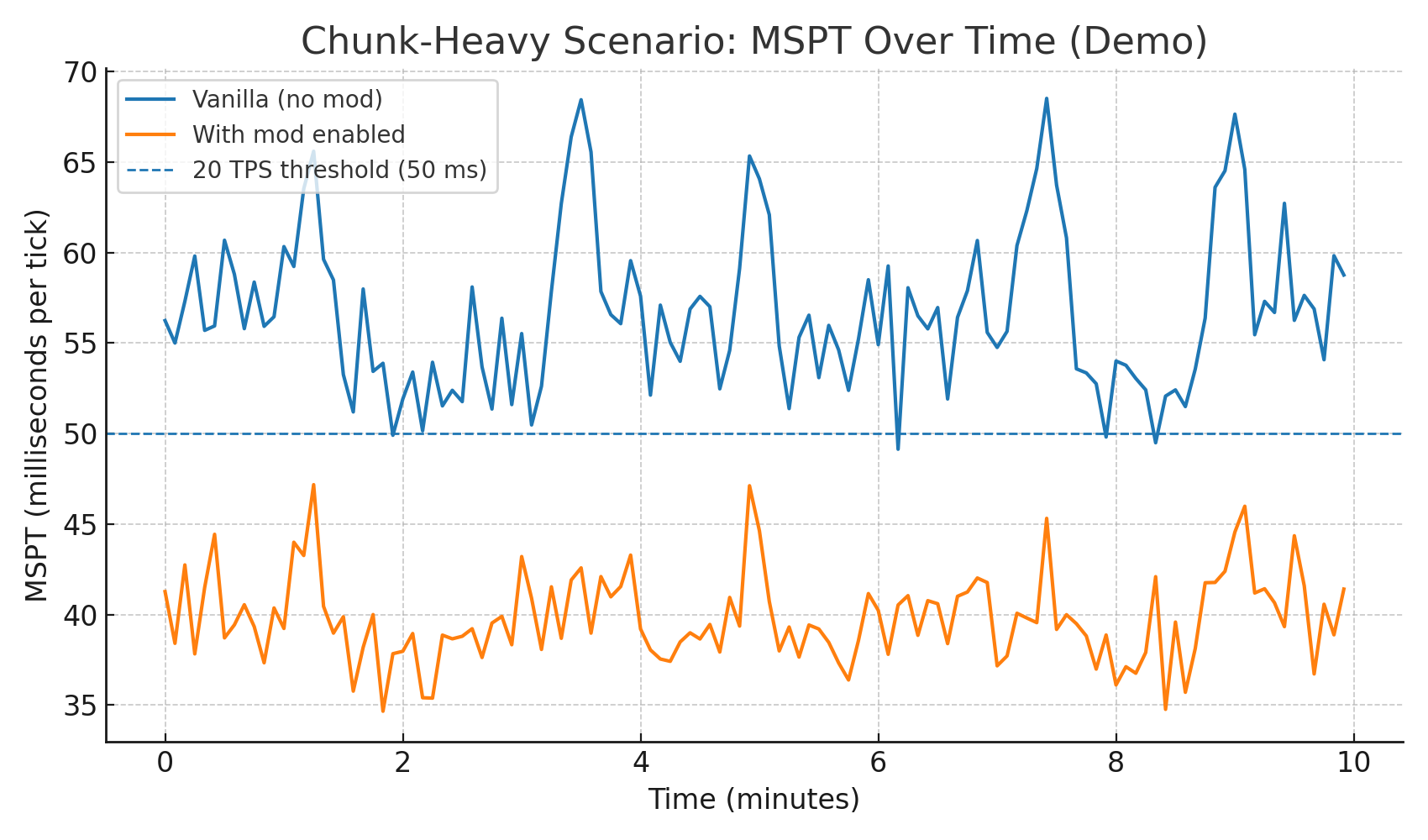
📈Statistics:
🧠 How it works (in plain English)
Minecraft often asks for a “background executor” to run chunk tasks.
QuantumChunks swaps those calls to a dedicated worker pool.
Each task is tagged with its 32×32 chunk region:
Same region → processed one at a time (no races)
Different regions → processed in parallel across your cores
Result: smoother TPS and fewer MSPT spikes when many players move at once.
🔧 Config (server)
config/quantumchunks-server.toml

📊 Verifying improvements
Use your favorite profiler (e.g., Spark):
/quantumchunks - CPU average usage, chunks loaded for 10 secs/1 minute
/spark tps — watch MSPT during exploration
/spark profiler --timeout 60 — look for chunk work on worker threads
You should see higher total CPU usage (multiple cores active) and fewer >50ms ticks during chunk storms.
Available Versions
How to Install QuantumChunks on Your Server
Order Server
Order a Minecraft Java server with at least 3 GB RAM (4 GB recommended).
Set forge Loader
In the panel under "Egg", select the forge loader and matching Minecraft version (1.20.6).
Install Mod
Open the mod browser in the dashboard and search for "QuantumChunks". Click "Install" – done! Alternatively, upload the .jar via SFTP to the /mods folder.
Compatibility
Mod Loaders
Minecraft Versions
1.20.6, 1.20.5, 1.20.4 (+3 more)
Server-side
✓ RequiredRecommended RAM
4 GB(min. 3 GB)Frequently Asked Questions
QuantumChunks server crashes on startup – what to do?
Most common cause: wrong forge version or insufficient RAM. Check the server log (latest.log) for "OutOfMemoryError" or "Mixin" errors. With Mado Hosting: ensure at least 3 GB RAM is allocated and the loader matches the mod version (1.20.6). You can switch loaders with one click in the panel.
Is QuantumChunks compatible with forge?
QuantumChunks officially supports forge for Minecraft 1.20.6, 1.20.5, 1.20.4. The Mado dashboard automatically detects incompatible loader combinations.
Server lagging with QuantumChunks – how to optimize performance?
Recommended RAM: 4 GB (per 8 players). Use /spark profiler to check if QuantumChunks consumes the most tick time. Common fixes: reduce server view-distance to 8-10, install "performant" or "starlight" as supplementary mods on Forge. With Mado Hosting, your server runs on NVMe SSDs with dedicated CPU cores for minimal latency.
Similar Mods






Rent Modded Server
Install QuantumChunks with just one click on your server.