
Quest Plaques
Adds plaques for quests to Advancement Plaques.
Screenshots
About this Mod
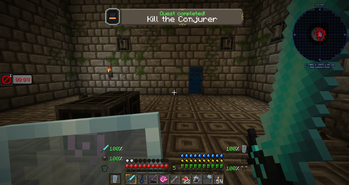
Replace those boring, anti-climactic quest popups with fancy glowing plaques.
This mod is an add-on for the Advancement Plaques mod, providing the same fancy popups for quest completion in various questing mods.

(Screenshot shown using the Embellished Stone resource pack)
This mod requires Iceberg, you can download it here. It also requires Advancement Plaques, you can download it here.
Client / Server
This addon needs to be installed on both the client and server (as does Advancement Plaques).
Configuration
Can be configured to display plaques for any or all of the three quest "levels" (Task / Goal / Challenge). These generally equate to tasks for multi-task quests (Task), quests (Goal), and full quest chapters (Challenge). If you'd like plaques to only show for select quests, you can provide a list of quest IDs with the whitelist configuration option. Additionally, there is an option to skip task plaques for quests that only have a single task.
Compatibility
Currently supports quests from FTB Quests and Custom Quests. More quest mods may be added in the future, depending on demand.
Please note that this is an add-on for Advancement Plaques, so any changes via resource packs and the like will apply to plaques from Quest Plaques as well.
You are free to use this mod in modpacks.

Problems, feature request, something else? Join us on Discord!
Available Versions
How to Install Quest Plaques on Your Server
Order Server
Order a Minecraft Java server with at least 3 GB RAM (4 GB recommended).
Set forge Loader
In the panel under "Egg", select the forge loader and matching Minecraft version (1.18.2).
Install Mod
Open the mod browser in the dashboard and search for "Quest Plaques". Click "Install" – done! Alternatively, upload the .jar via SFTP to the /mods folder.
Compatibility
Mod Loaders
Minecraft Versions
1.18.2, 1.16.5
Server-side
✓ RequiredRecommended RAM
4 GB(min. 3 GB)Frequently Asked Questions
Quest Plaques server crashes on startup – what to do?
Most common cause: wrong forge version or insufficient RAM. Check the server log (latest.log) for "OutOfMemoryError" or "Mixin" errors. With Mado Hosting: ensure at least 3 GB RAM is allocated and the loader matches the mod version (1.18.2). You can switch loaders with one click in the panel.
Is Quest Plaques compatible with forge?
Quest Plaques officially supports forge for Minecraft 1.18.2, 1.16.5. The Mado dashboard automatically detects incompatible loader combinations.
Server lagging with Quest Plaques – how to optimize performance?
Recommended RAM: 4 GB (per 8 players). Use /spark profiler to check if Quest Plaques consumes the most tick time. Common fixes: reduce server view-distance to 8-10, install "performant" or "starlight" as supplementary mods on Forge. With Mado Hosting, your server runs on NVMe SSDs with dedicated CPU cores for minimal latency.
Similar Mods




Rent Modded Server
Install Quest Plaques with just one click on your server.
Details
- License
- Creative Commons Attribution Non Commercial No Derivatives 4.0 International
- Server-side
- Required