
Quest Shop
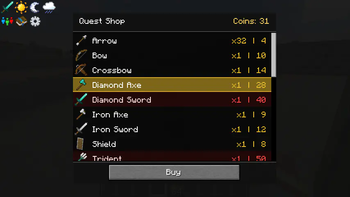
QuestShop provides an in-game shop and (quest) reward progression system. It is designed for modpack makers to support controlled item access, team play, and quest progression.
Screenshots
About this Mod
QuestShop
QuestShop is a lightweight Minecraft (NeoForge) mod that provides an in-game shop and reward progression system.
It is designed for modpack makers to support controlled item access, team play, and quest progression.
Inspired by FTB Money.
👩💻 Author: Holysweet
🧑💻 Developed by: AquariusSidhe (GitHub: alexanderheuts)
📜 License: MIT
Purpose
- Provide a fully customizable shop where players can spend earned coins.
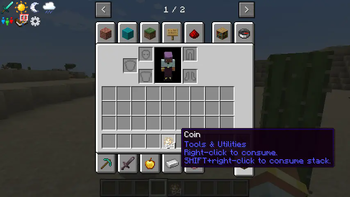
- Coins can be earned with QuestRewards, or given with commands.
- Support progression gating — Shop Categories can be (un)locked with commands.
Integrations
QuestShop works on its own, but offers optional integration with:
- FTB Teams – for shared team progression.
- FTB Quests – for quest-based rewards or unlocks.
No hard dependencies: packs can include QuestShop standalone or alongside these mods.
Commands
All in-game commands are attached under: /hqs
To open the shop use: /hqs shop
Shop Configuration
All shop content is defined via datapacks.
Shop category
data/yourpack/questshop/shop_categories/building.json
{ "display": "Building", "unlocked_by_default": true, "order": 30 }
- The filename determines the category ID.
- One file per category.
- display - name shown in game.
- unlocked_by_default - is the category, and its items, unlocked by default
- order - integer for default ordering, compared to other categories, higher is lower on the list
Shop entry
data/yourpack/questshop/shop_entries/building_basic.json
[
  {
    "item": "minecraft:cobblestone",
    "amount": 64,
    "cost": 2,
    "category": "building"
  },
  {
    "item": "minecraft:oak_planks",
    "amount": 64,
    "cost": 2,
    "category": "building"
  }
]
- Filenames are arbitrary. Used for your own grouping.
- item - minecraft item ID to sell.
- amount - the amount you get when purchased.
- price - cost in the built-in currency.
- category - category ID the item belongs to.
Folder structure (datapack):
(your_datapack)/
  pack.mcmeta
  data/
    yourpack/
      questshop/
        shop_categories/
          building.json
        shop_entries/
          building_basic.json
See repository for example datapack.
Available Versions
How to Install Quest Shop on Your Server
Order Server
Order a Minecraft Java server with at least 3 GB RAM (4 GB recommended).
Set neoforge Loader
In the panel under "Egg", select the neoforge loader and matching Minecraft version (1.21.1).
Install Mod
Open the mod browser in the dashboard and search for "Quest Shop". Click "Install" – done! Alternatively, upload the .jar via SFTP to the /mods folder.
Compatibility
Mod Loaders
Minecraft Versions
1.21.1
Server-side
✓ RequiredRecommended RAM
4 GB(min. 3 GB)Frequently Asked Questions
Quest Shop server crashes on startup – what to do?
Most common cause: wrong neoforge version or insufficient RAM. Check the server log (latest.log) for "OutOfMemoryError" or "Mixin" errors. With Mado Hosting: ensure at least 3 GB RAM is allocated and the loader matches the mod version (1.21.1). You can switch loaders with one click in the panel.
Is Quest Shop compatible with neoforge?
Quest Shop officially supports neoforge for Minecraft 1.21.1. The Mado dashboard automatically detects incompatible loader combinations.
Server lagging with Quest Shop – how to optimize performance?
Recommended RAM: 4 GB (per 8 players). Use /spark profiler to check if Quest Shop consumes the most tick time. Common fixes: reduce server view-distance to 8-10, install "performant" or "starlight" as supplementary mods on Forge. With Mado Hosting, your server runs on NVMe SSDs with dedicated CPU cores for minimal latency.
Similar Mods




![CobbleDollars [Cobblemon Addon]](https://cdn.modrinth.com/data/s7N7AsqL/684040a264fc1d7f9b856ec5d2da39767398c7ad.png)
Rent Modded Server
Install Quest Shop with just one click on your server.