
Quick menu Renewed
This is a renewed fork based on the original (abandoned?) quick-menu.
Screenshots
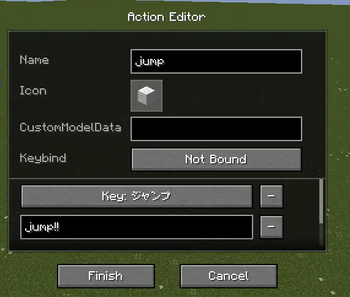

About this Mod
Quick Menu (Renewed) is a modernized, lightweight Fabric MOD for Minecraft that provides a highly configurable menu for executing repetitive commands and keybindings.
This is a renewed fork maintained by inorganic, based on the original (abandoned?) quick-menu. It has been completely rebuilt to remove heavy dependencies like owo-lib, offering a faster, cleaner, and more stable experience.
Key Features
Modern & Minimalist Design
- Glassmorphism UI: A sleek, semi-transparent charcoal interface designed to blend seamlessly with the modern Minecraft look.
- Pure Vanilla UI: No more heavy libraries. Built directly on Minecraft's native UI system for maximum compatibility and performance.
- Interactive Scrollbars: Full support for mouse wheel and draggable scrollbars in all menus.
Powerful Customization
- Dynamic Grid Size: Configure exactly how many buttons per row and how many rows are visible. The menu scales perfectly to fit your settings.
- Advanced Action Editor: Each button can run multiple actions (Commands or Keybinds).
- Icon Support: Pick any item as an icon, with full support for
CustomModelData. - Modifier Keybinds: Supports complex combinations like
Ctrl + C,Shift + G, etc.
Expert Productivity
- Quick Reorder (Ctrl + Click): Reorder buttons directly from the main menu by holding Ctrl.
- Quick Delete (Shift + Click): Instantly delete buttons while in edit mode by holding Shift.
- Release to Execute: Optionally trigger the hovered action the moment you release the menu key.
Usage
- Open Menu: Press
G(default) to open the menu. - Edit Mode: Click the pencil icon (
$270E) or pressEto enter edit mode. - Add Action: Use the
+ Actionbutton at the bottom of the editor. - Quick Organize (Edit Mode only):
- Ctrl + Left Click: Move button left.
- Ctrl + Right Click: Move button right.
- Shift + Click: Delete button.
Available Versions
How to Install Quick menu Renewed on Your Server
Order Server
Order a Minecraft Java server with at least 3 GB RAM (4 GB recommended).
Set fabric Loader
In the panel under "Egg", select the fabric loader and matching Minecraft version (26.1.2).
Install Mod
Open the mod browser in the dashboard and search for "Quick menu Renewed". Click "Install" – done! Alternatively, upload the .jar via SFTP to the /mods folder.
Compatibility
Mod Loaders
Minecraft Versions
26.1.2, 26.1.1, 26.1 (+1 more)
Server-side
✗ UnsupportedRecommended RAM
4 GB(min. 3 GB)Frequently Asked Questions
Quick menu Renewed server crashes on startup – what to do?
Most common cause: wrong fabric version or insufficient RAM. Check the server log (latest.log) for "OutOfMemoryError" or "Mixin" errors. With Mado Hosting: ensure at least 3 GB RAM is allocated and the loader matches the mod version (26.1.2). You can switch loaders with one click in the panel.
Is Quick menu Renewed compatible with fabric?
Quick menu Renewed officially supports fabric for Minecraft 26.1.2, 26.1.1, 26.1. The Mado dashboard automatically detects incompatible loader combinations.
Server lagging with Quick menu Renewed – how to optimize performance?
Recommended RAM: 4 GB (per 8 players). Use /spark profiler to check if Quick menu Renewed consumes the most tick time. Common fixes: reduce server view-distance to 8-10, install "performant" or "starlight" as supplementary mods on Forge. With Mado Hosting, your server runs on NVMe SSDs with dedicated CPU cores for minimal latency.
Similar Mods






Rent Modded Server
Install Quick menu Renewed with just one click on your server.