
QuickBinds
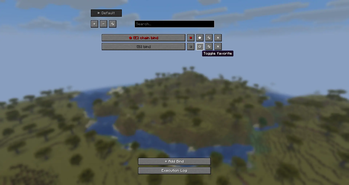
Advanced client-side mod that allows you to create powerful command keybinds and macros. Features: profiles with automatic server switching, Basic and Extended modes, action chains with WAIT delays, rich placeholders, favorites, logs, and other.
Screenshots

About this Mod
QuickBinds
QuickBinds is a client-side mod for Fabric 1.21.1–1.21.11 that allows you to bind commands, chat messages, key presses, mouse clicks, sounds, titles, and more to custom key combinations.

Features
- Basic & Extended Setup: Choose between a simplified bind editor or an advanced one with extra stages.
- Single Actions & Chains: Create simple binds or full action chains / macros.
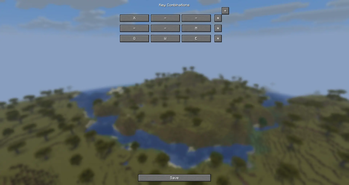
- Multi-Key Combinations: Create multiple key blocks (up to 3 keys per block) — bind activates when any block is pressed.
- Profiles: Create multiple profiles for different playstyles or servers.
- Profile Settings: Rename profiles and assign server addresses for automatic profile loading.
- Auto Profile Loading: Profiles can switch automatically when joining specific servers.
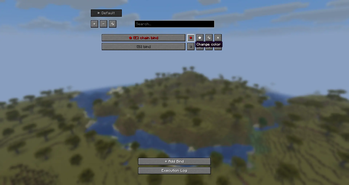
- Favorites: Mark important binds and keep them at the top of the list.
- Search: Quickly filter binds by name in the main list.
- Color Markers: Assign colors to binds for visual organization.
- Execution Log: View history of recently executed binds.
- Command & Chat Messages: Bind text, commands (for example
/home), or local client-side messages (*message) to keys. - Key Press Simulation: Simulate pressing any keyboard key.
- Mouse Simulation: Simulate Left Click (Attack) or Right Click (Use).
- Sound Action: Play any game sound with customizable volume and pitch.
- Title/Subtitle/Action Bar: Display large titles, subtitles, or action bar messages.
- WAIT Action: Add pauses inside chains without using per-action delays.
- Execution Stages:
- On Press — executes when the bind is activated.
- Main Action — the main action stage.
- On Release — executes when the bind is released or finished.
- Execution Modes:
- Press — executes once.
- Toggle — turns the bind on/off with each press.
- Hold — keeps the bind active while the key is held.
- Chain Mode: Execute multiple actions in sequence.
- Random Mode: Pick a random action from a chain.
- Repeat: Automatically repeat the main action when supported by the mode.
- Placeholders: Insert dynamic variables like
{x},{y},{z},{health},{dimension},{held_item},{clipboard}, and more. - Math Expressions: Use simple math like
{10+5}or{20-3}directly in messages. - Import/Export: Share your binds using clipboard code.
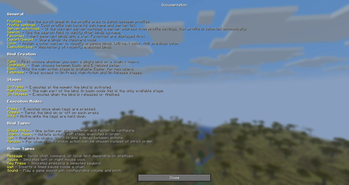
- Tooltips & Help Screen: Built-in hints and documentation inside the GUI.
- Multi-language: English, Russian, Polish, Ukrainian, German, French, Portuguese (Brazil).
Usage
- Press the
~key to open the main menu. - Use the profile buttons to create, delete, switch, or edit profiles.
- Click + Add Bind.
- Choose:
- Single Action or Chain / Macro
- Basic or Extended
- In the edit screen:
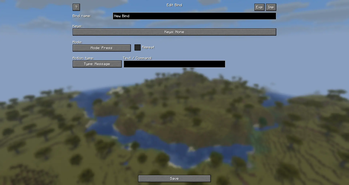
- Enter a bind name
- Configure key combinations (click the Keys button)
- Select the execution mode
- Configure the available action stages
- For chains, add multiple actions and optionally use WAIT
- Click Save.
Basic vs Extended
- Basic — only the Main Action stage is available.
- Extended — gives access to:
- On Press
- Main Action
- On Release
Action Types
- Message — Sends chat, command, or local text depending on prefix
- Mouse — Simulates left or right mouse click
- Key Press — Simulates pressing a selected key
- Sound — Plays a game sound with configurable volume and pitch
- Title — Displays a large title on screen
- Subtitle — Displays a subtitle below the title
- Action Bar — Displays a message above the hotbar
- Wait — Inserts a timed pause inside a chain (chain mode only)
Placeholders
{x},{y},{z}— Current coordinates{dimension}— Current dimension{nickname}— Your player name{health}— Current health{held_item}— Name of item in main hand{held_amount}— Stack size in main hand{durability}— Remaining durability of held item{offhand_item}— Name of item in offhand{armor}— Total armor points{food}— Current food level{xp_level}— Current XP level{gamemode}— Current gamemode{biome}— Current biome{direction}— Facing direction{server_ip}— Server IP (orSingleplayer){ping}— Current ping{fps}— Current FPS{clipboard}— Contents of your clipboard
Prefixes
/command— sends a command*text— shows a local client-side message"text"— sends plain text without prefix behavior
Have an idea for mod update?
- Join our Discord!
Available Versions
How to Install QuickBinds on Your Server
Order Server
Order a Minecraft Java server with at least 3 GB RAM (4 GB recommended).
Set fabric Loader
In the panel under "Egg", select the fabric loader and matching Minecraft version (1.21.11).
Install Mod
Open the mod browser in the dashboard and search for "QuickBinds". Click "Install" – done! Alternatively, upload the .jar via SFTP to the /mods folder.
Compatibility
Mod Loaders
Minecraft Versions
1.21.11, 1.21.10, 1.21.8 (+2 more)
Server-side
✗ UnsupportedRecommended RAM
4 GB(min. 3 GB)Frequently Asked Questions
QuickBinds server crashes on startup – what to do?
Most common cause: wrong fabric version or insufficient RAM. Check the server log (latest.log) for "OutOfMemoryError" or "Mixin" errors. With Mado Hosting: ensure at least 3 GB RAM is allocated and the loader matches the mod version (1.21.11). You can switch loaders with one click in the panel.
Is QuickBinds compatible with fabric?
QuickBinds officially supports fabric for Minecraft 1.21.11, 1.21.10, 1.21.8. The Mado dashboard automatically detects incompatible loader combinations.
Server lagging with QuickBinds – how to optimize performance?
Recommended RAM: 4 GB (per 8 players). Use /spark profiler to check if QuickBinds consumes the most tick time. Common fixes: reduce server view-distance to 8-10, install "performant" or "starlight" as supplementary mods on Forge. With Mado Hosting, your server runs on NVMe SSDs with dedicated CPU cores for minimal latency.
Similar Mods






Rent Modded Server
Install QuickBinds with just one click on your server.