
QuickChat: FastReplies
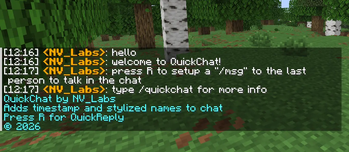
Adds timestamps and a hotkey (R) for a quick /msg setup
Screenshots
About this Mod
✨ QuickChat
QuickChat is a lightweight Fabric client-side mod that supercharges your Minecraft chat experience with styled messages, timestamps, and instant replies — all without any hassle.
🚀 Features
⏱️ Timestamps on Every Message
Never lose track of when something was said. QuickChat automatically overlays the time each message was received directly in your HUD, formatted in a clean HH:mm style.
🎨 Styled Chat Names
Chat messages get a visual glow-up — sender names are highlighted and formatted to stand out at a glance, making busy multiplayer servers much easier to read.
⚡ Instant Quick-Reply (Press R)
Spotted a message you want to reply to? Just press R to instantly address the last person who messaged you in chat — no typing their name manually, no fumbling through chat history. One key, and you're replying.
📦 Requirements
DependencyVersionMinecraft1.21.11Fabric Loader≥ 0.18.4Fabric APIAnyJava21+
🔧 Installation
Install Fabric Loader for Minecraft 1.21.11
Download Fabric API
Drop quickchat-1.21.11+1.1.jar into your mods/ folder
Launch and enjoy smarter chat!
📜 License
All Rights Reserved — © NV_Labs
Available Versions
How to Install QuickChat: FastReplies on Your Server
Order Server
Order a Minecraft Java server with at least 3 GB RAM (4 GB recommended).
Set fabric Loader
In the panel under "Egg", select the fabric loader and matching Minecraft version (1.21.11).
Install Mod
Open the mod browser in the dashboard and search for "QuickChat: FastReplies". Click "Install" – done! Alternatively, upload the .jar via SFTP to the /mods folder.
Compatibility
Mod Loaders
Minecraft Versions
1.21.11
Server-side
✗ UnsupportedRecommended RAM
4 GB(min. 3 GB)Frequently Asked Questions
QuickChat: FastReplies server crashes on startup – what to do?
Most common cause: wrong fabric version or insufficient RAM. Check the server log (latest.log) for "OutOfMemoryError" or "Mixin" errors. With Mado Hosting: ensure at least 3 GB RAM is allocated and the loader matches the mod version (1.21.11). You can switch loaders with one click in the panel.
Is QuickChat: FastReplies compatible with fabric?
QuickChat: FastReplies officially supports fabric for Minecraft 1.21.11. The Mado dashboard automatically detects incompatible loader combinations.
Server lagging with QuickChat: FastReplies – how to optimize performance?
Recommended RAM: 4 GB (per 8 players). Use /spark profiler to check if QuickChat: FastReplies consumes the most tick time. Common fixes: reduce server view-distance to 8-10, install "performant" or "starlight" as supplementary mods on Forge. With Mado Hosting, your server runs on NVMe SSDs with dedicated CPU cores for minimal latency.
Similar Mods






Rent Modded Server
Install QuickChat: FastReplies with just one click on your server.