
QuickCoordChat
Send messages with coordinates and dimension in one click.
Screenshots

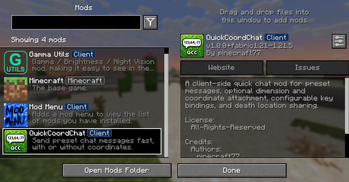
About this Mod
⚡ QuickCoordChat
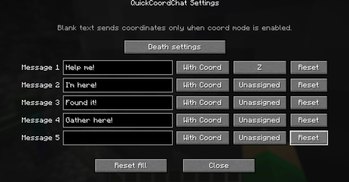
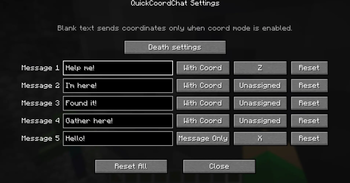
QuickCoordChat is a lightweight client-side mod that lets you instantly send predefined messages — with or without coordinates — using customizable hotkeys.
✨ Features
- Send messages instantly with hotkeys (Message1–Message5)
- Option to include coordinates and dimension
- Fully customizable key bindings (keyboard & mouse buttons)
- Prevents accidental triggers (no spam, no GUI conflicts)
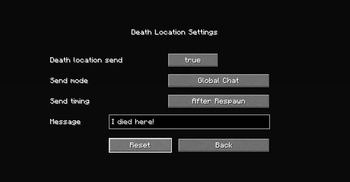
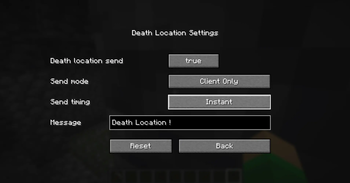
- Death location message (optional)
- YAML-based config (easy to edit)
- Multi-language support (22 languages)
- Clean and simple UI
- Works entirely client-side (no server required)
🌍 Example
Help me! [Overworld] X=123 Y=64 Z=-77
⚙️ Configuration
All settings are saved in:
config/quickcoordchat/config.yml
- Customize messages
- Enable/disable coordinate sending
- Change key bindings
- Toggle death messages
🌐 Language Support
Supports 22 languages with automatic client-language detection.
🧩 Compatibility
- Minecraft: 1.21.6 – 1.21.11
- Fabric Loader required
- Works on any server (including Vanilla)
💡 Why this mod?
In modern Minecraft, communication speed matters.
QuickCoordChat allows you to instantly share your situation without opening chat or typing coordinates manually.
👤 Author
Created by pinecraft77
📦 Notes
- This is a client-side mod — safe to use on any server
- No impact on server performance
- No required dependencies beyond Fabric API
Available Versions
How to Install QuickCoordChat on Your Server
Order Server
Order a Minecraft Java server with at least 3 GB RAM (4 GB recommended).
Set fabric Loader
In the panel under "Egg", select the fabric loader and matching Minecraft version (26.2).
Install Mod
Open the mod browser in the dashboard and search for "QuickCoordChat". Click "Install" – done! Alternatively, upload the .jar via SFTP to the /mods folder.
Compatibility
Mod Loaders
Minecraft Versions
26.2, 26.1.2, 26.1.1 (+20 more)
Server-side
✗ UnsupportedRecommended RAM
4 GB(min. 3 GB)Frequently Asked Questions
QuickCoordChat server crashes on startup – what to do?
Most common cause: wrong fabric version or insufficient RAM. Check the server log (latest.log) for "OutOfMemoryError" or "Mixin" errors. With Mado Hosting: ensure at least 3 GB RAM is allocated and the loader matches the mod version (26.2). You can switch loaders with one click in the panel.
Is QuickCoordChat compatible with fabric?
QuickCoordChat officially supports fabric for Minecraft 26.2, 26.1.2, 26.1.1. The Mado dashboard automatically detects incompatible loader combinations.
Server lagging with QuickCoordChat – how to optimize performance?
Recommended RAM: 4 GB (per 8 players). Use /spark profiler to check if QuickCoordChat consumes the most tick time. Common fixes: reduce server view-distance to 8-10, install "performant" or "starlight" as supplementary mods on Forge. With Mado Hosting, your server runs on NVMe SSDs with dedicated CPU cores for minimal latency.
Similar Mods






Rent Modded Server
Install QuickCoordChat with just one click on your server.