
Fast Kits
QuickKit lets you save your entire Minecraft inventory as named kits and instantly load them whenever you need them. It includes commands, a GUI, and reusable Kit Binders while preserving enchantments, components, armor, offhand items, and custom names.
Screenshots
About this Mod
QuickKit v1.0.0
Minecraft 1.21.11 (Fabric)
WHAT IT DOES
QuickKit allows you to save your entire inventory as named kits and restore them instantly whenever you need them. Every kit preserves the complete state of your inventory, including your hotbar, armor, offhand items, enchantments, components, lore, custom names, and all other item data.
Kits are serialized using Minecraft's ItemStack.CODEC, ensuring accurate and future-proof storage of item information. Each player's kits are stored in individual JSON files located under:
pvppractice_kits/
within the server's run directory.
COMMANDS
All commands require Operator Level 2.
/kit save
Saves your current inventory as a named kit. Kit names can be up to 64 characters long.
/kit load
Clears your current inventory and restores the selected kit.
/kit delete
Permanently deletes the specified kit.
/kit rename
Renames an existing kit.
/kit list
Displays all saved kits in chat.
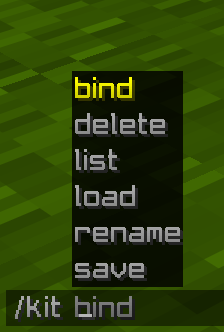
/kit bind
Creates a special binder item that instantly loads the selected kit when used.
Tab completion is available for kit names on the load, delete, bind, and rename commands.
GUI
Press K (configurable under Controls → PVP Practice Mod) to open the kit management interface.
The GUI displays all saved kits in a scrollable list.
Kit List Actions
• Left-click a kit → Instantly loads the kit and closes the GUI.
• Right-click a kit → Selects the kit and highlights it in blue for management actions.
Buttons
Load Kit
• Loads the currently selected kit.
Save Inventory
• Prompts for a kit name and saves your current inventory.
Delete Kit
• Opens a confirmation dialog before permanently deleting the selected kit.
Rename Kit
• Prompts for a new name and renames the selected kit.
Refresh
• Reloads the kit list directly from the server.
KIT BINDERS
Running:
/kit bind
gives you a glowing Nether Star with:
• Custom Name: "Kit:
• Lore: "Right-click to load kit" (gray, italic)
• Hidden component: pvppractice:kit_name
Right-clicking the binder instantly loads the linked kit.
To prevent accidental loss, if the binder would be overwritten during kit loading, QuickKit automatically moves it to the next available inventory slot, ensuring it remains in your inventory whenever possible.
TECHNICAL DETAILS
• Uses Fabric API networking through custom payloads:
• C2SKitActionPayload
• S2CKitListPayload
• Uses a custom data component:
• pvppractice:kit_name (String type) for binder identification.
• Server-side kit caching is handled through a ConcurrentHashMap per player UUID and persisted to disk.
• Kits are automatically loaded when a player joins and automatically saved when they disconnect.
• Fully server-authoritative architecture — the client only sends requests, while all validation, kit management, and inventory operations are handled exclusively on the server.
REQUIREMENTS
• Java 21
• Fabric Loader 0.18.4+
• Fabric API 0.141.3+
• Minecraft 1.21.11
Available Versions
How to Install Fast Kits on Your Server
Order Server
Order a Minecraft Java server with at least 3 GB RAM (4 GB recommended).
Set fabric Loader
In the panel under "Egg", select the fabric loader and matching Minecraft version (1.21.11).
Install Mod
Open the mod browser in the dashboard and search for "Fast Kits". Click "Install" – done! Alternatively, upload the .jar via SFTP to the /mods folder.
Compatibility
Mod Loaders
Minecraft Versions
1.21.11
Server-side
✓ RequiredRecommended RAM
4 GB(min. 3 GB)Frequently Asked Questions
Fast Kits server crashes on startup – what to do?
Most common cause: wrong fabric version or insufficient RAM. Check the server log (latest.log) for "OutOfMemoryError" or "Mixin" errors. With Mado Hosting: ensure at least 3 GB RAM is allocated and the loader matches the mod version (1.21.11). You can switch loaders with one click in the panel.
Is Fast Kits compatible with fabric?
Fast Kits officially supports fabric for Minecraft 1.21.11. The Mado dashboard automatically detects incompatible loader combinations.
Server lagging with Fast Kits – how to optimize performance?
Recommended RAM: 4 GB (per 8 players). Use /spark profiler to check if Fast Kits consumes the most tick time. Common fixes: reduce server view-distance to 8-10, install "performant" or "starlight" as supplementary mods on Forge. With Mado Hosting, your server runs on NVMe SSDs with dedicated CPU cores for minimal latency.
Similar Mods



![[TaCZ] Timeless and Classics Zero](https://cdn.modrinth.com/data/SzzJttH8/fd27766d2bb8390d284696b1dbd358f87e081439_96.webp)


Rent Modded Server
Install Fast Kits with just one click on your server.