
Quilt Bisect
A Quilt mod & loader plugin for finding mods responsible for issues using a search algorithm derived from binary search. This includes n-way mod incompatibilities.
Screenshots
About this Mod
Quilt Bisect
A Quilt mod & loader plugin for finding mods responsible for issues using a search algorithm derived from binary search. This includes n-way mod incompatibilities in the form of crashes or user-detected issues.
A word of warning
Quilt Bisect is still experimental. However, I consider it ready for most use cases. Some functions are untested (Realms support), and it depends on an experimental API in quilt loader. Please test all issues (especially with Quilt Loader) without Quilt Bisect before reporting them to other projects. Alternatively, join my discord and get support there.
Usage
- This project uses Loader Plugins,
-Dloader.experimental.allow_loading_plugins=trueneeds to be added to your JVM arguments. - Install this mod
- If your game crashes, a dialog will open asking if you want to bisect, else click the start bisect button at the top of your screen, and you will be prompted to give your issue a name.
- The game will automatically restart. Try to reproduce the issues you had before.
- If everything is fine, click the
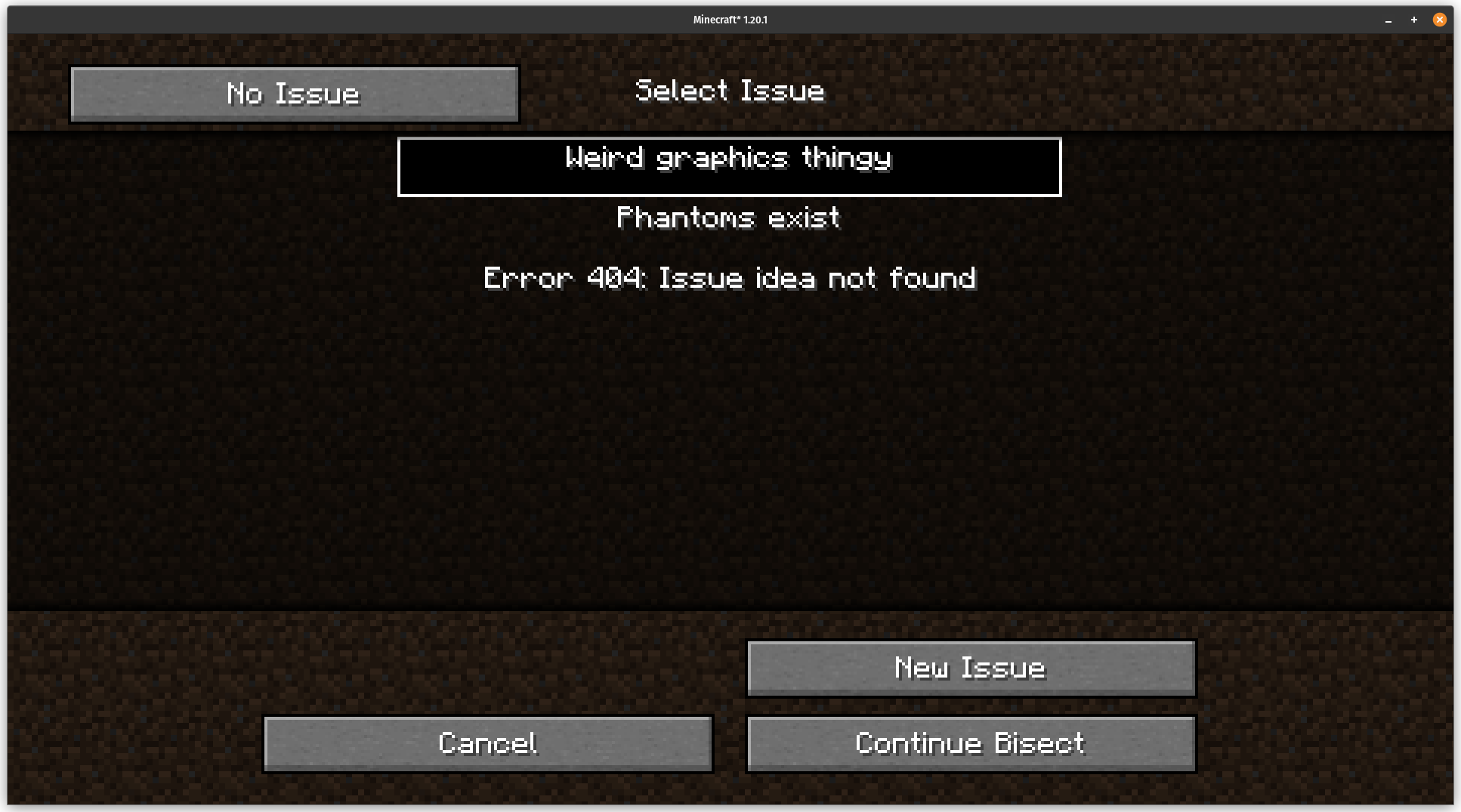
No Issuebutton - If you have an issue click the
Manual Issuebutton, and select the issue you are having or create a new one- Note that it is recommended to keep the number of issues in one bisect down, and instead run multiple bisects with previous fixes applied. See Bisecting multiple issues at once
- If everything is fine, click the
- once an issue is isolated, bisect will verify the solution(s) and continue bisecting the other issues
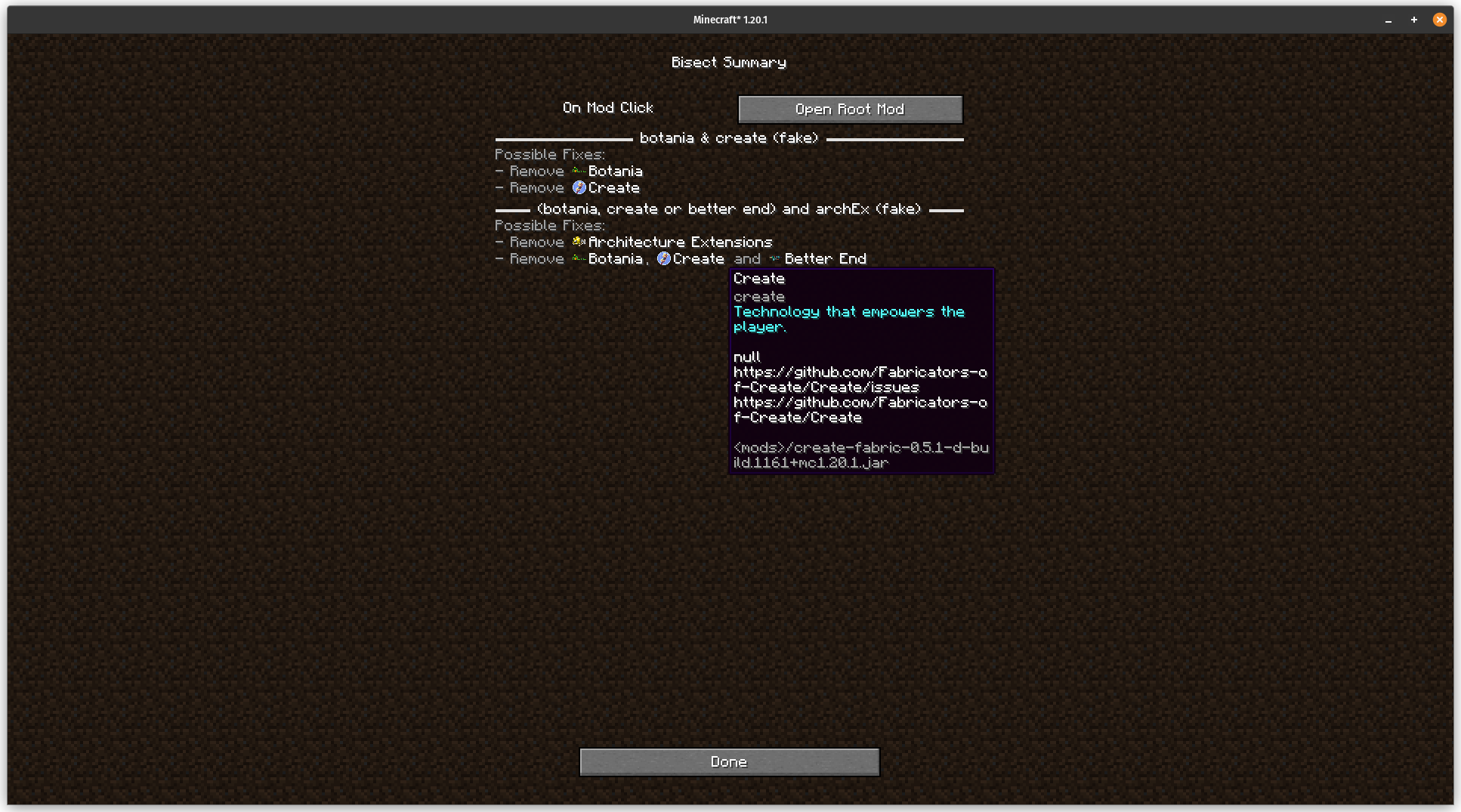
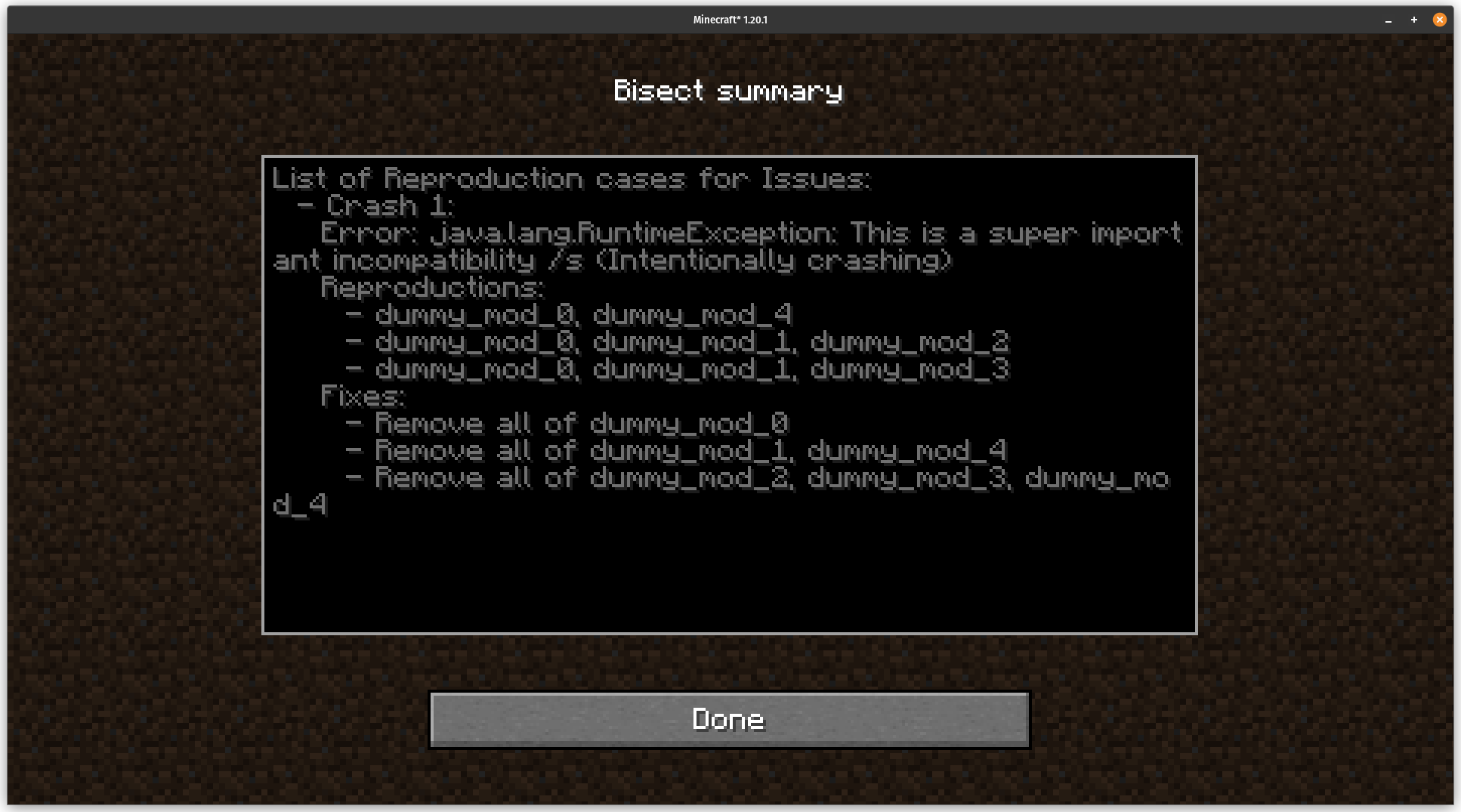
- once bisect is done, it will provide a summary of issues and solutions encountered. Please treat those with care though, due to the way bisect works
Configuring
The file <config>/quilt_bisect/main.json contains most things a user may want to configure, see MainConfig.java for now.
The file <config>/quilt_bisect/active_bisect.json contains information about the active bisect, including the settings, all tried mod sets and their respective log, and issue information.
The files <config>/quilt_bisect/modSet.txt, <config>/quilt_bisect/sections.txt, and <config>/quilt_bisect/lastActiveJoin.txt contain internal information and shouldn't be modified.
How does it work
Bisecting multiple issues at once
While bisecting multiple issues works, there are a few assumptions bisect makes that are essential when multiple issues are present:
- Only removing a mod can fix an issue, not adding one
- A common example for this would be indium, which fixes compatibility issues between sodium and other mods, if it wouldn't be declared by the other mods involved
- There is a constant priority order between issues
- If a subset B of a mod set with issue A has an issue different from issue A, issue A won't occur on any subset of B. This means that issues (even if marked by the user) must always be tested for in the same order
Automatically mark things as working
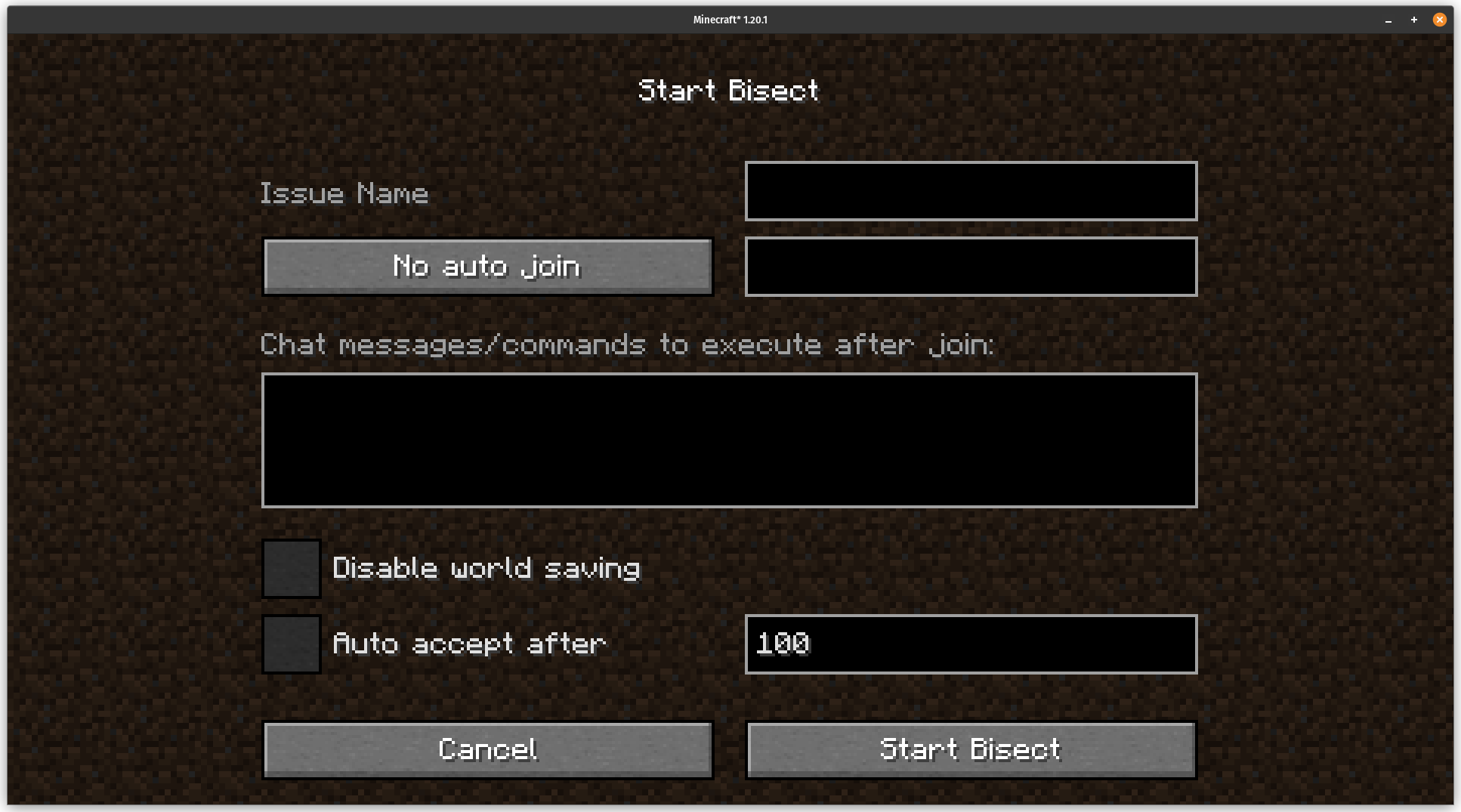
When starting a new bisect, you can configure bisect to
- automatically join a world, server, realm, or the last joined one (Note that realms rely on ids and not on names)
- automatically accept a mod set as working after a given time
- The time is in 1/20 seconds, and will start on world join if auto join is active, else when the title screen shows. If in single player, it will also wait for enough ticks to pass
- automatically run commands or sending chat messages after auto joining.
- It will be treated as if you sent them from chat, and also work with client side commands
- disable world saving
- This is to help reproduction of issues where the state of the world is relevant. No single player world will be changed after a relaunch if this is active. It also allows for testing content mods
- For maximum compatibility it is currently implemented by making a backup of the worlds folder and resetting the worlds that have been backed up to the stored state before launch if active
Handling crashes
Being a loader plugin, bisect hooks into the Quilt's loader process at an incredibly early stage.
There, it can create a new process that is actually running the game, and wait for that process to end.
After that bisect checks if minecraft crashed by searching for a new crash log, copies the latest.log, and updates config/quilt_bisect/active_bisect.json.
(if no bisect is active and it crashed it asks if a new one should be started)
If minecraft didn't quit normally (either through a crash or through the bisect menu) and a bisect is active, the parent process will restart the game.
Behind the scenes there is a lot more stuff going on making sure that for example killing the parent or child process makes them behave as expected.
Detecting issues
Bisect will
- Handle crashes
- (TODO) Check for log messages using regexes (if possible)
- Rely on user input
Selecting the next mod set to test
Bisect works using an extended version of binary search:
- First, select the smallest mod set with an (unfixed) issue
- For each section of that mod set(see last row)
- If a section simply includes one mod, that mod is required and no more work needs to be done on that section
- Divide that section into half
- Check those halves
- if one has an issue, it becomes a part of the issue mod set in the next iteration
- if all halves are working this means that in both halves are mods required for the issue to arise
- => store those halves as separate sections and bisect those like in step 3
- if all sections only contain one element, a minimal reproduction has been isolated. Mark the corresponding issue as fixed with the resulting mod set and debug the next issue, with one of the current mods removed
- Once all of this is done, display the final summary screen.
Loading the right mod set
One of the main problems such a bisect algorithm faces are dependencies.
Ideally, a bisect method would be aware of dependencies and bisect based on those.
However, this would immensely inflate the complexity of the algorithm, and this project is complex enough right now.
Instead, Quilt Bisect simply ignores dependency in its search algorithm and provides all mods to quilt loader.
However, it only force-loads mods in the mod set (this is what happens to mods in your mods folder) and provides the other mods as optional mods which are only loaded when a dependency requires it.
While solving the dependency issue, it has a few implications:
- If required, a mod not in the mod set still can be loaded
- This means that it can happen that when bisect identifies a minimal reproduction, that reproduction set actually only includes a mod which depends on the real culprit
- This means that the mod set can not show which mod is at fault and that before blaming a mod some better tests must occur
Development
For testing, I also recommend Quilt Crasher, which I developed to enable testing of this kind of mod.
Licensing
While the code is ARR, this is only to prevent ports to other mod loaders or low-effort copies. Feel free to copy parts of the code for your mod. If your mod does similar things to this mod, credit me. You can also ask for me for permission. If it's not a port to another mod loader, I'll likely agree.
Credit
PluginLogger, MinecraftServerMixin and GracefulTerminator were mostly taken from https://github.com/comp500/ModVote.BisectPluginProcessManager also contains large parts of ModvotePlugin from that repo.
All of these are under the MIT license (by comp500)
IconStore contains code from https://github.com/TerraformersMC/ModMenu, specifically from FabricIconHandler and FabricMod#getIcon. java_icon.png, minecraft_icon.png and unknown_icon.png were also taken from there. Mod Menu is also licensed under the MIT license (by Prospector)
Available Versions
How to Install Quilt Bisect on Your Server
Order Server
Order a Minecraft Java server with at least 3 GB RAM (4 GB recommended).
Set quilt Loader
In the panel under "Egg", select the quilt loader and matching Minecraft version (1.20.2).
Install Mod
Open the mod browser in the dashboard and search for "Quilt Bisect". Click "Install" – done! Alternatively, upload the .jar via SFTP to the /mods folder.
Compatibility
Mod Loaders
Minecraft Versions
1.20.2, 1.20.1
Server-side
✗ UnsupportedRecommended RAM
4 GB(min. 3 GB)Frequently Asked Questions
Quilt Bisect server crashes on startup – what to do?
Most common cause: wrong quilt version or insufficient RAM. Check the server log (latest.log) for "OutOfMemoryError" or "Mixin" errors. With Mado Hosting: ensure at least 3 GB RAM is allocated and the loader matches the mod version (1.20.2). You can switch loaders with one click in the panel.
Is Quilt Bisect compatible with quilt?
Quilt Bisect officially supports quilt for Minecraft 1.20.2, 1.20.1. The Mado dashboard automatically detects incompatible loader combinations.
Server lagging with Quilt Bisect – how to optimize performance?
Recommended RAM: 4 GB (per 8 players). Use /spark profiler to check if Quilt Bisect consumes the most tick time. Common fixes: reduce server view-distance to 8-10, install "performant" or "starlight" as supplementary mods on Forge. With Mado Hosting, your server runs on NVMe SSDs with dedicated CPU cores for minimal latency.
Similar Mods





Rent Modded Server
Install Quilt Bisect with just one click on your server.