
Quinn's FlexHUD
A HUD library for assisting with typesetting
About this Mod
FlexHUD
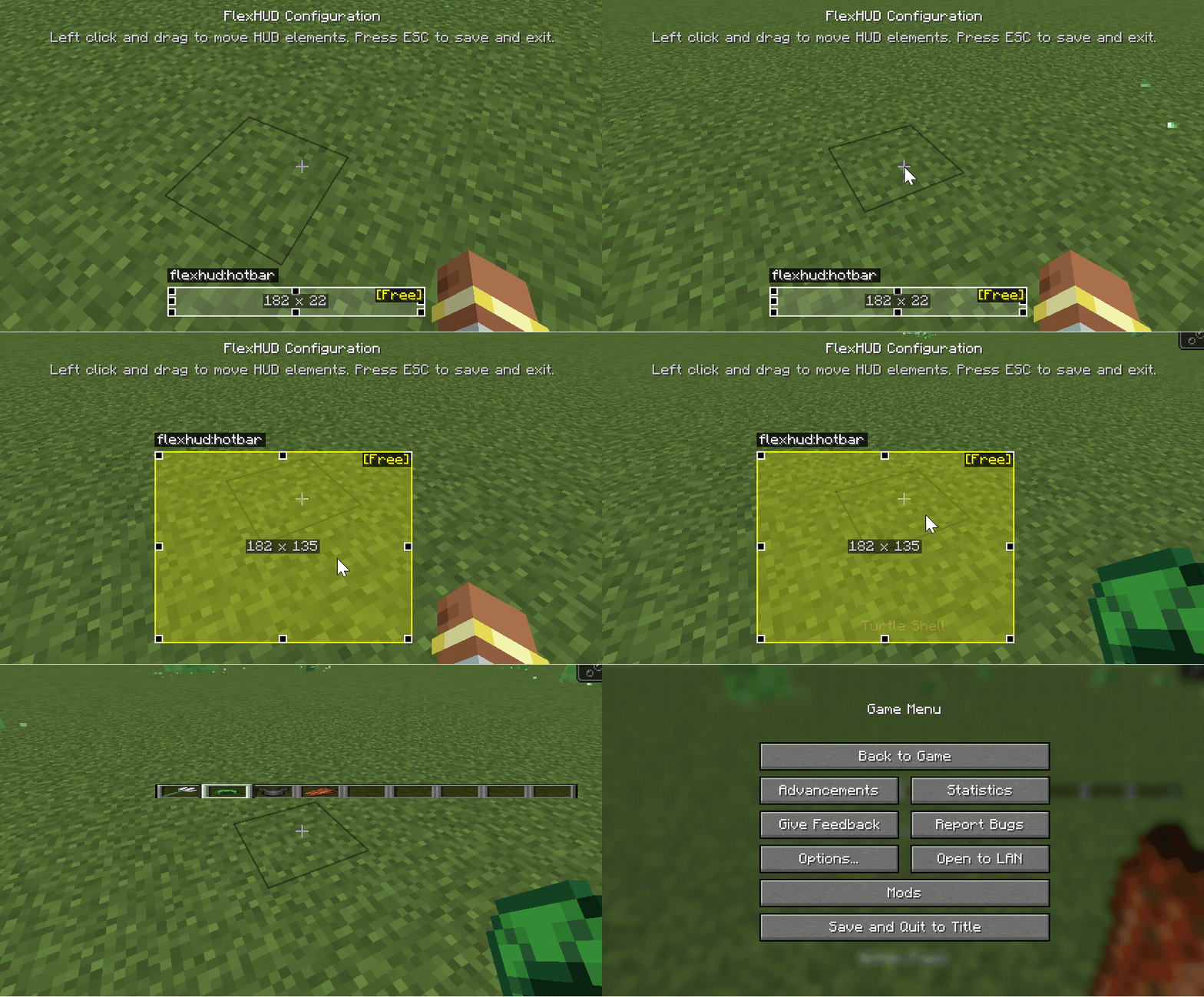
An extensible HUD layout and rendering library built on NeoForge. It uses “RelativeRect + Anchor” to describe HUD element positions and sizes in a resolution‑independent way, provides an interactive config screen for drag/resize with constraints, and persists layout to client config while auto‑recomputing on screen size changes.
Goals
- Describe HUD element position and size via
RelativeRectandAnchorso layouts are stable across resolutions/aspect ratios. - Expose a simple registration API: implement
Layer#renderto plug in your custom HUD element. - Provide a visual configuration screen (
FlexHudConfigScreen): drag to move, resize with handles;ResizeModecontrols constraints (Free, Aspect, Horizontal, Vertical, Fixed). - Persistence and hot‑update: use NeoForge
ModConfigto store and sync positions; changes apply immediately at runtime.
Quick Start
Register a freely resizable Hotbar HUD element:
public class BuiltInFlexHud {
    public static void registerHotbarHud() {
        ResourceLocation id = FlexHudApi.HOTBAR_ID; // unique element ID

        // Default relative rect: bottom-center anchor, width 182, height 22
        FlexHudApi.RelativeRect defaultRelativeRect = new FlexHudApi.RelativeRect(
                FlexHudApi.Anchor.BOTTOM_CENTER,
                0, 0,
                182, 22
        );

        // Render layer: draw using the computed absolute rect
        FlexHudApi.Layer hotbarLayer = (rect, guiGraphics, deltaTracker) -> {
            PoseStack pose = guiGraphics.pose();
            pose.pushPose();

            int screenWidth = guiGraphics.guiWidth();
            int screenHeight = guiGraphics.guiHeight();
            // Compute the vanilla hotbar default absolute rect from the default relative rect
            FlexHudApi.Rect defaultRect = defaultRelativeRect.toAbsolute(screenWidth, screenHeight);
            // Apply affine transform from defaultRect to the target rect for free move/scale
            pose.mulPose(defaultRect.transform(rect));

            ((GuiAccessor) Minecraft.getInstance().gui).callRenderHotbar(guiGraphics, deltaTracker);
            pose.popPose();
        };

        // Register with Free resize mode using the default relative rect and layer
        FlexHudApi.INSTANCE.register(id, FlexHudApi.ResizeMode.Free, defaultRelativeRect, hotbarLayer);
    }
}
At runtime, the library calls updateScreenDimensions() before rendering to convert each element’s RelativeRect into an absolute Rect for the current resolution and passes it to your Layer#render.
API Overview
FlexHudApi#register(ResourceLocation id, ResizeMode mode, RelativeRect defaultRect, Layer layer)- Register a HUD element; if a saved layout exists in config, it overrides the default.
FlexHudApi.Impl#updateElementRelativeRect(ResourceLocation id, RelativeRect newRect)- Update layout at runtime and persist; the config screen uses this.
FlexHudApi.Impl#updateScreenDimensions()- Recompute all absolute rects when screen size/aspect changes.
FlexHudApi.Layer#render(Rect rect, GuiGraphics g, DeltaTracker dt)- Render callback: draw using the provided absolute rect.
FlexHudApi.ResizeModeFree,Aspect(keep ratio),Horizontal,Vertical,Fixed.
FlexHudApi.Anchor- Nine‑grid anchors:
TOP_LEFT / TOP_CENTER / TOP_RIGHT / CENTER_LEFT / CENTER / CENTER_RIGHT / BOTTOM_LEFT / BOTTOM_CENTER / BOTTOM_RIGHT.
- Nine‑grid anchors:
FlexHudApi.RelativeRect- Fields:
anchor, offsetX, offsetY, width, height, useRelativeSize - Methods:
toAbsolute(int w, int h)to convert to absolute;fromAbsolute(Rect rect, Anchor a, int w, int h)to infer relative.
- Fields:
FlexHudApi.Rect#transform(Rect to)- Affine transform from source rect to target rect (translate + scale) to map existing drawing logic to the new position/size.
Visual Configuration
Press
Alt + Hin game to openFlexHudConfigScreen.Drag to move, resize with handles;
ResizeModedetermines constraints.Changes are persisted to client config (NeoForge
ModConfig), e.g.:[hud] relative_rects = [ "flexhud:hotbar|BOTTOM_CENTER|-2.9042664|-37.03853|188.19147|22.961472|false" ]
Requirements
Minecraft 1.21.1NeoForge 21.x(e.g.21.1.213)Java 21
License
- MIT (see build script / project config).
Available Versions
How to Install Quinn's FlexHUD on Your Server
Order Server
Order a Minecraft Java server with at least 3 GB RAM (4 GB recommended).
Set neoforge Loader
In the panel under "Egg", select the neoforge loader and matching Minecraft version (1.21.1).
Install Mod
Open the mod browser in the dashboard and search for "Quinn's FlexHUD". Click "Install" – done! Alternatively, upload the .jar via SFTP to the /mods folder.
Compatibility
Mod Loaders
Minecraft Versions
1.21.1
Server-side
✗ UnsupportedRecommended RAM
4 GB(min. 3 GB)Frequently Asked Questions
Quinn's FlexHUD server crashes on startup – what to do?
Most common cause: wrong neoforge version or insufficient RAM. Check the server log (latest.log) for "OutOfMemoryError" or "Mixin" errors. With Mado Hosting: ensure at least 3 GB RAM is allocated and the loader matches the mod version (1.21.1). You can switch loaders with one click in the panel.
Is Quinn's FlexHUD compatible with neoforge?
Quinn's FlexHUD officially supports neoforge for Minecraft 1.21.1. The Mado dashboard automatically detects incompatible loader combinations.
Server lagging with Quinn's FlexHUD – how to optimize performance?
Recommended RAM: 4 GB (per 8 players). Use /spark profiler to check if Quinn's FlexHUD consumes the most tick time. Common fixes: reduce server view-distance to 8-10, install "performant" or "starlight" as supplementary mods on Forge. With Mado Hosting, your server runs on NVMe SSDs with dedicated CPU cores for minimal latency.
Similar Mods



Rent Modded Server
Install Quinn's FlexHUD with just one click on your server.