
Rails Unnerfed
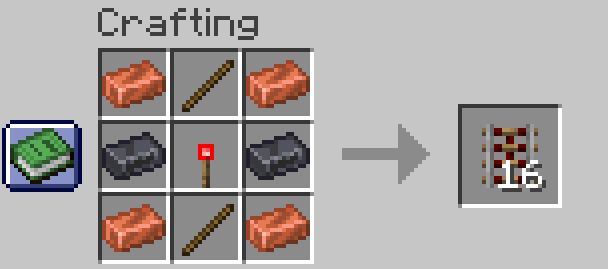
Modifies rail crafting recipes to make them more fair and up-to-date for modern Minecraft.
Screenshots
About this Mod
Rails Unnerfed v1.2.2
Rails in Minecraft are expensive to craft. When combined with the fact that better modes of transportation now exist, they feel disadvantageous to use for anything other than redstone contraptions.
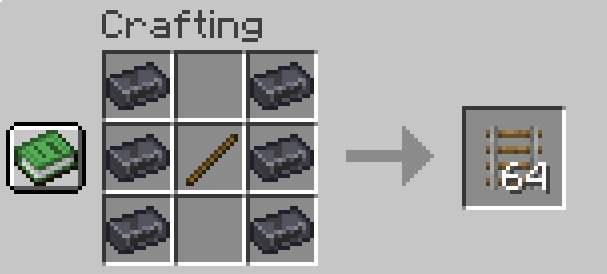
This fabric mod is for those who wish to build vast rail systems while keeping the classic Minecraft aesthetic. It changes crafting recipes and their outputs for rails. However, since the goal is to rebalance rails for modern Minecraft, the recipes aim not to be too overpowered either. In short, this mod makes building large rail networks possible without the need for duping machines.
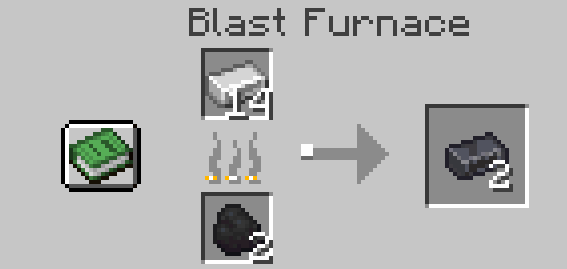
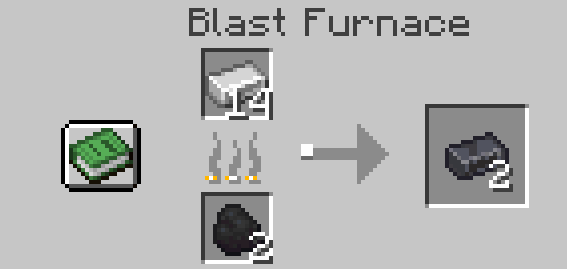
In order to balance recipes, steel ingots have been added. You can get a steel ingot only by blasting iron. This mechanic will eventually be rolled out further, into minecarts, etc.
Crafting Overview
Steel
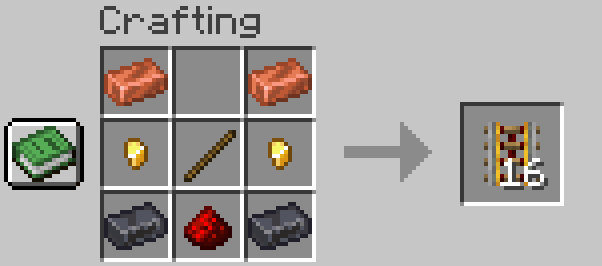
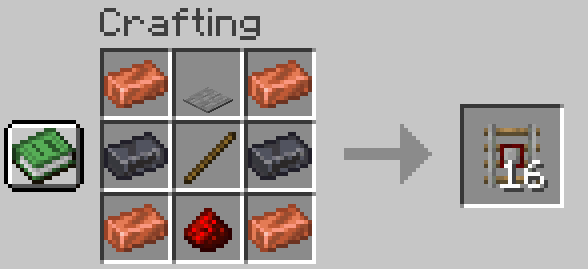
Rail
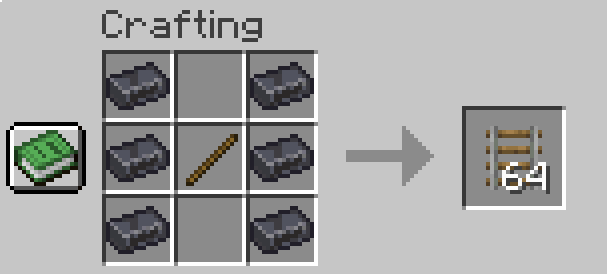
Note: All recipes can be found in the Gallery.
Commands
The cartSpeed command allows the player to set the speed at which minecarts travel in their world. The command accepts values from 0.1 to 0.9 blocks per tick, with 0.1 corresponding to 2bps and 0.9 equating to 18bps.
Features & Planned Features
Features
- New material: Steel Ingot
- New crafting recipes for all rail types.
- Activator rail stops furnace carts.
- Minecarts can now travel up to 18 bps, up from 8 bps.
- The cartSpeed command allows a player to set game cart speeds from 2 to 18 bps.
Planned Features
- Steel, Iron, and Copper minecarts (the cheaper, the slower).
- Stoppable Furnace Cart
- Signalling (maybe)
- Improved minecart speeds.
Future Plans
I’m dedicated to maintaining this mod and expanding its scope. Upcoming updates will include:
- Minecart Tweaks: Adjusted crafting recipes for all minecart types.
- QoL Improvements: General changes and additions to improve the overall rail experience.
- Version Parity: Ongoing updates to ensure compatibility with the latest Minecraft releases.
Feel free to leave suggestions. Thank you & enjoy!
Available Versions
How to Install Rails Unnerfed on Your Server
Order Server
Order a Minecraft Java server with at least 3 GB RAM (4 GB recommended).
Set fabric Loader
In the panel under "Egg", select the fabric loader and matching Minecraft version (1.21.11).
Install Mod
Open the mod browser in the dashboard and search for "Rails Unnerfed". Click "Install" – done! Alternatively, upload the .jar via SFTP to the /mods folder.
Compatibility
Mod Loaders
Minecraft Versions
1.21.11
Server-side
✓ RequiredRecommended RAM
4 GB(min. 3 GB)Frequently Asked Questions
Rails Unnerfed server crashes on startup – what to do?
Most common cause: wrong fabric version or insufficient RAM. Check the server log (latest.log) for "OutOfMemoryError" or "Mixin" errors. With Mado Hosting: ensure at least 3 GB RAM is allocated and the loader matches the mod version (1.21.11). You can switch loaders with one click in the panel.
Is Rails Unnerfed compatible with fabric?
Rails Unnerfed officially supports fabric for Minecraft 1.21.11. The Mado dashboard automatically detects incompatible loader combinations.
Server lagging with Rails Unnerfed – how to optimize performance?
Recommended RAM: 4 GB (per 8 players). Use /spark profiler to check if Rails Unnerfed consumes the most tick time. Common fixes: reduce server view-distance to 8-10, install "performant" or "starlight" as supplementary mods on Forge. With Mado Hosting, your server runs on NVMe SSDs with dedicated CPU cores for minimal latency.
Similar Mods





Rent Modded Server
Install Rails Unnerfed with just one click on your server.