
Threat Music Mod
Adds the threat music system from the game Rain World
About this Mod
Threat Music Mod
Implements the threat music system from Rain World into Minecraft.
Functions entirely on the client side and is compatible with entities from most mods. It contains all regions from the original game as well as DLC.
Also replaces Minecrafts vanilla ambient music with region specific tracks.
Features:
- Recreation: Provides a (mostly) accurate recreation of the threat music system from Rain World.
- Compatibility: Operates client-side, compatible with entities from most mods.
- Music from All Regions: Includes base game and DLC regions' music.
- Day/Night Variants: Features different themes for day and night in certain areas.
- Raid Music: Contains specific themes for raids, currently set to Metropolis.
- Dynamic Music: Adjusts based on nearby entities and player actions.
- Region Customization: Permits adding custom regions via JSON and .ogg files.
- Biome Configuration: Allows for music settings customization per biome.
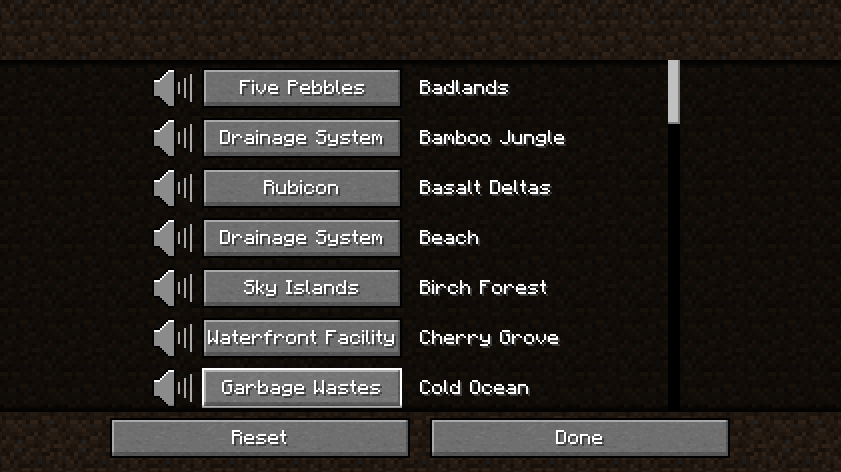
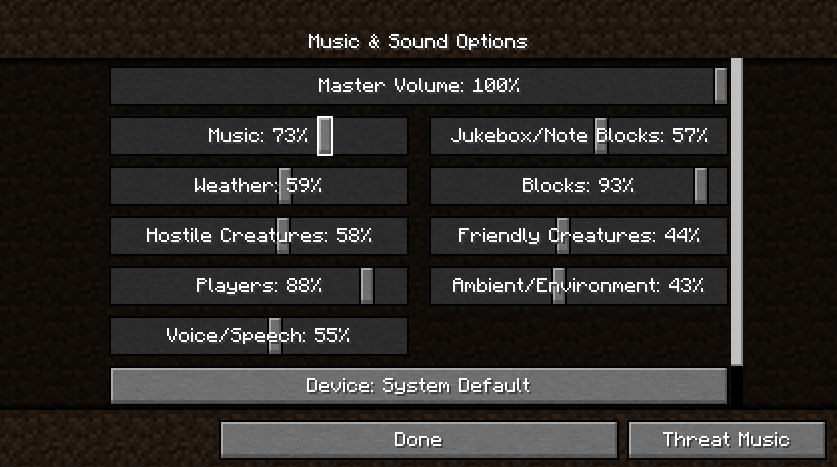
- Mod settings can be found under
Music and Sound Options
Installation and Setup:
To use, add the mod file to your mods folder.
For adding custom music, place .ogg files and the corresponding region JSON in the .Minecraft/ThreatMusic directory.
The Json file follows the following layout
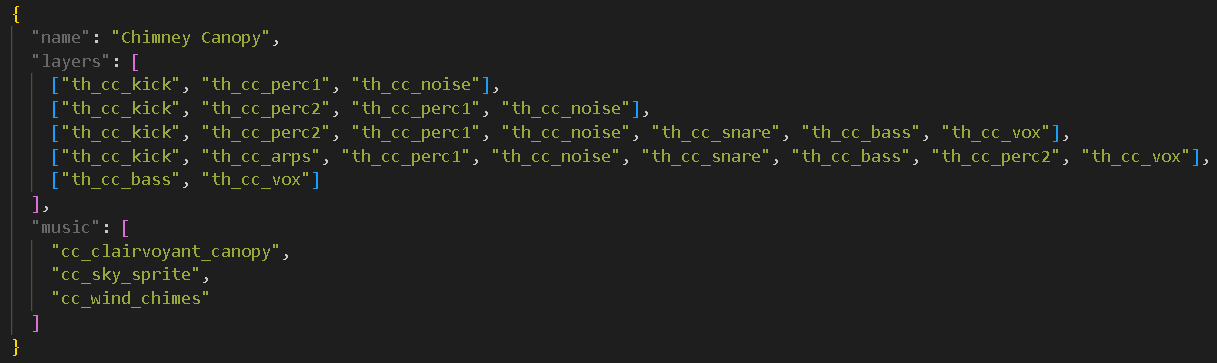
- "name": (Required) - The display name for the region in settings.
- "layers": (Optional) - List of lists of potential tracks per layer(one will be randomly chosen for each layer upon playing).
- "nightLayers": (Optional) - Optional tracks to play during night.
- "music": (Optional) - Tracks to replace minecrafts vanilla random music.
For questions and support, use the RainWorld MC Discord
FAQ:
Will this come to forge?
Perhaps, depending on demand and once ported to other versions first.Currently it will work for forge using Sintra Connector.
Other Versions?
Support for more versions is planned and will be done at some point in the future.I cant hear the music?
Threat music is currently tied to the "Players" volume slider, but this may change in the future. Region ambient music is tied to the normal music slider, and if turned off will result in no ambient music.
Special thanks:
- Ohmanit - Mod Icon
- dicedpixels
- alphappy
Available Versions
How to Install Threat Music Mod on Your Server
Order Server
Order a Minecraft Java server with at least 3 GB RAM (4 GB recommended).
Set fabric Loader
In the panel under "Egg", select the fabric loader and matching Minecraft version (1.21.11).
Install Mod
Open the mod browser in the dashboard and search for "Threat Music Mod". Click "Install" – done! Alternatively, upload the .jar via SFTP to the /mods folder.
Compatibility
Mod Loaders
Minecraft Versions
1.21.11, 1.21.10, 1.21.1 (+3 more)
Server-side
✗ UnsupportedRecommended RAM
4 GB(min. 3 GB)Frequently Asked Questions
Threat Music Mod server crashes on startup – what to do?
Most common cause: wrong fabric version or insufficient RAM. Check the server log (latest.log) for "OutOfMemoryError" or "Mixin" errors. With Mado Hosting: ensure at least 3 GB RAM is allocated and the loader matches the mod version (1.21.11). You can switch loaders with one click in the panel.
Is Threat Music Mod compatible with fabric?
Threat Music Mod officially supports fabric for Minecraft 1.21.11, 1.21.10, 1.21.1. The Mado dashboard automatically detects incompatible loader combinations.
Server lagging with Threat Music Mod – how to optimize performance?
Recommended RAM: 4 GB (per 8 players). Use /spark profiler to check if Threat Music Mod consumes the most tick time. Common fixes: reduce server view-distance to 8-10, install "performant" or "starlight" as supplementary mods on Forge. With Mado Hosting, your server runs on NVMe SSDs with dedicated CPU cores for minimal latency.
Similar Mods




Rent Modded Server
Install Threat Music Mod with just one click on your server.