
Rainbow Chat
Chat Glow enhances your default Minecraft chat HUD by adding a subtle, dynamic glowing aura to all chat text.
Screenshots
About this Mod
✨ Chat Glow (Rainbow Chat)
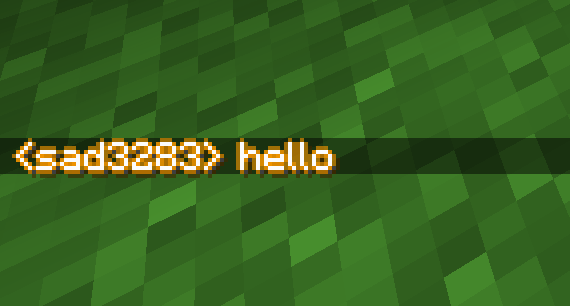
Chat Glow is a lightweight, client-side Fabric mod that upgrades the appearance and readability of your default Minecraft chat. It replaces the flat, static vanilla drop shadow with a beautiful, pulsing neon gold-to-orange glow outline.
📝 What It Does
Pulsing Glow Outline: Captures all text rendered in your chat HUD and wraps every character in a smooth, ambient glow that gently transitions between a warm neon gold and a vibrant orange.
Enhanced Readability: The 4-directional outline creates high contrast, making messages incredibly easy to read against bright backgrounds like snow, desert sand, or sky, where default chat text normally washes out.
Smooth Fading: Fully syncs with Minecraft’s default chat animations. As your chat messages fade away, the glow fades out naturally alongside them.
Highly Optimized: Built using efficient Sponge Mixins with zero frame drops, meaning you get premium visuals without sacrificing performance.
Client-Side Only: Runs entirely on your computer. You can safely join any vanilla or modded multiplayer server, and the glowing effect will work perfectly.
🛠️ How to Use It
Install Fabric: Ensure you have the Fabric Loader installed for Minecraft 1.21.1 (or compatible 1.21.x version)
Add the Mod: Download the modid-1.0.0.jar file and place it directly into your Minecraft mods folder (located inside your .minecraft directory).
Ensure Dependencies: Make sure you also have the Fabric API mod in your mods folder.
Play: Launch Minecraft using your Fabric profile, join any world or multiplayer server, and open your chat window—your messages will immediately start glowing!
(yes description is ai slop)
Available Versions
How to Install Rainbow Chat on Your Server
Order Server
Order a Minecraft Java server with at least 3 GB RAM (4 GB recommended).
Set fabric Loader
In the panel under "Egg", select the fabric loader and matching Minecraft version (1.21.4).
Install Mod
Open the mod browser in the dashboard and search for "Rainbow Chat". Click "Install" – done! Alternatively, upload the .jar via SFTP to the /mods folder.
Compatibility
Mod Loaders
Minecraft Versions
1.21.4, 1.21.3, 1.21.2 (+1 more)
Server-side
✗ UnsupportedRecommended RAM
4 GB(min. 3 GB)Frequently Asked Questions
Rainbow Chat server crashes on startup – what to do?
Most common cause: wrong fabric version or insufficient RAM. Check the server log (latest.log) for "OutOfMemoryError" or "Mixin" errors. With Mado Hosting: ensure at least 3 GB RAM is allocated and the loader matches the mod version (1.21.4). You can switch loaders with one click in the panel.
Is Rainbow Chat compatible with fabric?
Rainbow Chat officially supports fabric for Minecraft 1.21.4, 1.21.3, 1.21.2. The Mado dashboard automatically detects incompatible loader combinations.
Server lagging with Rainbow Chat – how to optimize performance?
Recommended RAM: 4 GB (per 8 players). Use /spark profiler to check if Rainbow Chat consumes the most tick time. Common fixes: reduce server view-distance to 8-10, install "performant" or "starlight" as supplementary mods on Forge. With Mado Hosting, your server runs on NVMe SSDs with dedicated CPU cores for minimal latency.
Rent Modded Server
Install Rainbow Chat with just one click on your server.