
Random World Blocks
Random World Blocs is a chaotic Minecraft mod that replaces the terrain around you with completely random blocks as you explore. Every step transforms your world into a colorful mess of possibilities — from diamonds to dirt, obsidian to cake.
Screenshots
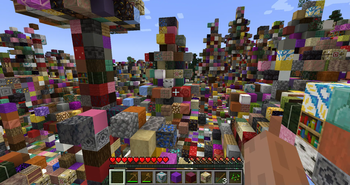
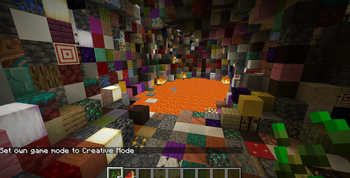
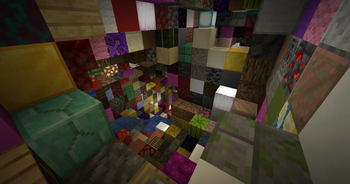
About this Mod
Random World Blocs brings pure chaos and fun to Minecraft by randomly replacing blocks around you as you walk.
🔹 Dynamic Randomization – Every time you approach new chunks, the surrounding blocks are swapped with random ones from the game.
🔹 Performance-Friendly – Only nearby blocks are randomized to keep gameplay smooth.
🔹 Player-Friendly – Player-placed blocks remain untouched, so your builds stay safe.
🔹 Full Block Coverage – Almost every block type can appear, from rare ores to decorative blocks (even leaves and other unusual blocks!).
🔹 Custom Exclusions – Special blocks like end portal frames are protected from replacement.
Perfect for challenge runs, chaotic survival worlds, or just to see your favorite seed in a whole new light!
Installation:
Install Minecraft Forge (compatible version).
Download Random World Blocs and place it in your mods folder.
Launch the game and prepare for chaos!
Note: This mod works with existing worlds — but be ready for surprises when you explore!

Available Versions
How to Install Random World Blocks on Your Server
Order Server
Order a Minecraft Java server with at least 4 GB RAM (6 GB recommended).
Set forge Loader
In the panel under "Egg", select the forge loader and matching Minecraft version (1.20.1).
Install Mod
Open the mod browser in the dashboard and search for "Random World Blocks". Click "Install" – done! Alternatively, upload the .jar via SFTP to the /mods folder.
Compatibility
Mod Loaders
Minecraft Versions
1.20.1
Server-side
✓ RequiredRecommended RAM
6 GB(min. 4 GB)Frequently Asked Questions
Random World Blocks server crashes on startup – what to do?
Most common cause: wrong forge version or insufficient RAM. Check the server log (latest.log) for "OutOfMemoryError" or "Mixin" errors. With Mado Hosting: ensure at least 4 GB RAM is allocated and the loader matches the mod version (1.20.1). You can switch loaders with one click in the panel.
Is Random World Blocks compatible with forge?
Random World Blocks officially supports forge for Minecraft 1.20.1. The Mado dashboard automatically detects incompatible loader combinations.
Server lagging with Random World Blocks – how to optimize performance?
Recommended RAM: 6 GB (per 5 players). Use /spark profiler to check if Random World Blocks consumes the most tick time. Common fixes: reduce server view-distance to 8-10, install "performant" or "starlight" as supplementary mods on Forge. With Mado Hosting, your server runs on NVMe SSDs with dedicated CPU cores for minimal latency.
Similar Mods





Rent Modded Server
Install Random World Blocks with just one click on your server.