
Rank Tag
Automatically adds suffixes based on permission levels.
Screenshots
About this Mod
⭐ RankTags – Permission-Based Suffixes for Minecraft 1.21.4
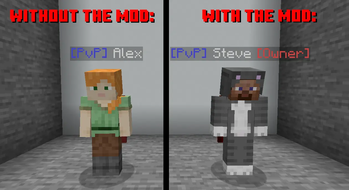
RankTags adds dynamic suffixes to player names based on their permission level — without fake teams, without client mods, and fully compatible with StatusPlay.
Adds a suffix afer your name based on your permission level.
The mod copies each player’s real scoreboard team, preserves its prefix and settings, and appends a suffix like §7[Owner] directly after the name.
The result appears correctly in tab lists, nametags, and all team-based displays.
🖼️ Example
If you have a team with the prefix PvP and you join it while having permission level 4, RankTags will automatically create a copy of that team with the suffix §7[Owner].
Your name will appear as:
[PvP] uOrb §7[Owner]
This happens instantly, without needing to manually configure teams or rejoin the server.

🔧 Features
✔ Real Team Copying
Detects the player’s current scoreboard team
Creates a copy only when needed
Preserves prefix, color, and visibility settings
Adds your suffix directly after the name
✔ Live Updates
Detects team changes instantly
No rejoin required
No duplication or crash loops
✔ Automatic Cleanup
Removes unused copy-teams
Runs on server start, periodically, or via command
✔ Compatible with Other Mods
Original teams remain untouched
Copies are safely isolated
No interference with scoreboard plugins
✔ Server-Side Only
No client mod required
Works on any Fabric server running 1.21.4
🛠️ Commands
/ranktags reload – reloads the config
/ranktags cleanup – removes unused copy-teams
📁 Configuration
The ranktags.config.json file lets you define suffixes per permission level:
ranktags.config.json
{
  "ranks": {
    "0": "",
    "1": "",
    "2": "§a[Mod]",
    "3": "§6[Admin]",
    "4": "§c[Owner]"
  }
}
🎯 Why This Mod Exists
Vanilla Minecraft doesn’t support suffixes based on permissions without breaking team logic.
RankTags solves that cleanly — preserving original teams while adding dynamic suffixes.
It’s especially useful for servers with many teams and frequent team switching, where manual suffix management would be tedious or error-prone.
Available Versions
How to Install Rank Tag on Your Server
Order Server
Order a Minecraft Java server with at least 3 GB RAM (4 GB recommended).
Set fabric Loader
In the panel under "Egg", select the fabric loader and matching Minecraft version (1.21.11).
Install Mod
Open the mod browser in the dashboard and search for "Rank Tag". Click "Install" – done! Alternatively, upload the .jar via SFTP to the /mods folder.
Compatibility
Mod Loaders
Minecraft Versions
1.21.11, 1.21.4
Server-side
✓ RequiredRecommended RAM
4 GB(min. 3 GB)Frequently Asked Questions
Rank Tag server crashes on startup – what to do?
Most common cause: wrong fabric version or insufficient RAM. Check the server log (latest.log) for "OutOfMemoryError" or "Mixin" errors. With Mado Hosting: ensure at least 3 GB RAM is allocated and the loader matches the mod version (1.21.11). You can switch loaders with one click in the panel.
Is Rank Tag compatible with fabric?
Rank Tag officially supports fabric for Minecraft 1.21.11, 1.21.4. The Mado dashboard automatically detects incompatible loader combinations.
Server lagging with Rank Tag – how to optimize performance?
Recommended RAM: 4 GB (per 8 players). Use /spark profiler to check if Rank Tag consumes the most tick time. Common fixes: reduce server view-distance to 8-10, install "performant" or "starlight" as supplementary mods on Forge. With Mado Hosting, your server runs on NVMe SSDs with dedicated CPU cores for minimal latency.
Similar Mods






Rent Modded Server
Install Rank Tag with just one click on your server.